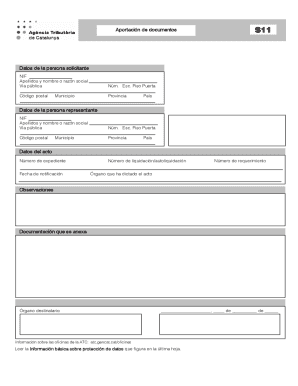
Na representante NIF Apellidos y nombre o raz n social V a p blica N m. Esc. Piso Puerta C digo postal Provincia Municipio Pa s Datos del acto N mero de expediente Fecha de notificaci n N mero de liquidaci n/autoliquidaci n N mero de requerimiento rgano que ha dictado el acto Observaciones Documentaci n que se anexa rgano destinatario, fecha y firma rgano destinatario: , Tributaria de de Sus datos de car cter personal.
Open form follow the instructions
Easily sign the form with your finger
Send filled & signed form or save
How to fill out the 2013 ES ATC S11 online
Filling out the 2013 ES ATC S11 form online can streamline your process for managing tax-related documentation. This guide will walk you through each section of the form, ensuring a clear understanding of the required information and how to submit it efficiently.
Follow the steps to successfully complete the form online:
- Click the ‘Get Form’ button to obtain the form and open it in your preferred platform.
- Begin by entering the personal details of the applicant. This section includes the NIF (Tax Identification Number), the applicant’s full name or business name, and their public address, which includes street name, building number, floor, and door number.
- Next, provide the postal code, province, municipality, and country of the applicant.
- Then, fill out the information for the representative, if applicable. Repeat the same details as for the applicant: NIF, name or business name, address, postal code, province, municipality, and country.
- In the section for the act details, enter the dossier number, notification date, liquidation/self-assessment number, and requirement number.
- Identify the body that issued the act and provide any observations relevant to the submission.
- Attach any required documentation as specified in the form.
- Lastly, complete the recipient body section, including the date and signature fields. Ensure all personal data is accurate before submission.
- Once you have filled out all sections, you can save any changes, download the form, print it, or share it as necessary.
Complete your documentation online and ensure your submission is accurate and timely.
Experience a faster way to fill out and sign forms on the web. Access the most extensive library of templates available.
Related content
... Air Traffic Control (ATC) functions. The FAA currently allocates a significant portion...
Jun 27, 2016 — Under each program of study you will find links summarizing all the...
The N700 series was introduced in July 2007, and was developed for replacement of the...
Get answers to your most pressing questions about US Legal Forms API.
How to learn to speak to an ATC?
Learning to speak to ATC involves understanding the basic communication protocols and improving your vocabulary related to aviation. You can utilize the 2013 ES ATC S11 feature to practice realistic scenarios. Pair your learning with resources such as aviation forums, books, and tutorials. Over time, you'll refine your skills and feel more comfortable in your communications.
Is talking to ATC hard?
Talking to ATC can initially seem challenging, but with practice, it becomes easier. The 2013 ES ATC S11 feature is designed to guide you through the process, providing you with the tools needed to communicate effectively. Many new pilots find that their confidence grows as they engage more frequently. Remember, the key is to stay calm and focused.
How to get used to ATC?
To get used to ATC, it helps to immerse yourself in the environment by listening to live communications and following along. Using the 2013 ES ATC S11 can simulate real-life ATC scenarios, allowing you to practice in a safe space. Engaging in tutorials, forums, or group flights can also enhance your understanding and comfort level. Over time, your interaction with ATC will feel more seamless.
What are the 4 W's of aviation communication?
The 4 W's of aviation communication refer to 'Who,' 'What,' 'When,' and 'Where.' Understanding these elements helps you structure your message clearly when communicating with ATC. Knowing who you are contacting, what you need, when to communicate, and where you are will improve accuracy and efficiency. Utilizing the 2013 ES ATC S11 can also provide guidance in these scenarios.
How to get comfortable talking to an ATC?
Getting comfortable talking to ATC takes some practice, but you can start by familiarizing yourself with common phrases and procedures. Regularly using the 2013 ES ATC S11 feature can help you gain confidence during your communication. Try practicing with flight simulators or joining online flight communities to gain experience. Remember, the more you practice, the more natural it will feel.
How to get ATC in Xplane 11?
To get ATC in Xplane 11, you need to enable the ATC system in your settings. Go to the 'Settings' menu, then 'Flight' and ensure that the ATC option is activated. Once you are in your flight, you can communicate with ATC using the designated keyboard shortcuts or your mouse. Engaging with the 2013 ES ATC S11 feature can enhance your experience and streamline your interactions.
Use professional pre-built templates to fill in and sign documents online faster. Get access to thousands of forms.
If you believe that this page should be taken down, please follow our DMCA take down process here.