Loading
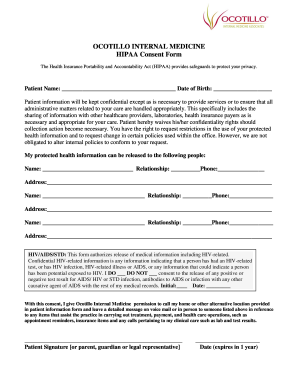
Get Ocotillo Internal Medicine Hipaa Consent
How it works
-

Open form follow the instructions
-

Easily sign the form with your finger
-

Send filled & signed form or save
How to fill out the Ocotillo Internal Medicine HIPAA Consent online
Filling out the Ocotillo Internal Medicine HIPAA Consent form is an important step in ensuring your health information is protected while allowing necessary communications for your care. This guide will walk you through the process of completing the form online, step by step.
Follow the steps to complete your HIPAA Consent form.
- Click ‘Get Form’ button to access the consent form and open it in your preferred editor.
- Begin by entering your full name in the designated field labeled 'Patient Name'. Ensure correct spelling and formatting.
- Review the consent section regarding the confidentiality of your patient information. Make note of your rights to request restrictions and changes.
- List individuals to whom your protected health information may be released. For each person, provide their name, relationship to you, phone number, and address in the appropriate fields.
- Indicate your consent regarding the release of HIV/AIDS/STD information. Check either 'I DO' or 'I DO NOT' as per your preference, and provide your initials and date.
- Read the permissions stating that Ocotillo Internal Medicine may contact you at home or other provided locations. Confirm your understanding by signing the signature field.
- Finally, enter the date of your consent at the bottom of the form. This consent will expire in one year from the date of signature.
- Once all fields are completed, ensure to save your changes. You may then download, print, or share the completed form as necessary.
Complete your Ocotillo Internal Medicine HIPAA Consent form online today to streamline your healthcare experience.