Loading
Get Nj Cn 10705 2019-2026
How it works
-

Open form follow the instructions
-

Easily sign the form with your finger
-

Send filled & signed form or save
How to fill out the NJ CN 10705 online
Navigating legal forms can be daunting, but filling out the NJ CN 10705 online is straightforward with the right guidance. This guide provides clear instructions to help you complete the form accurately and efficiently.
Follow the steps to complete the NJ CN 10705 online.
- Click the ‘Get Form’ button to obtain the form and open it in your editor.
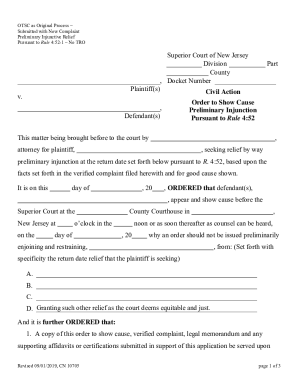
- Identify the court division and county where your case will be filed. Enter this information in the designated fields of the form.
- Enter the docket number associated with your case, ensuring accuracy in this critical field.
- Fill in the plaintiff(s) and defendant(s) information in the appropriate sections, providing full names and addresses as required.
- Specify the type of order being requested by filling in the details about the preliminary injunction.
- Complete the section concerning service of the order, indicating whether it will be done personally or through substituted service.
- Review all filled fields for accuracy and completeness before moving forward to submission.
- Once all information is complete, you can save your changes, download the form for your records, print it for submission, or share it with relevant parties as needed.
Start filling out the NJ CN 10705 form online today for a seamless legal experience.
To file a motion for reconsideration in New Jersey, you must draft a written request detailing your reasons for the reconsideration. This document should reference the prior court decision and present new evidence or arguments. You will need to file it with the court that issued the original ruling. If this is related to NJ CN 10705, it is wise to consult legal assistance to ensure you meet all the necessary requirements.