Loading
Form preview
  • US Legal Forms
  • Form Library
  • More Forms
  • More Multi-State Forms
  • Tn Lb-0441 2017

Get Tn Lb-0441 2017-2026

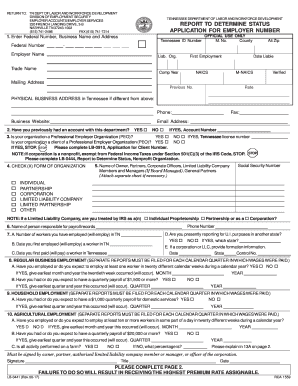
15) 741-7214 TENNESSEE DEPARTMENT OF LABOR ANDWORKFORCE DEVELOPMENT REPORT TO DETERMINE STATUS APPLICATION FOR EMPLOYER NUMBER 1. Enter Federal Number, Business Name and Address Tennessee ID Number Federal Number OFFICIAL USE ONLY M. No. County Alt Zip - Employer Name Liab. Org. Trade Name First Employment Comp Year NAICS Date Liable M-NAICS Verified Mailing Address Previous No. Rate PHYSICAL BUSINESS ADDRESS in Tennessee if different from above:.

How it works

  1. Open form

    Open form follow the instructions

  2. Easily sign form

    Easily sign the form with your finger

  3. Share form

    Send filled & signed form or save

How to fill out the TN LB-0441 online

The TN LB-0441 form is essential for employers seeking to determine their status and apply for an employer number within the state of Tennessee. This guide provides clear, step-by-step instructions for completing the form online, ensuring you have all necessary information at hand.

Follow the steps to complete the TN LB-0441 form correctly.

  1. Click ‘Get Form’ button to access the TN LB-0441 and open it in your editor.
  2. Begin by entering your Federal Number, Business Name, and Address in Section 1. Make sure to provide your Tennessee ID Number and verify that all information is accurate.
  3. Next, indicate whether you have previously held an account with the department by marking 'Yes' or 'No'. If yes, provide your account number.
  4. In Section 3, specify if your organization is a Professional Employer Organization (PEO). If you select 'Yes', follow the instruction to complete Form LB-0910.
  5. Provide the nature of your business and organizational structure in Section 4. Check the appropriate box for your form of organization and list the names of responsible parties for payroll records.
  6. Fill out employment details in Sections 7 through 10, including the number of workers employed or expected, and relevant payroll information.
  7. Complete additional information in Section 11 regarding any predecessor employer's accounts and make sure to explain ownership interests where applicable.
  8. In Section 12, indicate your total payroll amounts for each quarter. Be thorough and precise to avoid complications with your application.
  9. Describe your primary business activity in Section 13, including any specific industry-related questions that may apply to your business.
  10. Finally, review all sections of the form for completeness, sign where indicated, and save your changes before submitting your application.

Complete the TN LB-0441 form online today to ensure your employer status is recorded accurately.

Get form

Experience a faster way to fill out and sign forms on the web. Access the most extensive library of templates available.
Get form

Related content

Start Your Business
Every employer in Tennessee is required to fill out a Report to Determine Status...
Learn more
Technical Assistance and Checklist for Starting a...
For assistance in determining which food manufacturing regulations apply to your product...
Learn more
2011 Nissan Xterra Owner's Manual - Dealer E...
Welcome to the growing family of new NISSAN owners. This vehicle is delivered to you with...
Learn more

Related links form

Canada PWGSC-TPSGC 8001-552E 2017 Canada PWGSC-TPSGC 8001-552E 2023 AU Visitor Visa (Subclass 600) Tourist Stream Application Document Checklist 2015 SCAT2 Sport Concussion Assessment Tool 2 2009

Questions & Answers

Get answers to your most pressing questions about US Legal Forms API.

Contact support

To acquire your Tennessee employer account number, you must register your business with the Tennessee Department of Labor. Once your registration is complete, you will automatically receive your account number. Be sure to keep this number safe, as you will use it when dealing with your TN LB-0441 filings and reports.

To obtain your TNpaws access code, you must first register on the Tennessee Department of Labor’s website. After registration, follow the instructions provided to receive your access code via email or directly on your account dashboard. This code is crucial for managing your employer services, including TN LB-0441 functionalities.

To get your employer ID number, also known as the Federal Employer Identification Number (EIN), you can apply through the IRS website. The application can be completed online, and in most cases, you will receive your EIN immediately after completion. It’s essential to keep this information handy, especially when dealing with your TN LB-0441 responsibilities.

You can obtain your employer number by registering your business with the Tennessee Department of Labor. Most businesses receive their employer number within a few days of successful registration. If you have trouble receiving it, reach out to the department directly, and they can assist you in retrieving your employer number easily.

To locate your employer registration number, start by reviewing your earlier tax documents or correspondence from the Tennessee Department of Labor. If those documents are unavailable, you can contact the department directly for assistance in retrieving your TN LB-0441 registration information. They can guide you through the process and ensure you have the correct number for your business.

The Tennessee Department of Labor oversees various functions, including the distribution of unemployment benefits, workforce development, and assistance in job placements. It plays a crucial role in managing the TN LB-0441 program, ensuring both employers and employees have access to necessary resources. Engaging with this department can help clarify your obligations and support your business operations.

In Tennessee, employers contribute to the unemployment insurance system through state payroll taxes. These taxes support the unemployment benefits available to eligible workers. As an employer, your responsibilities regarding the TN LB-0441 program ensure that you contribute fairly to this essential state service.

The employer account number and the EIN are not the same; they serve different functions. The EIN is a federal number issued by the IRS, while the employer account number is specific to Tennessee for state tax oversight. Make sure you understand how each number applies to your TN LB-0441 obligations to maintain compliance.

A Tennessee employer account number is a specific identifier for businesses operating in the state. This number is essential for reporting unemployment insurance taxes and allows you to comply with state regulations. Ensuring you have your TN LB-0441 information correct helps streamline your financial responsibilities.

Your Tennessee employer account number is a unique identifier assigned to your business by the Tennessee Department of Labor. This number helps manage your unemployment insurance taxes and associated responsibilities. You can locate your account number on prior tax filings or by contacting the department directly to access your TN LB-0441 information.

Get This Form Now!

Use professional pre-built templates to fill in and sign documents online faster. Get access to thousands of forms.
Get form
If you believe that this page should be taken down, please follow our DMCA take down processhere.

Industry-leading security and compliance

US Legal Forms protects your data by complying with industry-specific security standards.
  • In businnes since 1997
    25+ years providing professional legal documents.
  • Accredited business
    Guarantees that a business meets BBB accreditation standards in the US and Canada.
  • Secured by Braintree
    Validated Level 1 PCI DSS compliant payment gateway that accepts most major credit and debit card brands from across the globe.
Get TN LB-0441
Get form
  • Adoption
  • Bankruptcy
  • Contractors
  • Divorce
  • Home Sales
  • Employment
  • Identity Theft
  • Incorporation
  • Landlord Tenant
  • Living Trust
  • Name Change
  • Personal Planning
  • Small Business
  • Wills & Estates
  • Packages A-Z
  • Affidavits
  • Bankruptcy
  • Bill of Sale
  • Corporate - LLC
  • Divorce
  • Employment
  • Identity Theft
  • Internet Technology
  • Landlord Tenant
  • Living Wills
  • Name Change
  • Power of Attorney
  • Real Estate
  • Small Estates
  • Wills
  • All Forms
  • Forms A-Z
  • Form Library
  • Legal Hub
  • About Us
  • Help Portal
  • Legal Resources
  • Blog
  • Affiliates
  • Contact Us
  • Delete My Account
  • Site Map
  • Industries
  • Forms in Spanish
  • Localized Forms
  • State-specific Forms
  • Forms Kit
  • Real Estate Handbook
  • All Guides
  • Notarize
  • Incorporation services
  • For Consumers
  • For Small Business
  • For Attorneys
  • USLegal
  • FormsPass
  • pdfFiller
  • signNow
  • altaFlow
  • DocHub
  • Instapage
Form Packages
  • Adoption
  • Bankruptcy
  • Contractors
  • Divorce
  • Home Sales
  • Employment
  • Identity Theft
  • Incorporation
  • Landlord Tenant
  • Living Trust
  • Name Change
  • Personal Planning
  • Small Business
  • Wills & Estates
  • Packages A-Z
Form Categories
  • Affidavits
  • Bankruptcy
  • Bill of Sale
  • Corporate - LLC
  • Divorce
  • Employment
  • Identity Theft
  • Internet Technology
  • Landlord Tenant
  • Living Wills
  • Name Change
  • Power of Attorney
  • Real Estate
  • Small Estates
  • Wills
  • All Forms
  • Forms A-Z
  • Form Library
Customer Service
  • Legal Hub
  • About Us
  • Help Portal
  • Legal Resources
  • Blog
  • Affiliates
  • Contact Us
  • Delete My Account
  • Site Map
  • Industries
  • Forms in Spanish
  • Localized Forms
  • State-specific Forms
  • Forms Kit
Legal Guides
  • Real Estate Handbook
  • All Guides
Prepared for you
  • Notarize
  • Incorporation services
Our Customers
  • For Consumers
  • For Small Business
  • For Attorneys
Our Sites
  • USLegal
  • FormsPass
  • pdfFiller
  • signNow
  • altaFlow
  • DocHub
  • Instapage
Social Media
Call us now toll free:
+1 833 426 79 33
As seen in:
© Copyright 1999-2026 airSlate Legal Forms, Inc. 3720 Flowood Dr, Flowood, Mississippi 39232
  • Your Privacy Choices
  • Terms of Service
  • Privacy Notice
  • Content Takedown Policy
  • Bug Bounty Program