Loading
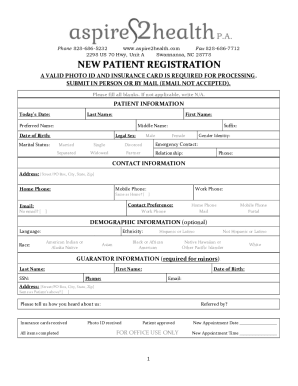
Get Nc Aspire2health New Patient Registration 2021-2025
How it works
-

Open form follow the instructions
-

Easily sign the form with your finger
-

Send filled & signed form or save
How to fill out the NC Aspire2Health New Patient Registration online
Filling out the NC Aspire2Health New Patient Registration online is an essential step in ensuring a smooth onboarding process for new patients. This guide provides a detailed, step-by-step approach to help users navigate the registration form efficiently.
Follow the steps to complete your registration form
- Click 'Get Form' button to obtain the registration form and open it in your preferred editing tool.
- Begin by entering today's date at the top of the form, ensuring it reflects the current date accurately.
- Next, complete the contact information section. Provide your address, including street/PO Box, city, state, and zip code. Also, include home, mobile, and work phone numbers, ensuring to indicate if any are the same as home. Select your preferred method of contact and provide your email address. If you do not have an email, mark the option accordingly.
- In the demographic information section, which is optional, list your language, race, and ethnicity as applicable.
- If you are filling this form for a minor, include the guarantor information, which includes the guarantor's last name, first name, social security number, date of birth, phone number, email, and their address. Indicate if the address is the same as the patient's.
- Proceed to the health history section, providing your name and date of birth again. Document your present complaint, any known drug allergies, and list past surgeries, hospitalizations, and medications with respective details.
- Complete the maintenance and prevention section, specifying any recent medical procedures and their completion dates.
- Provide your social history by indicating your consumption of coffee, tea, caffeinated soda, tobacco, alcohol, and any drug history. Note any felony convictions if applicable.
- Once all sections are completed, review the entire form for accuracy. Save your changes, and if needed, download, print, or share the form as directed.
Get started now by completing the NC Aspire2Health New Patient Registration online.
To access the NC Aspire2Health New Patient Registration, simply visit our website and navigate to the registration section. You will find clear instructions guiding you through the process. Alternatively, you can contact our support team for assistance, and they will walk you through each step. We are here to ensure your registration experience is seamless and straightforward.
Industry-leading security and compliance
US Legal Forms protects your data by complying with industry-specific security standards.
-
In businnes since 199725+ years providing professional legal documents.
-
Accredited businessGuarantees that a business meets BBB accreditation standards in the US and Canada.
-
Secured by BraintreeValidated Level 1 PCI DSS compliant payment gateway that accepts most major credit and debit card brands from across the globe.