Loading
Get Cy Colmex Pro Withdrawal Request 2015-2026
How it works
-

Open form follow the instructions
-

Easily sign the form with your finger
-

Send filled & signed form or save
How to fill out the CY Colmex Pro Withdrawal Request online
Completing the CY Colmex Pro Withdrawal Request form is an essential step for users wishing to withdraw their funds securely and efficiently. This guide provides step-by-step instructions to ensure a smooth and accurate submission process.
Follow the steps to successfully complete your withdrawal request.
- Click ‘Get Form’ button to obtain the form and open it in your preferred editor.
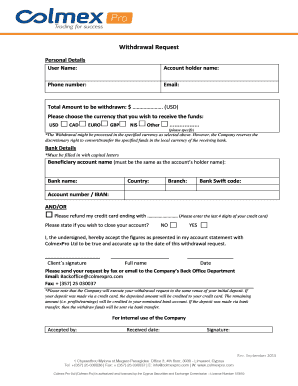
- Begin by entering your personal details. Fill in the 'User Name,' 'Account holder name,' 'Phone number,' and 'Email' fields accurately.
- Indicate the total amount you wish to withdraw in the 'Total Amount to be withdrawn' field in USD.
- Select the currency in which you would like to receive the funds from the options provided: USD, CAD, EURO, GBP, NIS, or 'Other' (if you specify a different currency).
- In the 'Bank Details' section, make sure to fill in all fields with capital letters. Start with the 'Beneficiary account name,' which must match the account holder name.
- Next, provide the 'Bank name,' 'Country,' 'Branch,' and 'Bank Swift code' accurately.
- Input your 'Account number / IBAN,' or choose the alternative option to refund to your credit card by checking the box and entering the last four digits of your card.
- Decide if you wish to close your account by selecting 'YES' or 'NO'.
- Read and accept the statement regarding the accuracy of your account figures, and provide your signature, full name, and date in the allocated spaces.
- Finally, submit your completed request by fax at + (357) 25 030037 or via email to Backoffice@colmexpro.com for processing.
Complete your CY Colmex Pro Withdrawal Request online today for a hassle-free experience!
You can reach out to Colmex Pro by sending an email to their support address, which is usually listed on their website. Include all relevant details regarding your inquiry and any specific information related to your CY Colmex Pro Withdrawal Request. This helps the support team assist you effectively and promptly.