Get N:formsattorney Registrationattorney Cm-ecf Registration Form ...
How it works
-

Open form follow the instructions
-

Easily sign the form with your finger
-

Send filled & signed form or save
How to fill out the N:FormsAttorney RegistrationAttorney CM-ECF Registration Form online
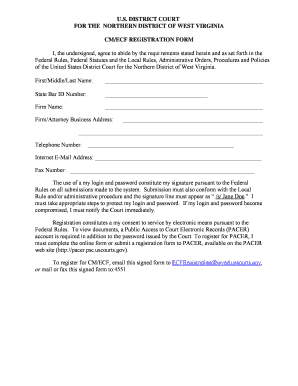
Filling out the N:FormsAttorney RegistrationAttorney CM-ECF Registration Form online is a straightforward process designed to facilitate your registration with the U.S. District Court for the Northern District of West Virginia. This guide will provide step-by-step instructions to ensure that you complete the form accurately and efficiently.
Follow the steps to complete the registration form online.
- Click the ‘Get Form’ button to obtain the registration form and open it in your preferred online editor.
- Begin by entering your first, middle, and last name in the designated fields. Ensure that you provide your full legal name as it appears on your identification.
- Next, input your State Bar ID number in the appropriate section. This number is essential for your identification as a registered attorney.
- Provide the name of your firm in the field labeled ‘Firm Name.’ If you operate as an independent attorney, simply enter 'N/A' or 'Independent.'
- Fill in your firm or attorney business address accurately. Include the street address, city, state, and zip code to avoid any issues.
- Enter your telephone number and ensure it is a valid number where you can be reached. Include the area code.
- In the ‘Internet E-Mail Address’ field, provide a valid email address for electronic correspondence. This address is crucial for communication regarding your registration.
- Optionally, you may fill in your fax number if available. This will be a secondary method of communication, though it may not be required.
- Review the statement regarding the use of your login and password. Make sure you understand the importance of safeguarding this information.
- Affirm your consent to service by electronic means as stated in the guidelines. This is a crucial part of the registration process.
- At the end of the form, input the date on which you are completing the registration.
- Sign the form electronically where indicated. You may be required to include your signature in the format ‘/s/ Your Name.’
- Once you have filled in all required fields, save your changes. You then have the options to download, print, or share the completed form as needed.
- To submit your registration, email the signed form to ECFRegistration@wvnd.uscourts.gov, or you may mail or fax it to the appropriate address provided in the instructions.
Complete your registration form online today for a smooth and efficient filing experience.
ECF stands for Electronic Case Filing, which is a system that allows users to submit legal documents electronically to the court. This process makes filing more efficient and reduces the need for paper documents. ECF improves case management by enabling quicker access to filings for both attorneys and the public. If you're navigating the ECF system, consider the N:Forms Attorney Registration and Attorney CM-ECF Registration Form, which helps simplify your registration and integration with these systems.
Industry-leading security and compliance
-
In businnes since 199725+ years providing professional legal documents.
-
Accredited businessGuarantees that a business meets BBB accreditation standards in the US and Canada.
-
Secured by BraintreeValidated Level 1 PCI DSS compliant payment gateway that accepts most major credit and debit card brands from across the globe.