We use cookies to improve security, personalize the user experience, enhance our marketing activities (including cooperating with our marketing partners) and for other business use.
Click "here" to read our Cookie Policy. By clicking "Accept" you agree to the use of cookies. Read less
Read more
Accept
Loading
Form preview
  • US Legal Forms
  • Form Library
  • More Forms
  • More Multi-State Forms
  • - Hang Seng Bank

Get - Hang Seng Bank

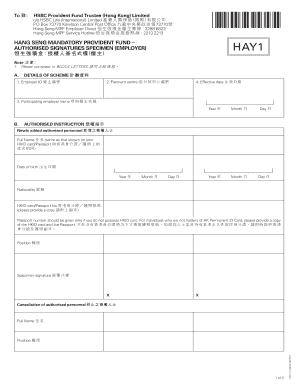
73770 Hang Seng MPF Employer Direct 2288 6822 Hang Seng MPF Service Hotline 2213 2213 HANG SENG MANDATORY PROVIDENT FUND AUTHORISED SIGNATURES SPECIMEN (EMPLOYER) HAY1 Note 1. Please complete in BLOCK LETTERS. A. DETAILS OF SCHEME 1. Employer ID 2. Payment centre ID 4. Ef.

How it works

  1. Open form

    Open form follow the instructions

  2. Easily sign form

    Easily sign the form with your finger

  3. Share form

    Send filled & signed form or save

How to fill out the - Hang Seng Bank online

This guide aims to provide clear and concise instructions for completing the Hang Seng Mandatory Provident Fund authorised signatures specimen form online. Following these steps will help ensure that your submission is accurate and compliant.

Follow the steps to complete the form accurately.

  1. Use the ‘Get Form’ button to access the form, allowing you to begin the filling process.
  2. Enter the employer ID in the designated field to uniquely identify your organization.
  3. Input the payment centre ID, which directs the contributions to the appropriate location.
  4. Specify the effective date, marking when the information provided will become applicable.
  5. Fill in the participating employer name as it appears in official documents, ensuring accuracy and clarity.
  6. Complete the personal information for any newly added authorised personnel, including their full name, date of birth, nationality, and identification number.
  7. Provide the position title for the person signing the form, ensuring it reflects their role within the organization.
  8. Include the specimen signature of the authorised personnel as required, adhering to the guidelines for signature formats.
  9. For any cancellation of authorised personnel, provide their full name and, if necessary, other pertinent details.
  10. Read and understand the declaration and authorisation section before signing, ensuring that the information provided is complete and correct.
  11. Finalize your form by selecting the options to save changes, download a copy, print, or share the completed document as needed.

Start completing your form online today for a seamless submission experience.

Get form

Experience a faster way to fill out and sign forms on the web. Access the most extensive library of templates available.
Get form

Related content

FORM 6
Hang Seng Bank is the first foreign bank to acquire more than 15 per cent of a mainland...
Learn more
Hang Seng Bank Customer Contact Centre Recruitment...
Hang Seng Bank Customer Contact Centre Recruitment Day. This form is currently inactive.
Learn more
HSBC - NamuWiki
Jun 1, 2025 — HSBC is the UK 's largest financial company and the largest financial...
Learn more

Related links form

How To Write Letter Of Undertaking For Secondary School Virtual Awards Ceremony Script Charlemont Rise Design Guidelines Khwada Marathi Movie Download

Questions & Answers

Get answers to your most pressing questions about US Legal Forms API.

Contact support

The email format for Hang Seng Bank typically follows the pattern of first.last@hangseng. This format ensures that your email reaches the correct department or staff member efficiently. Be sure to follow this pattern when contacting the bank for inquiries.

The bank code for Hang Seng Bank is 024, while the branch code varies depending on the specific location. You can find your branch code on your bank statement or by contacting customer service. It's important to have the correct codes for smooth transactions.

The SWIFT code for Hang Seng Bank is not the same for all branches. Each branch has its unique code to facilitate international transactions accurately. It’s essential to use the correct SWIFT code for your specific branch to ensure your transfers reach the right destination without any delays.

The bank code of Hang Seng Bank is 024. This six-digit code is specifically utilized for various banking transactions, particularly electronic payments. Knowing Hang Seng Bank's bank code is key to ensuring that your transactions are processed smoothly and accurately.

To find a bank's bank code, you can visit the bank's official website or contact customer service for assistance. Additionally, many financial institutions provide this information in their documentation or FAQs. For Hang Seng Bank, you can easily find the bank code listed on their site or through their support channels.

The full name of the bank commonly referred to as Hang Seng is Hang Seng Bank Limited. Founded in 1933, it has a strong presence in Hong Kong and offers various financial services. This bank is known for its commitment to customer service and innovative banking solutions.

The bank code for Hang Seng Bank is crucial for transactions and is used primarily for electronic fund transfers. In Hong Kong, the bank code is 024. Knowing this code helps you ensure accurate and successful fund transfers when dealing with Hang Seng Bank.

To register for online banking with Hang Seng Bank, visit their official website and click on the online banking section. You will need your bank account number and some personal information for verification. Follow the prompts to create your username and password, completing the registration process. Once registered, you can easily manage your finances anytime.

To make a Hang Seng Bank account, you need to visit a branch or apply online through their official website. First, gather the necessary documents, including identification and proof of address. Complete the application form, and a bank representative will assist you in the process. Once approved, you can enjoy all the services Hang Seng Bank offers.

To activate online banking with China Bank, first, secure your account number and other identification details. Visit the China Bank website, and locate the online banking activation section. Follow the instructions provided to set up your online access, ensuring that all details are accurate.

Get This Form Now!

Use professional pre-built templates to fill in and sign documents online faster. Get access to thousands of forms.
Get form
If you believe that this page should be taken down, please follow our DMCA take down processhere.

Industry-leading security and compliance

US Legal Forms protects your data by complying with industry-specific security standards.
  • In businnes since 1997
    25+ years providing professional legal documents.
  • Accredited business
    Guarantees that a business meets BBB accreditation standards in the US and Canada.
  • Secured by Braintree
    Validated Level 1 PCI DSS compliant payment gateway that accepts most major credit and debit card brands from across the globe.
Get - Hang Seng Bank
Get form
Form Packages
Adoption
Bankruptcy
Contractors
Divorce
Home Sales
Employment
Identity Theft
Incorporation
Landlord Tenant
Living Trust
Name Change
Personal Planning
Small Business
Wills & Estates
Packages A-Z
Form Categories
Affidavits
Bankruptcy
Bill of Sale
Corporate - LLC
Divorce
Employment
Identity Theft
Internet Technology
Landlord Tenant
Living Wills
Name Change
Power of Attorney
Real Estate
Small Estates
Wills
All Forms
Forms A-Z
Form Library
Customer Service
Terms of Service
Privacy Notice
Legal Hub
Content Takedown Policy
Bug Bounty Program
About Us
Help Portal
Legal Resources
Blog
Affiliates
Contact Us
Delete My Account
Site Map
Industries
Forms in Spanish
Localized Forms
State-specific Forms
Forms Kit
Legal Guides
Real Estate Handbook
All Guides
Prepared for You
Notarize
Incorporation services
Our Customers
For Consumers
For Small Business
For Attorneys
Our Sites
US Legal Forms
USLegal
FormsPass
pdfFiller
signNow
airSlate WorkFlow
DocHub
Instapage
Social Media
Call us now toll free:
+1 833 426 79 33
As seen in:
  • USA Today logo picture
  • CBC News logo picture
  • LA Times logo picture
  • The Washington Post logo picture
  • AP logo picture
  • Forbes logo picture
© Copyright 1997-2025
airSlate Legal Forms, Inc.
3720 Flowood Dr, Flowood, Mississippi 39232
Form Packages
Adoption
Bankruptcy
Contractors
Divorce
Home Sales
Employment
Identity Theft
Incorporation
Landlord Tenant
Living Trust
Name Change
Personal Planning
Small Business
Wills & Estates
Packages A-Z
Form Categories
Affidavits
Bankruptcy
Bill of Sale
Corporate - LLC
Divorce
Employment
Identity Theft
Internet Technology
Landlord Tenant
Living Wills
Name Change
Power of Attorney
Real Estate
Small Estates
Wills
All Forms
Forms A-Z
Form Library
Customer Service
Terms of Service
Privacy Notice
Legal Hub
Content Takedown Policy
Bug Bounty Program
About Us
Help Portal
Legal Resources
Blog
Affiliates
Contact Us
Delete My Account
Site Map
Industries
Forms in Spanish
Localized Forms
State-specific Forms
Forms Kit
Legal Guides
Real Estate Handbook
All Guides
Prepared for You
Notarize
Incorporation services
Our Customers
For Consumers
For Small Business
For Attorneys
Our Sites
US Legal Forms
USLegal
FormsPass
pdfFiller
signNow
airSlate WorkFlow
DocHub
Instapage
Social Media
Call us now toll free:
+1 833 426 79 33
As seen in:
  • USA Today logo picture
  • CBC News logo picture
  • LA Times logo picture
  • The Washington Post logo picture
  • AP logo picture
  • Forbes logo picture
© Copyright 1997-2025
airSlate Legal Forms, Inc.
3720 Flowood Dr, Flowood, Mississippi 39232