Loading
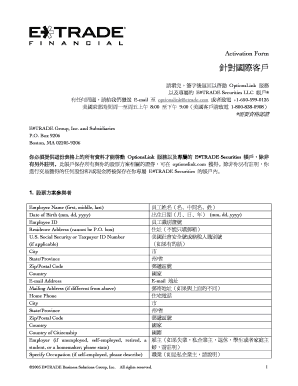
Get 2-optionslink. Activation Formtxt-formatted-can.doc
How it works
-

Open form follow the instructions
-

Easily sign the form with your finger
-

Send filled & signed form or save
How to use or fill out the 2-OptionsLink Activation Formtxt-formatted-CAN.doc online
Filling out the 2-OptionsLink Activation Form is an important step to activate your OptionsLink service and exclusive E*TRADE Securities LLC account. This guide provides a clear and supportive walkthrough to complete the form accurately and efficiently.
Follow the steps to fill out your 2-OptionsLink Activation Form.
- Click the 'Get Form' button to access the form and open it in your preferred document editor.
- Provide your employee information in Section 1. Fill in your full name, date of birth, employee identification number, and residence address. Ensure that the address is complete, including the city, state or province, zip or postal code, and country.
- Complete your email address and home phone number in the designated fields. If your mailing address differs from your residence address, fill in the separate mailing address section.
- Indicate your country of citizenship and employer details. If relevant, specify your occupation and provide your U.S. Social Security or Taxpayer ID number.
- In Section 2, choose your account type by selecting one of the options: Individual, Joint-rights of survivorship, Joint-tenancy in common, or Community property.
- Section 3 involves selecting your investment objectives. Choose the relevant investment strategy that suits your needs: Capital Preservation, Income, Growth, or Speculation. Fill in your annual income range and total net worth.
- Section 4 is optional, where you may set up an exercise password for additional security when exercising your stock options. Select 'Yes' or 'No' accordingly.
- If applicable, provide details for co-account holders in Section 5. Fill in the required fields like name, date of birth, and other relevant information.
- In Section 6, opt for electronic document delivery. Select the types of documents you wish to receive electronically and provide an email address if it differs from the above.
- Finally, complete Section 7 by reviewing and signing the account agreement. Ensure that you agree to all terms and conditions before sending the form.
- After filling out all sections, save your changes. You can then download, print, or share the completed form as needed.
Complete your 2-OptionsLink Activation Form online to activate your OptionsLink service today!
Industry-leading security and compliance
US Legal Forms protects your data by complying with industry-specific security standards.
-
In businnes since 199725+ years providing professional legal documents.
-
Accredited businessGuarantees that a business meets BBB accreditation standards in the US and Canada.
-
Secured by BraintreeValidated Level 1 PCI DSS compliant payment gateway that accepts most major credit and debit card brands from across the globe.