Loading
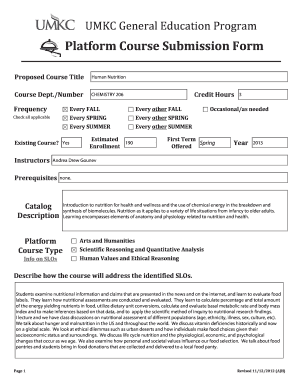
Get Platform Course Submission Form - College Of Arts And Sciences - Cas Umkc
How it works
-

Open form follow the instructions
-

Easily sign the form with your finger
-

Send filled & signed form or save
How to fill out the Platform Course Submission Form - College Of Arts And Sciences - Cas Umkc online
Filling out the Platform Course Submission Form is a crucial step in proposing a new course within the College of Arts and Sciences at UMKC. This guide provides clear, step-by-step instructions to help users navigate the form with ease.
Follow the steps to successfully complete the submission form.
- Click the ‘Get Form’ button to obtain the Platform Course Submission Form and open it in your preferred digital editing tool.
- Begin with the proposed course title. Clearly enter the title of your course, such as 'Human Nutrition', ensuring accuracy as this is an essential identifier for the course.
- Input the course department and number. This should align with the departmental coding at UMKC, for example, 'CHEMISTRY 206', to ensure proper classification.
- Indicate the frequency of the course offering in the designated checkboxes. Select all applicable options like 'Every FALL' or 'Every SPRING' to clarify how often the course will be taught.
- Confirm if this is an existing course by selecting 'Yes' or 'No'. This helps clarify if this submission is for a newly proposed course or a revision of an existing one.
- Fill in the instructor’s name, along with their qualifications and relevant contact information. This ensures students and faculty can reach out for inquiries regarding the course.
- State the credit hours assigned to the course, typically reflecting the amount of academic credit the students will earn upon course completion.
- Address the estimated enrollment number. This allows the department to assess the expected demand for the course appropriately.
- Specify the first term the course is to be offered along with the corresponding year. For instance, if the course is set for the Spring term of 2023, clearly indicate this.
- Complete the catalog description section, summarizing what the course covers and highlighting its educational objectives and context.
- Detail how the course will meet the identified Student Learning Outcomes (SLOs) by providing specific examples to illustrate the educational goals.
- Describe the assessment methods intended for evaluating student learning. Include quizzes, exams, and any other evaluation techniques in line with department standards.
- Clarify any required supporting documentation, such as course outlines or sample syllabuses. Attach any relevant files that support your submission.
- Finally, ensure that all required approvals are signed and dated where indicated. This verifies that necessary stakeholder consultations have taken place.
- Review all the information entered for accuracy and completeness. After doing so, save changes, download, print, or share the completed form as needed.
Begin your course proposal by filling out the Platform Course Submission Form online today.
Industry-leading security and compliance
US Legal Forms protects your data by complying with industry-specific security standards.
-
In businnes since 199725+ years providing professional legal documents.
-
Accredited businessGuarantees that a business meets BBB accreditation standards in the US and Canada.
-
Secured by BraintreeValidated Level 1 PCI DSS compliant payment gateway that accepts most major credit and debit card brands from across the globe.