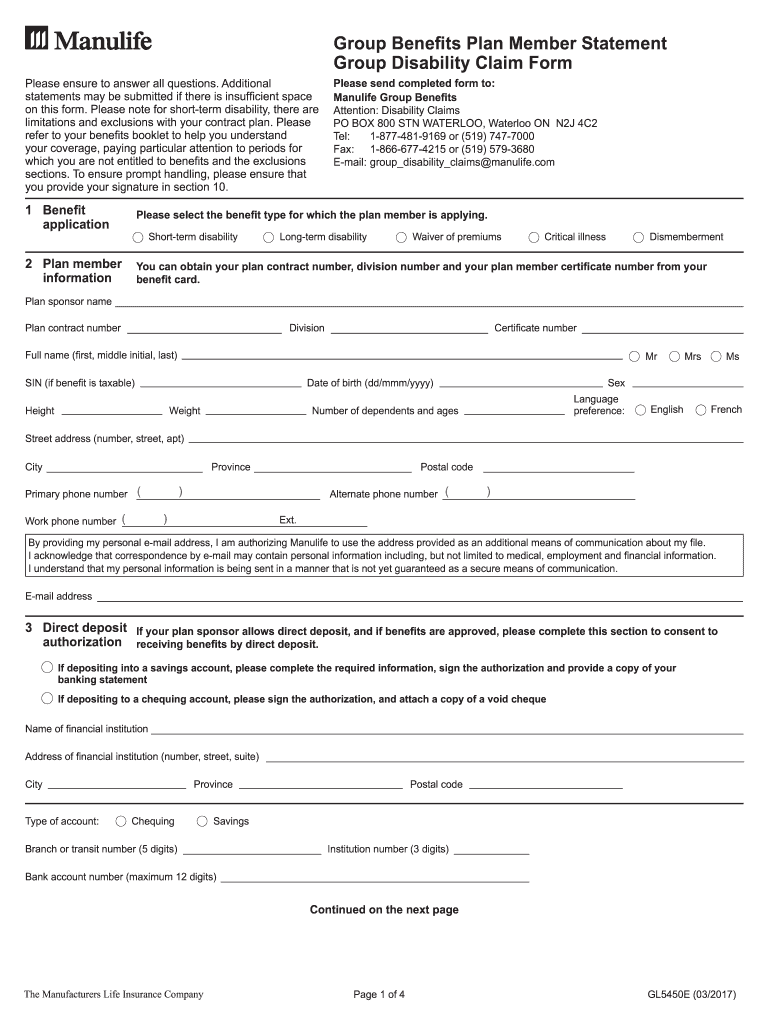
Group Benefits Plan Member Statement Group Disability Claim Form Please ensure to answer all questions. Additional statements may be submitted if there is insufficient space on this form. Please note.
Loading

Open form follow the instructions

Easily sign the form with your finger

Send filled & signed form or save
How to fill out the Manulife GL5450E online
Filling out the Manulife GL5450E form online is an important step in managing your group disability claim effectively. This guide will provide you with clear instructions on each section of the form, ensuring a smooth completion process.
Follow the steps to fill out your Manulife GL5450E form online.
- Press the 'Get Form' button to access the Manulife GL5450E form and open it in your preferred online editor.
- In the 'Benefit application' section, select the appropriate benefit type you are applying for, such as short-term disability, long-term disability, or critical illness.
- Provide your plan member information, which includes your contract number, division number, and certificate number. You can find these details on your benefit card.
- Complete your personal details including your full name, social insurance number (if applicable), date of birth, height, weight, and language preference.
- If applicable, fill out the 'Direct deposit' section with your banking information. Ensure to attach necessary documentation like a void cheque or banking statement as required.
- In the 'Injury information' section, describe the details of your injury or illness, including the original date of hire and whether the condition is work-related.
- Detail your work information, including the last date you worked and if you performed any other paid or volunteer work since that date.
- Provide illness information, including treatment dates and a description of how your symptoms affect your work duties. Mention any previous similar conditions.
- List all health care professionals you have consulted in the last 12 months in the designated section, including their names, specialties, and contact information.
- Complete the 'Other income' section if you have applied for or are receiving benefits from other sources, noting amounts and relevant dates.
- Read the 'When to contact Manulife' section carefully and acknowledge understanding by signing and dating where required.
- Finally, confirm all information is accurate and sign the authorization in section 10. Send your completed form to Manulife using the provided methods.
- You can save changes, download, print, or share the form as needed once completed.
Complete your Manulife GL5450E form online today for efficient document management.
Experience a faster way to fill out and sign forms on the web. Access the most extensive library of templates available.
Get answers to your most pressing questions about US Legal Forms API.
How do I send documents to Manulife?
You can send documents to Manulife either online or by mail. For online submissions, log into your Manulife account and choose the upload option. If you prefer mailing, ensure that all documents related to your Manulife GL5450E are properly addressed to the correct department to prevent any delays.
How to file a veterans life insurance claim?
To file a veterans life insurance claim, gather all necessary documentation and complete the relevant forms. You can check the Manulife website for specific guidelines pertaining to veterans claims under the Manulife GL5450E policy. Ensure your submission is clear and correct for a smooth processing experience.
How do I add attachments to my Manulife claim?
When you are filing a claim under Manulife GL5450E, you will see an option to add attachments during the submission process. Make sure your attachments are relevant to your claim. If you have any difficulties, consult the resources on the Manulife site for further assistance.
How do I submit a form to Manulife?
To submit a form to Manulife, you can either upload it directly through your online account or send it via postal mail. Be sure to check the specific submission guidelines on the Manulife website for the Manulife GL5450E to ensure all your information is included correctly.
How do I upload documents on Manulife?
Uploading documents on Manulife is straightforward. Log in to your account on the Manulife website, navigate to the 'My Documents' section, and follow the prompts to upload your files. Make sure the documents are clear and complete to avoid delays in processing your Manulife GL5450E-related tasks.
How do I claim Manulife fund value?
To claim your fund value with Manulife GL5450E, you first need to complete a claims form. This form can typically be found on the Manulife website. Once you fill it out, submit it following the instructions provided so that your claim is processed efficiently.
What is the email address for Manulife?
To contact Manulife, you can use their official email address which is available on the Manulife website. Ensure that your email includes relevant details regarding your Manulife GL5450E policy for a prompt response. If you have specific inquiries or need assistance, providing clear information will help Manulife assist you better.
What is a Manulife customer number?
A Manulife customer number is a unique identifier assigned to you, which allows you to access your account and services. This number can be found on your policy documents or by logging into your online account. If you experience any difficulty retrieving this information, UsLegalForms can help streamline the process.
Where can I find my Manulife policy number?
Your Manulife policy number is generally included in all communications from Manulife, such as your policy documents or statements. You can also find it by logging into your online account. For further assistance in locating your policy number, consider using UsLegalForms, which can guide you through your documents.
How do I get a Manulife ID?
To obtain a Manulife ID, visit the Manulife website and follow the steps for registration. You will need to provide some personal information and your policy number during this process. Once completed, you will receive your Manulife ID via email, allowing you to manage your Manulife GL5450E account and services online.
Use professional pre-built templates to fill in and sign documents online faster. Get access to thousands of forms.
If you believe that this page should be taken down, please follow our DMCA take down process here.
This form is available in several versions. Select the version you need from the drop-down list below.