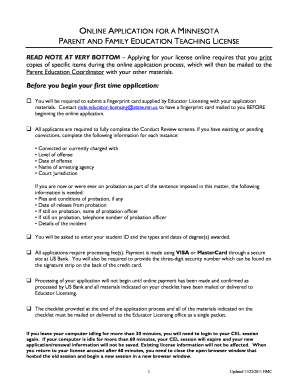
Get The Initial Application You Make Online Requires That You Print A Copy Of The Application, Conduct
How it works
-

Open form follow the instructions
-

Easily sign the form with your finger
-

Send filled & signed form or save
How to fill out the initial application for a Minnesota parent and family education teaching license online
This guide provides step-by-step instructions on how to fill out the initial application for a Minnesota parent and family education teaching license online. By following these directions, you can successfully complete your application process and ensure all necessary materials are submitted.
Follow the steps to complete your online application
- Click the 'Get Form' button to obtain the application form and open it in your preferred online editor.
- Begin filling out your personal information in the designated sections. This typically includes your name, contact information, and other required identifiers.
- Proceed to the Conduct Review screens where you must enter information regarding any existing or pending convictions. This includes details such as the level of offense, date of offense, name of arresting agency, and court jurisdiction.
- If applicable, provide details about any probation you are currently on, including the name and contact information of your probation officer.
- Enter your student ID along with the types and dates of degrees awarded.
- Review the processing fees. Payments, including a fee of $90.65, can be made through a secure site using a VISA or MasterCard.
- Once all required fields are completed and the payment is confirmed, print a copy of the application materials.
- Gather and complete the necessary supporting documents, including the checklist of license documents, receipt of payment, verification of completion form, fingerprint card, and stamped transcripts.
- Mail all printed application materials as a single packet to the Parent Education Coordinator at the provided address.
- Ensure that your application is submitted within the 60-day timeframe post completion of your online application for processing to commence.
Start your application process online today to pursue your teaching license.
If your Breeze account is locked, you can unlock it by following the 'Forgot Password?' option available on the login page. After receiving the password reset instructions, you can regain access quickly. If the problem persists, consider reaching out to Breeze customer support for further assistance. Always remember, the initial application you make online requires that you print a copy of the application, conduct.
Industry-leading security and compliance
-
In businnes since 199725+ years providing professional legal documents.
-
Accredited businessGuarantees that a business meets BBB accreditation standards in the US and Canada.
-
Secured by BraintreeValidated Level 1 PCI DSS compliant payment gateway that accepts most major credit and debit card brands from across the globe.