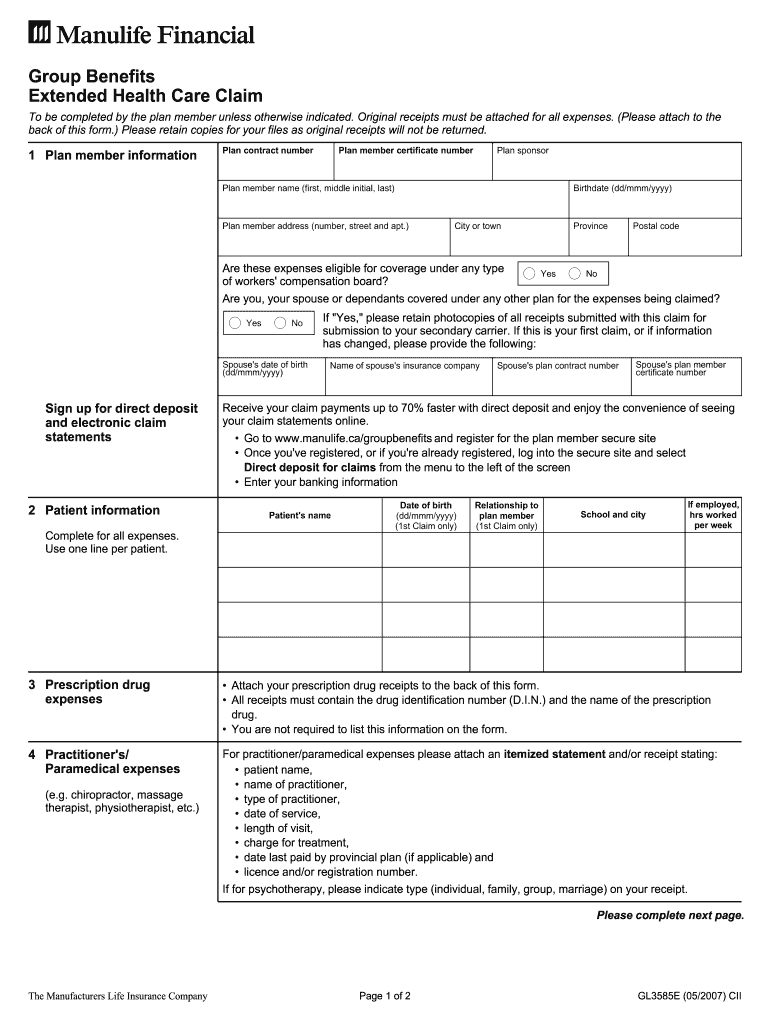
Attach your prescription drug receipts to the back of this form. All receipts ... Go to www.manulife.ca/groupbenefits and register for the plan member secure site .
Loading

Open form follow the instructions

Easily sign the form with your finger

Send filled & signed form or save
How to fill out the Manulife Financial GL3585E online
Filling out the Manulife Financial GL3585E can seem daunting, but this guide will help you navigate the process with ease. By following each step carefully, you will ensure that your claims are processed efficiently.
Follow the steps to complete your claim form online.
- Click ‘Get Form’ button to obtain the form and open it in the editor.
- In the first section, fill out the plan member information. Provide details such as your plan contract number, plan member certificate number, plan member name, and date of birth.
- Complete your address details, including city, province, and postal code. Indicate whether the expenses claimed are eligible for coverage under a worker's compensation board.
- Answer whether you, your partner, or dependants are covered under any other insurance plan for the expenses being claimed. If yes, include your partner's insurance information.
- If you wish to sign up for direct deposit and electronic claim statements, follow the instructions provided and enter your banking information.
- Proceed to the patient information section. Enter the patient's name, date of birth, relationship to the plan member, school and city, and working hours if applicable.
- In the prescription drug expenses section, ensure all receipts are attached at the back of the form. Confirm that each receipt contains the drug identification number and the name of the prescription drug.
- For practitioner or paramedical expenses, attach itemized statements that include necessary details like patient name, practitioner name, service type, date of service, treatment charge, and practitioner license number.
- If claiming equipment and appliance expenses, attach a written recommendation from the prescribing physician, including the required activities and duration.
- For vision care expenses, ensure the supplier completes the necessary section and submits an itemized receipt.
- Complete the claims confirmation section by signing and dating the form. Ensure all original receipts are attached.
- Finally, follow the mailing instructions provided to send your completed claim form and receipts to the appropriate address.
Complete your Manulife Financial GL3585E claim form online today to ensure swift processing of your claims.
Experience a faster way to fill out and sign forms on the web. Access the most extensive library of templates available.
Get answers to your most pressing questions about US Legal Forms API.
What is a Manulife access card?
A Manulife access card serves as a physical representation of your Manulife Financial GL3585E account information. This card allows you to access your benefits easily, showing providers that you are covered. It is a convenient tool for managing and utilizing your insurance benefits.
How do you find your Manulife policy number?
You can find your Manulife policy number in several locations. Check your policy documents, or access your Manulife Financial GL3585E account online, where your policy number is listed in the account summary. If you're still having trouble, customer service can help retrieve this information for you.
How do I get a Manulife ID?
To obtain a Manulife ID, complete the online registration process on the Manulife website. You will need to provide specific information about your account, such as your Manulife Financial GL3585E policy details. After submitting your registration, you will receive your ID confirmation via email.
Is Manulife the same as Manulife financial?
Yes, Manulife is often used interchangeably with Manulife Financial. The full name, Manulife Financial GL3585E, represents the financial services offered, including insurance and investment products. Therefore, when discussing Manulife, you are referring to their financial services division.
How to get manulife ID?
To get your Manulife ID, you need to register on the Manulife website. During the registration, provide your personal details, including your Manulife Financial GL3585E policy number. Once you complete the registration, you will receive your unique Manulife ID via email.
How do I access Manulife?
To access Manulife, visit the official Manulife website or use the mobile app. You will need your Manulife Financial GL3585E account number and password for a secure login. If you encounter any issues during the process, you can always reach out to customer support for assistance.
What is a sponsor manulife ID?
A sponsor Manulife ID is a unique identifier linked to your Manulife Financial GL3585E account. It allows you to access your insurance and investment services securely. This ID connects you to your sponsor’s benefits, ensuring you receive the support and resources you need.
What is another name for Manulife?
Another name for Manulife is Manulife Financial, which reflects its broad array of services in the financial sector. In the United States, this encompasses the brand Manulife Financial GL3585E. The company is recognized for its dedication to innovation and customer service in both insurance and investment markets. By understanding this dual identity, customers recognize where to turn for their financial needs.
What does Manulife do?
Manulife offers a variety of services, including life insurance, health insurance, retirement solutions, and investment products. Through its operations, Manulife Financial GL3585E aims to help customers achieve financial security and manage their wealth effectively. By providing comprehensive financial solutions, Manulife focuses on building lasting relationships with clients to support their changing needs. As a trusted advisor, Manulife is committed to your financial journey.
What kind of company is Manulife?
Manulife is a multinational financial services company that provides insurance, investment, and banking products. It operates as Manulife Financial GL3585E in the U.S. and serves millions of customers across multiple markets. The company prides itself on delivering tailored solutions to meet individual and family financial goals. Whether you are looking for insurance, investment opportunities, or banking solutions, Manulife encompasses a broad range of financial products.
Use professional pre-built templates to fill in and sign documents online faster. Get access to thousands of forms.
If you believe that this page should be taken down, please follow our DMCA take down process here.
This form is available in several versions. Select the version you need from the drop-down list below.