Loading
Get Life's Doors Hospice Volunteer Report Form 2010-2026
How it works
-

Open form follow the instructions
-

Easily sign the form with your finger
-

Send filled & signed form or save
How to fill out the Life's Doors Hospice Volunteer Report Form online
Filling out the Life's Doors Hospice Volunteer Report Form online is a straightforward process that helps document vital interactions with patients. This guide will assist you in completing the form accurately and efficiently.
Follow the steps to fill out the form correctly
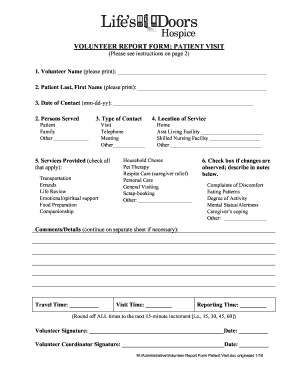
- Click ‘Get Form’ button to access the Life's Doors Hospice Volunteer Report Form and open it in your preferred online editor.
- Begin by entering your name clearly in the 'Volunteer Name' field.
- In the 'Patient Last, First Name' field, accurately fill in the patient's name.
- Enter the date of contact using the format mm-dd-yy.
- Indicate the type of persons served by selecting 'Patient,' 'Family,' or 'Other' and specifying if 'Other' is chosen.
- Select the type of contact made by marking 'Visit,' 'Telephone,' 'Meeting,' or 'Other' and detailing if 'Other' is applicable.
- Check all services provided during the interaction, such as 'Transportation,' 'Companionship,' or any other relevant options.
- Specify the location of the service by choosing from the provided options or writing in another location.
- Indicate any observed changes in the patient’s condition by checking the relevant box and documenting specifics in the comments section.
- Add any additional comments or details about the visit in the designated section.
- Record your travel time, visit time, and reporting time, rounding to the next 15-minute increment.
- Sign the form with your name and date, then obtain the signature and date from the volunteer coordinator.
- Once all fields are completed, save your changes, download the report, or print it as needed to submit.
Complete the Life's Doors Hospice Volunteer Report Form online today to help support patient care.