Loading
Get Request For Official Transcript - University Of Minnesota, Crookston
How it works
-

Open form follow the instructions
-

Easily sign the form with your finger
-

Send filled & signed form or save
How to use or fill out the Request For Official Transcript - University Of Minnesota, Crookston online
This guide provides clear instructions for completing the Request For Official Transcript form for the University of Minnesota, Crookston. By following these steps, you can ensure a smooth process in obtaining your official transcript online.
Follow the steps to complete the request form online:
- Press the ‘Get Form’ button to access the Request For Official Transcript. This will open the form in your document management system.
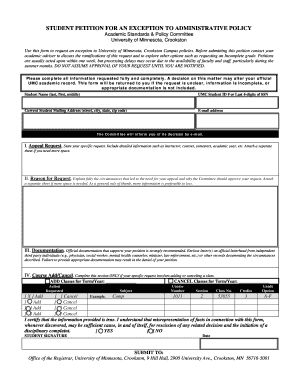
- Fill out your personal information, including your full name (last, first, middle) and UMC Student ID number or the last four digits of your Social Security Number.
- Provide your current mailing address. Ensure this includes your street address, city, state, and zip code.
- Enter your email address. This is critical, as the committee will notify you of their decision through this email.
- In the 'I. Appeal Request' section, clearly state your specific request. Include detailed information, such as the names of instructors, the courses involved, the semesters, and any relevant academic year information. If more space is needed, attach a separate sheet.
- In the 'II. Reason for Request' section, thoroughly explain the circumstances surrounding your appeal. Justify why the committee should approve your request, providing as much detail as possible. Additional details can be added on a separate sheet.
- In the 'III. Documentation' section, include any official documentation that supports your request. This may include letters from third-party individuals or any other relevant records to substantiate your circumstances.
- If your request involves adding or canceling a class, complete the section labeled 'IV. Course Add/Cancel.' Specify which classes you wish to add or cancel, including the term/year, course number, section, class number, credits, and grade option.
- Review all entered information to make sure it is accurate and complete. Omissions or inaccuracies could lead to delays.
- Sign the form in the designated area, certifying that the information provided is truthful. Indicate whether you agree or disagree with the statement concerning misrepresentation.
- Finally, submit the form to the Office of the Registrar at the University of Minnesota, Crookston. You may want to save, download, or print a copy of the completed form for your records.
Complete your request for transcripts online today.
Related links form
Yes, you can check the status of your college transcript online through the university’s secure portal. This service allows you to monitor your transcript request and ensure everything is proceeding smoothly. Accessing your records has never been easier at the University of Minnesota, Crookston.
Industry-leading security and compliance
US Legal Forms protects your data by complying with industry-specific security standards.
-
In businnes since 199725+ years providing professional legal documents.
-
Accredited businessGuarantees that a business meets BBB accreditation standards in the US and Canada.
-
Secured by BraintreeValidated Level 1 PCI DSS compliant payment gateway that accepts most major credit and debit card brands from across the globe.