Get Application For Eecs Computer Account - Electrical Engineering ...
How it works
-

Open form follow the instructions
-

Easily sign the form with your finger
-

Send filled & signed form or save
How to fill out the Application For EECS Computer Account - Electrical Engineering online
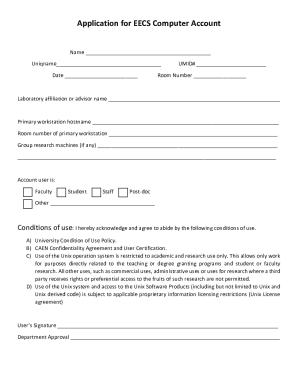
Filling out the Application For EECS Computer Account is a key step for individuals in the Electrical Engineering department seeking access to essential computing resources. This guide will provide clear and supportive instructions to navigate each section of the application effectively.
Follow the steps to complete your application successfully.
- Click ‘Get Form’ button to obtain the form and open it in the editor.
- Fill in your full name in the designated Name field. Ensure that your name matches the official documentation to avoid any verification issues.
- Enter your uniqname in the provided field. This is typically your University of Michigan username and is essential for account identification.
- Record the current date in the Date field, as this helps keep track of your application timeline.
- Input your UMID# in the appropriate section. Your University of Michigan ID number is crucial for logging and processing your application.
- In the Room Number field, indicate where your primary workstation will be located. This information helps in managing resources and ensuring proper support.
- Provide the name of the laboratory or the advisor you are affiliated with in the designated field. This indicates the context of your research or study.
- Enter your primary workstation hostname, which is crucial for system setup and account access.
- Detail the room number of your primary workstation to assist with resource allocation.
- If you have any group research machines, list them in the specified area. This may include any lab equipment you will be using.
- Select your user role by checking the appropriate box for faculty, student, staff, post-doc, or other. This categorization helps in assigning the right privileges.
- Acknowledge your agreement to the conditions of use by reviewing the terms outlined in the application. Ensure you understand the restrictions related to usage.
- Sign the document in the User’s Signature field to confirm your agreement to the conditions laid out.
- Seek departmental approval by having the appropriate person sign in the Department Approval section.
- Once all fields are filled out, review your application for accuracy. You can then save changes, download, print, or share the completed form as required.
Complete your application online today to gain access to essential computing resources.
While becoming a transfer student may pose challenges, it is not impossible with the right approach. Factors such as your academic performance and the competitiveness of the EECS program play a significant role in your application. The Application For EECS Computer Account - Electrical Engineering helps streamline your transition by connecting you with relevant resources and advisors. Stay positive, prepare thoroughly, and present a strong application to improve your chances.
Industry-leading security and compliance
-
In businnes since 199725+ years providing professional legal documents.
-
Accredited businessGuarantees that a business meets BBB accreditation standards in the US and Canada.
-
Secured by BraintreeValidated Level 1 PCI DSS compliant payment gateway that accepts most major credit and debit card brands from across the globe.