Loading
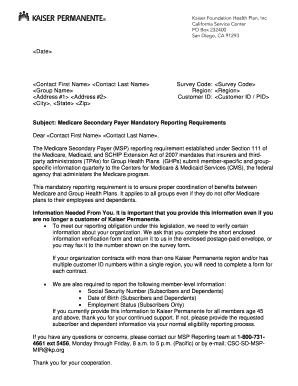
Get Kaiser Permanente Sku 60083503 2011-2026
How it works
-

Open form follow the instructions
-

Easily sign the form with your finger
-

Send filled & signed form or save
How to fill out the Kaiser Permanente SKU 60083503 online
Filling out the Kaiser Permanente SKU 60083503 is a crucial task for ensuring proper compliance with Medicare Secondary Payer reporting requirements. This guide will provide comprehensive instructions to help you accurately complete the form with ease.
Follow the steps to complete the Kaiser Permanente SKU 60083503 effectively.
- Press the ‘Get Form’ button to access the Kaiser Permanente SKU 60083503 form and open it in your chosen platform.
- Begin by entering the date at the top of the form. This should reflect the date you are submitting the information.
- Fill in the contact fields with accurate details: first name, last name, group name, and complete address including city, state, and zip code.
- Provide the survey code, region, and customer ID within the designated fields to ensure proper identification of your organization.
- Review the information needed section and ensure you are getting ready to gather the required data for reporting, including Social Security numbers, dates of birth, and employment statuses.
- Once all sections are filled out, ensure the accuracy of the details before you finalize the document.
- You can now choose to save the changes, download a copy for your records, print the form, or share it via email or fax to the appropriate recipient.
Complete your filing of the Kaiser Permanente SKU 60083503 online today to meet regulatory requirements!
To open a Kaiser account, visit the Kaiser Permanente website and look for the sign-up option. You will need to provide personal details like your member ID and contact information. By creating an account, you gain easy access to manage your services under Kaiser Permanente SKU 60083503.