Loading
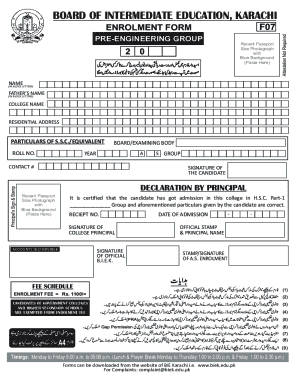
Get Pk Biek F07 2020-2026
How it works
-

Open form follow the instructions
-

Easily sign the form with your finger
-

Send filled & signed form or save
How to fill out the PK BIEK F07 online
Filling out the PK BIEK F07 form online is a simple process that helps you officially enroll in your educational program. Following this guide will ensure that you complete each section correctly, making your application seamless and efficient.
Follow the steps to successfully complete the form online.
- Click ‘Get Form’ button to obtain the form and open it in the editor.
- Begin by entering your name in block letters in the designated field. Make sure to double-check the spelling for accuracy.
- Proceed to input your father’s name in block letters, also ensuring correct spelling.
- Fill in your residential address, which should be clearly stated to reflect your current location.
- Include the name of your college in the specified field.
- Enter your year of study and roll number as required by the form.
- Provide your particulars from the S.S.C. or equivalent board/examining body. Ensure these details match official documents.
- Select your group (Group A, in this case) from the options available.
- Input your contact number clearly without any discrepancies.
- Sign in the section designated for the candidate's signature, confirming the accuracy of the information provided.
- Include the recent passport-size photograph with a blue background by pasting it in the provided area.
- Complete the declaration by the principal section, ensuring that the principal's signature, official stamp, and date of admission are included.
- Finally, review all the information you have entered. Once confirmed, you can save the changes, download the completed form, print it out, or share it accordingly.
Complete your PK BIEK F07 form online today to ensure a smooth enrollment process.
(1) To acquire Migration Certificate for Regular Students attestation of form from the Principal of College concerned is a must. (2) Attachment of Photocopy of Enrolment Card/Registration Card and Admit Card or Marks Sheet is essential.