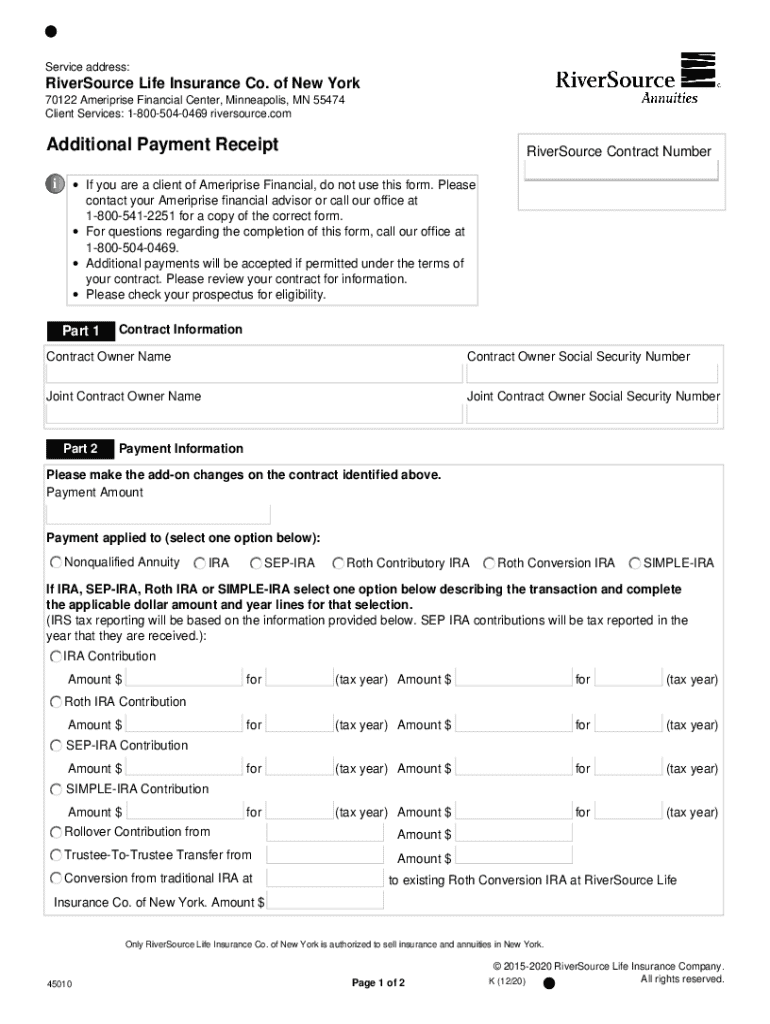
Service address:RiverSource Life Insurance Co. of New York 70122 Ameriprise Financial Center, Minneapolis, MN 55474 Client Services: 18005040469 riversource.comAdditional Payment ReceiptRiverSource.
Loading

Open form follow the instructions

Easily sign the form with your finger

Send filled & signed form or save
How to fill out the RiverSource Life Insurance 45010 online
Filling out the RiverSource Life Insurance 45010 form online can be a straightforward process when approached step by step. This guide aims to provide clear instructions on each section and field within the form to ensure a smooth completion.
Follow the steps to complete the RiverSource Life Insurance 45010 form effectively.
- Press the ‘Get Form’ button to access the RiverSource Life Insurance 45010 form and open it in your chosen digital platform.
- In Part 1, enter your contract information, including the contract owner name and their Social Security number. If there is a joint contract owner, provide their name and Social Security number as well.
- Proceed to Part 2 to fill out the payment information. Specify the payment amount and select the type of account: Nonqualified Annuity, IRA, SEP-IRA, Roth Contributory IRA, Roth Conversion IRA, or SIMPLE-IRA.
- For IRAs or related accounts, indicate the specific transaction type by filling in the appropriate dollar amounts for each relevant tax year. Ensure that the amounts align with IRS reporting requirements as indicated on the form.
- In Part 3, provide details about the agent including the agent bank and the agent's name.
- In Part 4, you can include any remarks or special instructions that may be relevant to the form submission.
- Finally, in Part 5, sign and date the form. Each contract owner must provide their signature along with their Social Security number and the date in the specified format (MMDDYYYY). If there is a joint owner, ensure they also sign and date the form.
- After completing all the sections, save your changes, and you may choose to download, print, or share the form as needed.
Complete your RiverSource Life Insurance 45010 form online today for a seamless experience.
Experience a faster way to fill out and sign forms on the web. Access the most extensive library of templates available.
Related content
Awards include grants, cooperative agreements, and other agreements in the form of money...
Pay periods are three times a quarter. Final checks will be distributed upon receipt of a...
(deficit), and Consolidated Statements of Cash Flows for the fiscal years ended ... as...
Use professional pre-built templates to fill in and sign documents online faster. Get access to thousands of forms.
If you believe that this page should be taken down, please follow our DMCA take down process here.