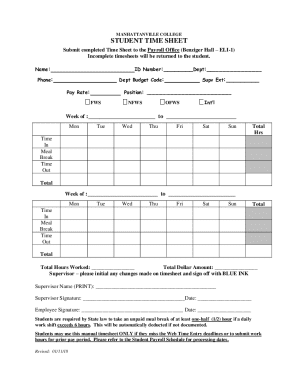
T: Phone: Dept Budget Code: Pay Rate: Position: FWS Supv Ext: NFWS OFWS Int l Week of : to Mon Tue Wed Thu Fri Sat Sun Total Hrs Time In Meal Break Time Out Total Week of : to Mon Tue Wed Thu Fri Sat Sun Total Time In Meal Break Time Out Total Total Hours Worked: Total Dollar Amount: Supervisor.
Open form follow the instructions
Easily sign the form with your finger
Send filled & signed form or save
How to fill out the Manhattanville College Student Time Sheet online
This guide provides a comprehensive overview for users on how to successfully complete the Manhattanville College Student Time Sheet online. Follow the detailed instructions provided to ensure your time sheet is accurately filled out and submitted without any issues.
Follow the steps to complete your time sheet accurately.
- Click the ‘Get Form’ button to access the Manhattanville College Student Time Sheet and open it in your preferred editor.
- Begin by entering your Name and ID Number in the designated fields. Additionally, include your Department and Phone number for identification purposes.
- Next, provide the Department Budget Code and Pay Rate in the corresponding sections.
- Specify your Position by selecting one of the options: FWS (Federal Work Study), NFWS (Non-Federal Work Study), OFWS (Other Federal Work Study), or Int’l (International).
- Input the week of your work by filling in the starting and ending dates.
- Record your daily hours by entering the Time In, Meal Break, and Time Out for each day of the week (Monday to Sunday). The Total Hours for each day should be calculated automatically based on your inputs.
- At the end of the week, total your worked hours in the designated Total Hours Worked field and calculate the Total Dollar Amount based on your pay rate.
- If any changes were made to the timesheet, ensure your Supervisor initials the adjusted entries, and they should also sign off using BLUE INK.
- Lastly, include both your signature and the date in the provided fields. Once everything is complete and verified, proceed to save your changes, download, print, or share the completed form as required.
Complete your Manhattanville College Student Time Sheet online now for accurate tracking of your hours worked.
Experience a faster way to fill out and sign forms on the web. Access the most extensive library of templates available.
Related content
Students will describe interrelationship among life management skills, independence...
complete the Student Employment Action Form (SEAF) leaving no blanks. We ask ... guide is...
Student Workbook. Volume II ... SG STUDENT GUIDE. INTRODUCTION...
Get answers to your most pressing questions about US Legal Forms API.
What happens if I don't submit my timesheet?
ing to legislation, timekeeping remains ultimately the employers' obligation. So, following the FLSA, even when employees have failed to submit their timesheets or keep track of their time, the employer must pay them for hours worked when their paycheck is due.
What should I put on my timesheet?
The employee timesheet should include the following information: Employee's name. Pay period. Date worked. Day worked. Hours worked. Total workweek hours.
What are 3 types of timesheets?
There are different methods that have been used to record timesheets, such as paper, spreadsheet software, and online time-tracking software. Paper-based timesheets have now given way to the digital formats.
How do I fill out a timesheet for work?
How to fill out a timesheet (step-by-step guide) Step 1: Enter the employee's name. ... Step 2: Add the date or date range. ... Step 3: Fill in the project and task details. ... Step 4: Add working hours for each day of the week. ... Step 5: Calculate the total hours. ... Step 6: Add notes if required. ... Step 7: Get approval.
What is standard timesheet?
There are actually three types of timesheets that can be created using the Standard and In/Out formats: Standard. Users enter the duration of time they worked on each task or activity, each day. In/Out. Users enter the time they started and stopped working on each task or activity throughout the day.
What is timesheet with example?
A timesheet is a data table which an employer can use to track the time a particular employee has worked during a certain period. Businesses use timesheets to record time spent on tasks, projects, or clients.
How do you write hours on a timesheet?
When determining the number of hours to record on the timesheet, You must convert the decimal in the total hours to minutes. Example: Recipient has 283 monthly authorized hours – divided by 4, the provider may work a maximum of 70.75 hours per week. This is equal to 70 hours, 45 minutes.
Use professional pre-built templates to fill in and sign documents online faster. Get access to thousands of forms.
If you believe that this page should be taken down, please follow our DMCA take down process here.