Loading
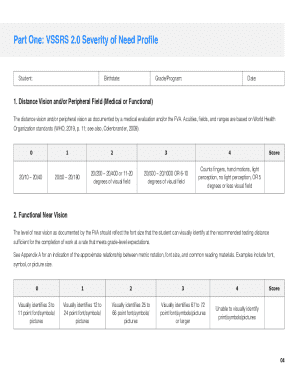
Get Mi Vision Services Severity Rating Scale 2.0 (vssrs 2.0) 2024-2026
How it works
-

Open form follow the instructions
-

Easily sign the form with your finger
-

Send filled & signed form or save
How to fill out the MI Vision Services Severity Rating Scale 2.0 (VSSRS 2.0) online
The MI Vision Services Severity Rating Scale 2.0 (VSSRS 2.0) is a vital tool that aids Teachers of Students with Visual Impairment in assessing service needs for students who are blind or visually impaired. This guide will provide you with clear, step-by-step instructions to effectively complete the VSSRS 2.0 online.
Follow the steps to complete the VSSRS 2.0 online
- Press the ‘Get Form’ button to acquire the document and open it in your preferred editor.
- Review the introduction and the purpose of the VSSRS 2.0 to understand its application and significance in assessing service time for students who are visually impaired.
- Prior to filling out the form, gather the necessary documents, including an eye report, Functional Vision Assessment (FVA), Learning Media Assessment (LMA), and an Expanded Core Curriculum Needs Assessment. Ensure all relevant data is available to facilitate accurate scoring.
- Begin with Part One: Severity of Need Profile. For each category listed, analyze the results from the gathered assessments. Read the descriptors carefully and select the one that most accurately reflects the student's needs, inputting the appropriate severity score in the designated column.
- Once Part One is completed, review Part Two: Additional Considerations to Support Student Success. Document the estimated time needed for non-instructional services such as material preparation, communication, and training school personnel.
- Proceed to Part Three: Calculating Suggested Service Time. Refer to the Severity of Need Summary tables to determine the appropriate frequency of services based on the severity of need score. Calculate and document the suggested service delivery time.
- After completing all parts of the VSSRS 2.0, review the entire form for accuracy. You can then save your changes, download a copy of the document, print it, or share it with relevant team members involved in the IEP or IFSP process.
Complete your VSSRS 2.0 online today to ensure effective service delivery for students in need.
Severity rating refers to the impact to the host of the network traffic detected by a Trend Micro pattern called Network Content Inspection Pattern. The rating has the following levels: High - The host exhibits behavior that definitely indicates it is compromised.