Loading
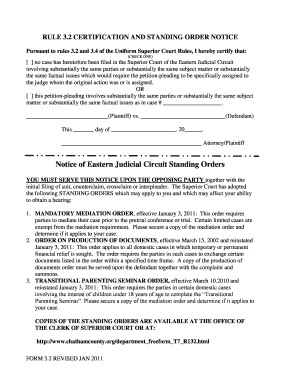
Get Ga Form 3.2 - Chatham County 2011-2026
How it works
-

Open form follow the instructions
-

Easily sign the form with your finger
-

Send filled & signed form or save
How to fill out the GA Form 3.2 - Chatham County online
Filling out the GA Form 3.2 - Chatham County online is a straightforward process designed to ensure clarity and accuracy in your submission. This guide provides essential instructions to help you navigate each component of the form effectively.
Follow the steps to successfully complete the GA Form 3.2 online.
- Click the ‘Get Form’ button to access the document and open it in your preferred editing tool.
- Begin by selecting the appropriate certification option. You can indicate whether no similar case has been filed or provide the details of a related case by filling in the case number and the names of the plaintiff and defendant.
- Enter the date of completion in the designated space provided on the form.
- At the bottom of the form, sign your name as the attorney or plaintiff to certify your filing.
- Review all the fields to ensure that all necessary information has been completed accurately.
- Once you have filled out the form, save your changes. You may also download, print, or share the completed document as needed.
Complete your documents online today to streamline your filing process.
Related links form
Chatham County is located in the Eastern Judicial Circuit of Georgia. This circuit includes several counties, and it handles all types of cases, including family law, civil, and criminal matters. For specific cases concerning GA Form 3.2 - Chatham County, you will want to engage with the resources available in this circuit to ensure you follow the proper legal procedures.