Loading
Get Academic Actions
How it works
-

Open form follow the instructions
-

Easily sign the form with your finger
-

Send filled & signed form or save
How to fill out the ACADEMIC ACTIONS online
This guide provides a comprehensive overview of how to fill out the ACADEMIC ACTIONS form online. You will find step-by-step instructions designed to assist you in completing each section accurately and efficiently.
Follow the steps to successfully complete the ACADEMIC ACTIONS form.
- Click ‘Get Form’ button to obtain the ACADEMIC ACTIONS form and open it in the editor.
- Start by entering the employee's Last Day on Pay. This date indicates when the employee will last receive compensation, formatted as MMDDYY.
- Next, input the Separation Date, which is usually the same as the Last Day on Pay, also in MMDDYY format.
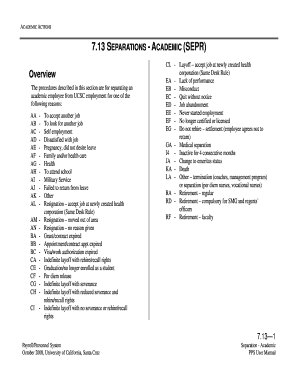
- Select the Reason Code for the separation from the provided list, or press F1 Help to see valid codes specific to reasons for separation.
- Indicate the Destination Code, which shows the employee's next place of employment. Use F1 Help to identify valid options.
- For employees moving to another institution, enter the Future Institution Code, or refer to F1 Help for valid codes.
- Proceed to the EAPP function to end all relevant appointments and set the effective end date for them as MMDDYY.
- Move to the ELVE function if applicable, ensuring that leave records reflect the correct begin and return dates.
- Then, in the EADD function, update the employee's address only if a change is indicated. Ensure all fields are filled in accurately.
- Finally, access the EPD1 function to review all entered data for accuracy. Be sure there are no consistency errors before moving to the update.
- Once all steps are completed and verified, you can save changes, download a copy, print, or share the form as needed.
Take action now and complete the ACADEMIC ACTIONS online for a smooth separation process.
Academic suspension typically results from continued poor performance after being placed on academic probation. If you fail to meet the terms outlined in academic actions, the institution may decide to suspend you. Staying informed about your academic standing and seeking help can help you avoid this serious outcome.
Industry-leading security and compliance
US Legal Forms protects your data by complying with industry-specific security standards.
-
In businnes since 199725+ years providing professional legal documents.
-
Accredited businessGuarantees that a business meets BBB accreditation standards in the US and Canada.
-
Secured by BraintreeValidated Level 1 PCI DSS compliant payment gateway that accepts most major credit and debit card brands from across the globe.