Get Courtesy Appointment Form And Procedures - Office Of The Provost ...
How it works
-

Open form follow the instructions
-

Easily sign the form with your finger
-

Send filled & signed form or save
How to fill out the Courtesy Appointment Form and Procedures - Office of the Provost online
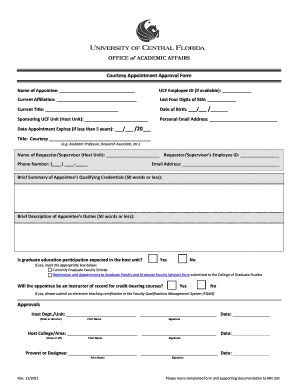
Filling out the Courtesy Appointment Form and Procedures is an essential step for individuals seeking courtesy appointments at the university. This guide provides a clear and detailed approach for users to complete the form online, ensuring a smooth and efficient application process.
Follow the steps to successfully complete the courtesy appointment form online.
- Click ‘Get Form’ button to obtain the form and open it in the editing interface.
- Begin by filling out the 'Name of Appointee' field, providing the full name of the individual seeking the appointment.
- If applicable, enter the UCF Employee ID in the designated field. This is helpful for tracking purposes.
- Fill in the 'Current Affiliation' of the appointee, which could include their organization or professional status.
- Provide the last four digits of the appointee's Social Security Number in the appropriate field.
- Complete the 'Current Title' section with the individual’s current job title.
- Input the appointee's date of birth in the format specified (MM/DD/YYYY) to ensure accurate identification.
- Indicate the 'Sponsoring UCF Unit' where the appointment will be held.
- Enter a personal email address for the appointee to facilitate communication.
- Specify the 'Date Appointment Expires' if it is less than five years; otherwise, leave this blank.
- Specify the appointee's title using the 'Title: Courtesy' field, giving context such as 'Courtesy Clinical Associate Professor'.
- Fill out the 'Name of Requestor/Supervisor' along with their Employee ID to ensure proper authorization.
- Provide the requestor/supervisor's phone number and email address for additional contact points.
- Summarize the appointee’s qualifying credentials in 50 words or less in the appropriate text box.
- Describe the appointee’s duties in 50 words or less in the related field, ensuring clarity on their responsibilities.
- Indicate whether participation in graduate education is expected by selecting 'Yes' or 'No', and if 'Yes', specify further details.
- State whether the appointee will be serving as an instructor of record for credit-bearing courses, followed by submitting an electronic teaching certification if applicable.
- Seek necessary approvals by having the department chair/director, college area dean or VP, and the provost or designee sign and date the form in the designated sections.
- Finally, route the completed form and all required supporting documentation to MH 331. Users can save changes, download, print, or share the form as required.
Take the first step towards completing your courtesy appointment by filling out the form online today.
Related links form
Courtesy appointments refer to positions granted to faculty members who may not be officially employed by a department but contribute significantly to its mission. These appointments enable collaboration and allow for sharing of resources and expertise. They are often formalized through the Courtesy Appointment Form and Procedures - Office Of The Provost. This process ensures that all necessary details are documented and communicated effectively.
Industry-leading security and compliance
-
In businnes since 199725+ years providing professional legal documents.
-
Accredited businessGuarantees that a business meets BBB accreditation standards in the US and Canada.
-
Secured by BraintreeValidated Level 1 PCI DSS compliant payment gateway that accepts most major credit and debit card brands from across the globe.