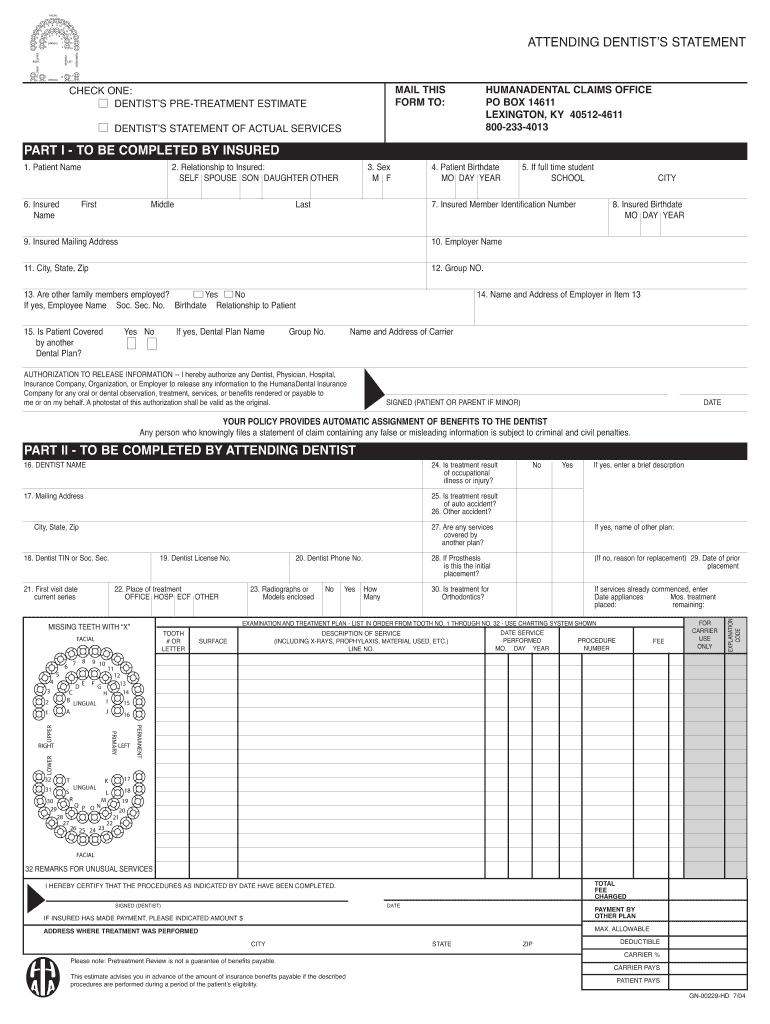
MENT OF ACTUAL SERVICES PART I - TO BE COMPLETED BY INSURED 1. Patient Name 6. Insured Name 2. Relationship to Insured: SELF SPOUSE SON DAUGHTER OTHER First Middle 3. Sex M F Last 4. Patient Birthdate MO DAY YEAR 5. If full time student SCHOOL 7. Insured Member Identification Number 9. Insured Mailing Address 8. Insured Birthdate MO DAY YEAR 10. Employer Name 11. City, State, Zip CITY 12. Group NO. 13. Are other family members employed? Yes No If yes, Employee Name Soc. Sec. No.

Open form follow the instructions

Easily sign the form with your finger

Send filled & signed form or save
How to fill out the Humana GN-00229-HD online
This guide provides a clear, step-by-step approach to filling out the Humana GN-00229-HD form online, ensuring you have all the necessary information at hand. By following these instructions, you can accurately complete the form to facilitate your dental claims process.
Follow the steps to successfully fill out the Humana GN-00229-HD online.
- Click the ‘Get Form’ button to obtain the Humana GN-00229-HD document and open it for editing.
- In Part I, begin by entering the patient's name in the designated field. Make sure to include their first, middle, and last name.
- Indicate the relationship to the insured person by selecting one of the options provided: self, spouse, child, or other.
- Select the patient's sex by marking the appropriate box for M (male) or F (female).
- Enter the patient's birthdate in the format required (month, day, year).
- If the patient is a full-time student, provide the name of the school they attend.
- Fill in the insured member's identification number.
- Provide the insured person's mailing address including street address, city, state, and zip code.
- Enter the insured person's birthdate in the specified format.
- Provide the name of the insured person's employer.
- Include the city, state, and zip code for the employer's address.
- Write down the group number associated with the insurance plan.
- Respond to whether any other family members are employed and, if so, provide their name, social security number, birthdate, and relationship to the patient.
- Indicate if the patient is covered by another dental plan and provide the name of that plan if applicable.
- Authorize the release of information by signing and dating the form as the patient or parent if the patient is a minor.
- In Part II, the attending dentist should fill in their name and mailing address.
- Provide the dentist's TIN or social security number, and their license number.
- Enter the date of the first visit in the current treatment series.
- Select the place of treatment by marking the appropriate option: office, hospital, other.
- Indicate any missing teeth by marking the corresponding tooth number or letter.
- If applicable, answer whether the prosthesis is an initial placement and provide additional details if necessary.
- List the examination and treatment plan in order, entering each service description and associated fees.
- Certify the completion of procedures by signing and dating at the bottom of Part II.
- Review the completed form for accuracy, and then you can save changes or download the form for printing or sharing.
Complete your dental claims quickly and efficiently by filling out the Humana GN-00229-HD online today.
Experience a faster way to fill out and sign forms on the web. Access the most extensive library of templates available.
Related content
by DAI FUKUMURA · 2008 · Cited by 232 — Intravital microscopy has provided...
by A Anadon Rosell · 2017 — dels canvis en els ecosistemes, que és l'activitat humana...
Get answers to your most pressing questions about US Legal Forms API.
How do I submit for reimbursement to Humana?
To submit for reimbursement to Humana, first gather all relevant receipts and documentation related to your dental expenses. Next, fill out the appropriate claims form, which you can find on the Humana website or through your member account. After completing the form, send it along with your receipts to Humana via email or postal mail. This process allows you to recover eligible expenses effectively.
How do I submit a power of attorney form to Humana?
You can submit a power of attorney form to Humana by mailing it to their designated address or through their online portal for members. Once you have the completed form, ensure it's signed and dated appropriately. If you need assistance, contacting Humana’s customer service can make the process smoother. Utilize these resources to set up your power of attorney efficiently.
What is the deductible for Humana dental insurance?
The deductible for Humana dental insurance under the plan Humana GN-00229-HD typically varies based on the specific policy details. Generally, deductibles may range from $50 to $200 for individuals. It is essential to review your plan documents for accurate figures. Understanding your deductible helps you manage costs effectively.
Why is Humana changing to CenterWell?
The change to CenterWell represents Humana's commitment to a comprehensive healthcare approach paired with strong community engagement. This new branding signifies a focus on holistic health solutions, fostering better relationships within healthcare. As you consider your options, including Humana GN-00229-HD, this transition indicates a stronger emphasis on patient-centered care.
Why is Humana changing the name?
Humana is changing its name to create a more unified brand that reflects its vision and values. This change aims to enhance customer experience and clarity around its offerings. As you explore products like Humana GN-00229-HD, you will notice this unified approach translates into improved services and support.
Is Humana Gold Plus a PPO or HMO?
Humana Gold Plus is primarily offered as an HMO plan, focusing on providing integrated health services through a network of doctors and hospitals. This structure often results in lower out-of-pocket costs for members who follow the plan's network guidelines. If you're evaluating options, consider how Humana GN-00229-HD fits within this HMO framework to meet your healthcare needs.
Who bought out Humana insurance?
Humana was acquired by a larger healthcare organization that sought to strengthen its position in the insurance market. This acquisition enabled Humana to expand its benefits and services further. If you are exploring options like Humana GN-00229-HD, you can trust that this backing enhances the value and reliability of their offerings.
What type of insurance is Humana considered?
Humana primarily offers health insurance products, including Medicare Advantage plans, individual health plans, and employer-sponsored plans. This variety allows individuals and families to find suitable coverage depending on their needs. Humana GN-00229-HD is a product that fits within this framework, designed to provide comprehensive healthcare solutions.
Why is Humana changing its name?
Humana is evolving its brand to better reflect its focus on health and well-being. The new name aligns with its mission of delivering tailored healthcare solutions. You might find that this change enhances recognition of Humana's services, including Humana GN-00229-HD, making it easier for consumers to identify their offerings.
Does Humana Gold Plus require a referral to see a specialist?
Under most circumstances, the Humana Gold Plus plan associated with Humana GN-00229-HD does require a referral to see a specialist. This policy ensures that your primary care provider coordinates your care effectively. However, certain circumstances may allow for direct access, so it’s wise to check your plan details.
Use professional pre-built templates to fill in and sign documents online faster. Get access to thousands of forms.
If you believe that this page should be taken down, please follow our DMCA take down process here.
This form is available in several versions. Select the version you need from the drop-down list below.