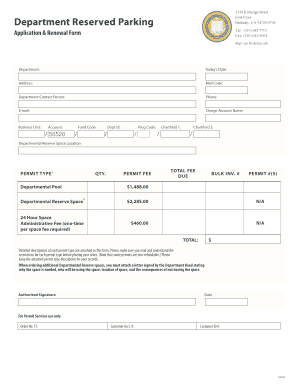
Get Departmental Reserved Parking - Live Parking Pantheon Berkeley
How it works
-

Open form follow the instructions
-

Easily sign the form with your finger
-

Send filled & signed form or save
Tips on how to fill out, edit and sign Departmental Reserved Parking - Live Parking Pantheon Berkeley online
How to fill out and sign Departmental Reserved Parking - Live Parking Pantheon Berkeley online?
Get your online template and fill it in using progressive features. Enjoy smart fillable fields and interactivity.Follow the simple instructions below:
The days of frightening complex tax and legal documents have ended. With US Legal Forms submitting official documents is anxiety-free. The leading editor is right close at hand giving you various advantageous tools for submitting a Departmental Reserved Parking - Live Parking Pantheon Berkeley. These tips, together with the editor will help you through the entire procedure.
- Click on the Get Form option to begin enhancing.
- Switch on the Wizard mode in the top toolbar to obtain extra suggestions.
- Fill every fillable area.
- Be sure the data you fill in Departmental Reserved Parking - Live Parking Pantheon Berkeley is updated and accurate.
- Include the date to the record with the Date function.
- Select the Sign button and create an electronic signature. There are three available choices; typing, drawing, or uploading one.
- Make sure that each area has been filled in correctly.
- Select Done in the top right corne to export the record. There are several options for getting the doc. An attachment in an email or through the mail as a hard copy, as an instant download.
We make completing any Departmental Reserved Parking - Live Parking Pantheon Berkeley less difficult. Use it now!
How to edit Departmental Reserved Parking - Live Parking Pantheon Berkeley: customize forms online
Put the right document management capabilities at your fingertips. Complete Departmental Reserved Parking - Live Parking Pantheon Berkeley with our reliable tool that combines editing and eSignature functionality}.
If you want to execute and certify Departmental Reserved Parking - Live Parking Pantheon Berkeley online without hassle, then our online cloud-based option is the ideal solution. We offer a rich template-based catalog of ready-to-use forms you can edit and complete online. Moreover, you don't need to print out the form or use third-party options to make it fillable. All the necessary tools will be available for your use as soon as you open the document in the editor.
Let’s examine our online editing capabilities and their key features. The editor has a self-explanatory interface, so it won't require a lot of time to learn how to utilize it. We’ll check out three main parts that allow you to:
- Edit and annotate the template
- Organize your documents
- Prepare them for sharing
The top toolbar has the tools that help you highlight and blackout text, without graphics and visual elements (lines, arrows and checkmarks etc.), sign, initialize, date the document, and more.
Use the toolbar on the left if you would like to re-order the document or/and delete pages.
If you want to make the template fillable for other people and share it, you can use the tools on the right and add various fillable fields, signature and date, text box, etc.).
Aside from the capabilities mentioned above, you can safeguard your document with a password, add a watermark, convert the file to the necessary format, and much more.
Our editor makes completing and certifying the Departmental Reserved Parking - Live Parking Pantheon Berkeley a breeze. It enables you to make just about everything concerning working with documents. Moreover, we always make sure that your experience modifying documents is secure and compliant with the major regulatory standards. All these factors make using our tool even more pleasant.
Get Departmental Reserved Parking - Live Parking Pantheon Berkeley, make the necessary edits and tweaks, and get it in the desired file format. Try it out today!
If you encounter illegal parking in Berkeley, you should report it to the city's parking enforcement department. You can either call them or use their online reporting system for convenience. Be sure to provide details such as the vehicle's license plate number and the location of the violation. Keeping Berkeley's streets clear and safe benefits everyone, and utilizing resources like the Departmental Reserved Parking - Live Parking Pantheon Berkeley can mitigate these issues.
Industry-leading security and compliance
-
In businnes since 199725+ years providing professional legal documents.
-
Accredited businessGuarantees that a business meets BBB accreditation standards in the US and Canada.
-
Secured by BraintreeValidated Level 1 PCI DSS compliant payment gateway that accepts most major credit and debit card brands from across the globe.