Loading
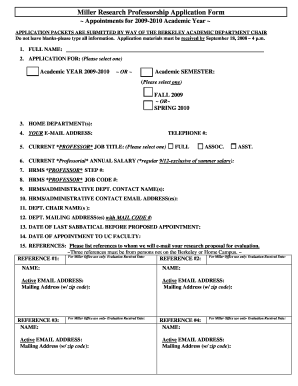
Get Mp Ay 09-10 Applic Form 2008.doc
How it works
-

Open form follow the instructions
-

Easily sign the form with your finger
-

Send filled & signed form or save
How to fill out the MP AY 09-10 Applic Form 2008.doc online
Filling out the MP AY 09-10 Applic Form 2008.doc online can be a straightforward process when you follow the correct steps. This guide will walk you through each section and field of the form, ensuring that you provide all necessary information clearly and accurately.
Follow the steps to successfully complete your application form online.
- Click ‘Get Form’ button to obtain the form and open it in the editor.
- Begin by filling in your full name in the designated field. Ensure that you provide your legal name as it appears on official documents.
- Under 'Application for,' select the academic year (2009-2010) and indicate whether your application is for the fall semester or spring semester.
- Fill in your home department(s) in the appropriate field to specify where you are currently employed.
- Provide your email address and telephone number clearly, ensuring that you can be easily contacted regarding your application.
- Select your current professor job title from the options provided: Full, Associate, or Assistant Professor.
- Enter your current professorial annual salary, excluding summer salary, in the designated field.
- Fill in your HRMS Professor Step number and Job Code number as these are essential identifiers.
- List the name(s) of your HRMS or administrative department contact(s) to facilitate communication.
- Provide the email address(es) for your administrative contacts to ensure all details are received and handled properly.
- Indicate the name(s) of your department chair(s) in the specified section.
- Complete the mailing address(es) of your department, including the mail code to assist in correspondence.
- State the date of your last sabbatical before the proposed appointment to highlight your academic journey.
- Fill in the date when you were appointed to the faculty at UC to establish your tenure.
- List three references who can evaluate your research proposal. Ensure none are from the Berkeley or Home Campus, and provide their active email addresses and mailing addresses.
- Once you have filled in all sections, review the form for completeness and accuracy.
- After confirming that all information is correct, save your changes and download, print, or share the form as required.
Start completing your documents online today to ensure all information is submitted before the deadline.
Industry-leading security and compliance
US Legal Forms protects your data by complying with industry-specific security standards.
-
In businnes since 199725+ years providing professional legal documents.
-
Accredited businessGuarantees that a business meets BBB accreditation standards in the US and Canada.
-
Secured by BraintreeValidated Level 1 PCI DSS compliant payment gateway that accepts most major credit and debit card brands from across the globe.