Loading
Get Pa Live Well Chiropractic Form I 2016-2026
How it works
-

Open form follow the instructions
-

Easily sign the form with your finger
-

Send filled & signed form or save
How to fill out the PA Live Well Chiropractic Form I online
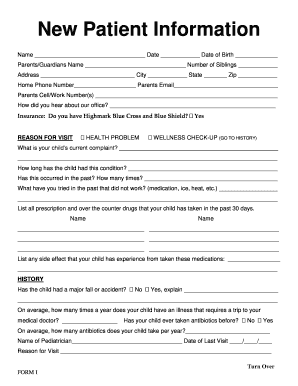
Filling out the PA Live Well Chiropractic Form I online is an important step in accessing chiropractic care for your child. This guide will provide you with a clear, step-by-step approach to ensure you complete the form accurately and efficiently.
Follow the steps to fill out the form correctly
- Press the ‘Get Form’ button to obtain the form and open it in the editing tool.
- Begin by entering your child's name and the current date in the designated fields. Ensure the date of birth is filled out accurately.
- Input the name of the parent or guardian along with the number of siblings in the appropriate sections.
- Fill out your home address, including city, state, and zip code.
- Provide the home phone number and the parent's contact email and cell/work number(s).
- Indicate how you heard about the chiropractic office in the specified field.
- In the 'Reason for Visit' section, select whether it's for a health problem or a wellness check-up, and then describe your child's current complaint.
- Document how long the child has had this condition and note any past occurrences along with details of previous attempts at treatment that did not work.
- List out all prescription and over-the-counter medications taken by the child in the past 30 days in the provided fields.
- Specify any side effects experienced from these medications.
- Complete the 'History' section by noting any major falls or accidents the child has had, along with the average number of illnesses that require a visit to the medical doctor each year.
- Include information regarding the child's pediatrician, date of last visit, and the reason for that visit.
- Mark any relevant conditions the child currently has or has had in the past from the provided list.
- If applicable, fill out the birthing history section, including difficulties during pregnancy, type of birth, and any problems with labor or birth.
- Indicate whether the child was breastfed or formula-fed and for how long.
- List any food or juice allergies or intolerances the child may have.
- Choose and answer one of the security questions for accessing health records online.
- Input the child's height, weight, blood pressure, and pulse into the respective fields.
- Carefully review the TERMS OF ACCEPTANCE regarding chiropractic care and understanding the practice's objective.
- Sign and date the form to provide authorization for chiropractic care and the release of health information.
- Once all sections are complete, save your changes, download a copy, or print the form for your records.
Complete the PA Live Well Chiropractic Form I online today to ensure your child receives the best care possible.