Loading
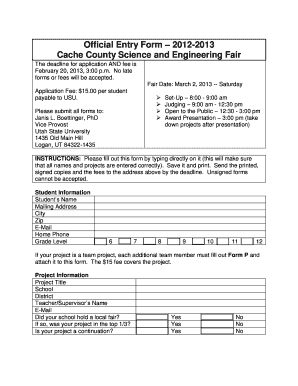
Get Registration Form(6-12) - Computer Science Department - Utah ...
How it works
-

Open form follow the instructions
-

Easily sign the form with your finger
-

Send filled & signed form or save
How to fill out the Registration Form(6-12) - Computer Science Department - Utah ... online
Filling out the Registration Form(6-12) for the Computer Science Department at Utah is a straightforward process that ensures your application is complete and submitted on time. This guide provides a step-by-step approach to help you successfully complete the form online.
Follow the steps to efficiently complete your registration form.
- Press the ‘Get Form’ button to acquire the Registration Form(6-12) for the Computer Science Department. This will allow you to access the form in a suitable application for completion.
- Begin by entering the student's personal information in the designated fields, including their name, mailing address, city, zip code, email, home phone number, and grade level. Ensure accuracy in spelling and details.
- If applicable, indicate if the project is a team project. Each additional team member will need to fill out an accompanying form. Note that the application fee covers each project.
- Fill out the project information section, including the project title, school, district, and the name and email of the teacher or supervisor. Confirm whether the project was part of a local fair and whether it was among the top third.
- Select the appropriate category for your project by checking one option from the provided list. Be mindful of category descriptions available on the Cache County Science and Engineering Fair website.
- Complete the Scientific Review Checklist by providing accurate answers regarding human subjects, vertebrates, hazardous materials, and more. Ensure that all such aspects were approved before the experiment began.
- Review the display and safety rules, and indicate if your display will require electricity or if your project will be too large for a table. Make sure to adhere to the specified size limits.
- Sign the form, along with a parent or guardian, to confirm agreement with the entry rules. Make sure all signatures are collected before submission.
- After completing all sections, save the document securely. Print the form, collect the necessary application fee, and prepare to send it to the designated address provided.
- Finally, either share the form electronically or send the printed copy to ensure it is postmarked by the deadline. Remember that unsigned forms are not accepted.
Start filling out the Registration Form(6-12) online today to ensure your timely participation!
Industry-leading security and compliance
US Legal Forms protects your data by complying with industry-specific security standards.
-
In businnes since 199725+ years providing professional legal documents.
-
Accredited businessGuarantees that a business meets BBB accreditation standards in the US and Canada.
-
Secured by BraintreeValidated Level 1 PCI DSS compliant payment gateway that accepts most major credit and debit card brands from across the globe.