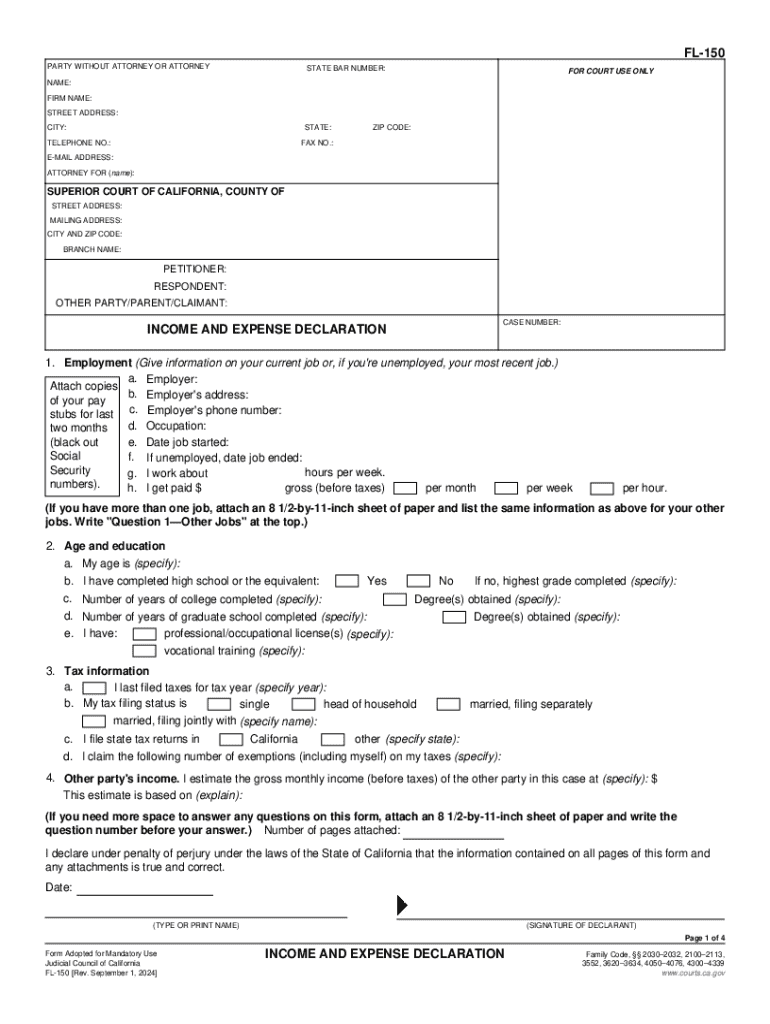
Me): SUPERIOR COURT OF CALIFORNIA, COUNTY OF STREET ADDRESS: MAILING ADDRESS: CITY AND ZIP CODE: BRANCH NAME: PETITIONER: RESPONDENT: OTHER PARTY/PARENT/CLAIMANT: CASE NUMBER: INCOME AND EXPENSE DECLARATION 1. Employment (Give information on your current job or, if you're unemployed, your most recent job.) a. Employer: Attach copies b. Employer's address: of your pay stubs for last c. Employer's phone number: d. Occupation: two months e. Date job started: (black out Social f. If unemployed,.
Loading

Open form follow the instructions

Easily sign the form with your finger

Send filled & signed form or save
How to fill out the CA FL-150 online
The CA FL-150 is a critical document used in California courts for declaring income and expenses during legal proceedings. This guide will walk you through each section of the form to ensure accurate completion, helping you navigate the process with confidence.
Follow the steps to successfully complete the CA FL-150 online.
- Click 'Get Form' button to obtain the form and open it in your interface.
- Identify if you are filing as a party without an attorney or with an attorney. Fill in your name, attorney's details, and contact information as required.
- Provide court information. Input the name of the court, case number, and specify the role (Petitioner, Respondent, or other). Ensure all fields are accurately filled.
- The first section pertains to employment. Include details about your current job or most recent job, such as employer name, address, phone number, occupation, and employment dates.
- Complete the age and education section by providing your age, education level, and any degrees or licenses you have earned.
- Fill out your tax information, including the last tax year filed, tax status, and number of exemptions claimed.
- Estimate the gross monthly income of the other party involved, providing any necessary explanations for your estimates.
- Break down your income sources into categories such as salary, spousal support, unemployment, etc. List monthly amounts accurately.
- Detail your expenditures, including housing, healthcare, childcare, and any additional expenses, ensuring clarity in amounts and categories.
- Document any installment payments and debts in the appropriate section, along with attorney fees if applicable.
- If your case involves child support, fill out the related section by providing details about the children and any associated costs.
- Review all information for accuracy before finalizing your form. Make any necessary corrections.
- After completing the form, take action to save your changes, download, print, or share the completed CA FL-150 as needed.
Start filling out the CA FL-150 online to manage your case effectively.
Experience a faster way to fill out and sign forms on the web. Access the most extensive library of templates available.
Related content
Sep 1, 2024 — a. Employer: b. Employer's address: c. Employer's phone number: d...
Jan 1, 2016 — (Judicial Council Form FL-150.) Page 154. Local Rules of Court. San...
This request is based on a. the attached completed Financial Statement (Simplified) (form...
Get answers to your most pressing questions about US Legal Forms API.
How to fill out California DE4 form?
To fill out the California DE4 form, start by entering your personal details, including your name and employer information. Specify your withholding allowances based on your individual tax situation, ensuring you refer to the provided guidelines for accuracy. It's important to double-check all information for correctness. Once completed, submit the form to your employer to adjust your withholding status.
How much do Live Scan operators make in California?
Live Scan operators in California earn varying salaries, depending on their experience and location. On average, operators can make between $40,000 to $60,000 annually. In some cases, those with specialized training or certifications can earn a higher salary. If you're considering this career path, it's beneficial to research current salary trends and job prospects in your area.
What shows up on a Live Scan background check in California?
A Live Scan background check in California reveals various criminal history details, including arrests, convictions, and any pending charges. This check also shows whether you have a state or federal conviction. Employers or licensing boards typically use this information to evaluate individuals for employment or licensing purposes. Make sure to understand what may appear on your Live Scan report, as this can affect your eligibility for certain positions or licenses.
How to fill out form FL 150 in California?
To fill out form FL 150 in California effectively, start by entering your personal information in the provided fields. Include details such as your income, expenses, and any other relevant financial information. Review the form thoroughly to ensure all sections are completed accurately. This form is crucial for financial disclosures in family law cases, so take your time and consider seeking assistance if needed.
How to fill out CA Live Scan form?
Filling out the CA Live Scan form requires attention to detail. Begin by entering your personal details, such as your full name, date of birth, and any aliases. Next, indicate the purpose of the background check, which may relate to employment or licensing. Finally, ensure all information is accurate before submitting it to the Live Scan operator, who will collect your fingerprints and forward them for processing.
How to fill out a fingerprint card in California?
To fill out a fingerprint card in California, start by obtaining the card from a local law enforcement agency or online. Write your personal information clearly in the designated sections, including your name, date of birth, and address. Ensure your fingerprints are clear; you can ask for help from a trained professional if needed. Additionally, if you're submitting the card for a specific legal purpose, make sure to include any required codes in the relevant sections.
Do I have to fill out an Income and Expense Declaration?
Yes, filling out an Income and Expense Declaration, typically using form FL-150, is necessary if the court requires financial disclosures for family law proceedings. This form is crucial for determining child support, spousal support, or attorney fees. Accurate reporting ensures fair outcomes in your case. Utilizing US Legal Forms can help you understand what to include and how to present your information clearly.
How do I file a California corporate disclosure statement?
You can file a California corporate disclosure statement by completing the necessary form and submitting it to the Secretary of State, either online or by mail. Be sure to meet the filing deadlines to avoid penalties. Thoroughly checking your submission for completeness can save you from delays. Platforms like US Legal Forms offer assistance and information that can guide you through this procedure.
How to file form SI 100 in California?
Filing form SI 100 in California requires you to complete the form and submit it to the Secretary of State. You can do this via mail or online through their official portal. Ensure that all the necessary details about your corporation are accurately listed. US Legal Forms offers templates and guidance to help make filing easier.
Can you file CA statement of information online?
Absolutely, you can file the CA statement of information online through the California Secretary of State’s website. This option saves you time and allows for quicker processing. It's a convenient way to ensure that your business remains compliant with state requirements. Consider using US Legal Forms for guidance and to simplify this process.
Use professional pre-built templates to fill in and sign documents online faster. Get access to thousands of forms.
If you believe that this page should be taken down, please follow our DMCA take down process here.