We use cookies to improve security, personalize the user experience, enhance our marketing activities (including cooperating with our marketing partners) and for other business use.
Click "here" to read our Cookie Policy. By clicking "Accept" you agree to the use of cookies. Read less
Read more
Accept
Loading
Form preview
  • US Legal Forms
  • Form Library
  • More Forms
  • More Multi-State Forms
  • Ach From - Student Business Services - Texas A&m University

Get Ach From - Student Business Services - Texas A&m University

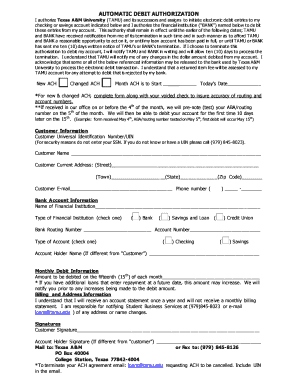
The financial institution ( BANK ) named below to de bit these entries from my account. This authority shall remain in effect until the earlier of the following dates; TAMU and BANK have received notification from me of its termination in such time and in such manner as to afford TAMU and BANK a reasonable opportunity to act on it, or until my loan account has been paid in full, or until TAMU or BANK has sent me ten (10) days written notice of TAMU s or BANK s termination. If I choose to.

How it works

  1. Open form

    Open form follow the instructions

  2. Easily sign form

    Easily sign the form with your finger

  3. Share form

    Send filled & signed form or save

How to fill out the ACH form - Student Business Services - Texas A&M University online

Filling out the ACH form for Student Business Services at Texas A&M University is an important process for managing automatic debits from your bank account. This guide will walk you through each section of the form to ensure you fill it out correctly and submit it successfully.

Follow the steps to accurately complete the ACH form.

  1. Press the ‘Get Form’ button to obtain the form and open it in the document management system.
  2. Indicate whether you are setting up a new ACH or changing an existing ACH by selecting New ACH or Changed ACH. Provide the month when the ACH is to start and today’s date.
  3. Fill in your Customer Universal Identification Number (UIN). Do not enter your Social Security Number. If you do not have a UIN, contact the provided number for assistance.
  4. Complete the customer information section by entering your name, current address (street, town, state, zip code), email address, and phone number.
  5. In the bank account information section, provide the name of your financial institution. Specify the type of institution (Bank, Savings and Loan, or Credit Union) by checking the appropriate box.
  6. Enter your bank routing number and account number. Specify the type of account (Checking or Savings) by checking the correct box.
  7. If the account holder's name is different from yours, provide that information in the designated section.
  8. In the monthly debit information section, state the amount to be debited on the fifteenth of each month. Be aware that this amount may change if you have additional loans that enter repayment in the future.
  9. Read the billing and address information carefully. Note that you will receive an account statement once a year and are responsible for updating any changes in your address or name.
  10. Sign the form in the customer signature section. If applicable, the account holder must also provide their signature if different from the customer.
  11. Mail the completed form to Texas A&M at the address provided or fax it to the specified number. Ensure you have saved any changes made to the form before submitting.

Complete your ACH form online today to ensure timely processing of your payments.

Get form

Experience a faster way to fill out and sign forms on the web. Access the most extensive library of templates available.
Get form

Related content

Proposal for ACH Origination Services
Aug 18, 2020 — This incentive is in exchange for a five-year service agreement, with the...
Learn more
ACH Form - Texas A&M Student Business Services
AUTOMATIC DEBIT AUTHORIZATION. I authorize Texas A&M University (TAMU) and its successors...
Learn more
2017 Publication 3
Feb 20, 2018 — Generally, you must file Form 2106, Employee Business. Expenses, or Form...
Learn more

Related links form

FL CG-10R 2017 MA Calvary Christian Church Benevolence Request Form 2016 MI Lawrence Technological University Popcorn Machine Rental 2010 NC Marriage Officiant & Couples Contract 2011

Questions & Answers

Get answers to your most pressing questions about US Legal Forms API.

Contact support

To accept your admission to Texas A&M University, you must log in to your applicant portal. Once logged in, follow the prompts to confirm your enrollment and submit any required deposit. This is an important step in your educational journey, including the ACH From - Student Business Services - Texas A&M University, which helps you manage any financial commitments effectively.

To make a payment to Texas A&M University, you can visit the Student Business Services website to access the payment portal. Here, you have multiple options, including credit card and ACH payments, that streamline your transaction process. Using the ACH From - Student Business Services - Texas A&M University ensures secure and efficient payments, allowing you to focus on your studies.

ACH enrollment allows students to authorize transactions directly from their bank accounts. For those using the ACH From service at Student Business Services - Texas A&M University, this process helps streamline payments for tuition, fees, and other services. It enhances the convenience of managing your financial obligations while attending the university.

Filling out the ACH enrollment form is straightforward. Start by collecting your bank's routing number and your account number. Download the form from the Texas A&M University Student Business Services site, fill it in, and ensure that you double-check all information before signing and submitting it according to the provided instructions.

Filling an ACH involves providing your bank details and ensuring that all information is accurate and complete. For the ACH From service offered by Student Business Services - Texas A&M University, you need to include your account and routing numbers. After submitting the necessary forms, you will receive confirmation of your setup.

To fill out a direct deposit enrollment form for ACH From - Student Business Services - Texas A&M University, first gather your bank details, including the account number and routing number. Then, download the enrollment form from the Student Business Services website. Complete the form with accurate information, sign it, and submit it as instructed, either online or in person.

The general deposit for students at Texas A&M University is typically $500. This deposit secures your spot and is applied toward your tuition or other fees. For detailed information about payment processing and managing your financial responsibilities, the ACH From - Student Business Services - Texas A&M University can support you.

The customer service number for Texas A&M University is 979-845-3211. They are available to assist you with any questions or concerns that may arise throughout your time at the university. If you require information specifically about ACH From - Student Business Services - Texas A&M University, they can provide the assistance you need.

You can get in touch with Ttuhsc Student Business Services by calling 806-743-3085. They offer support for students regarding billing and financial inquiries. For topics related to ACH From - Student Business Services - Texas A&M University, they can point you in the right direction.

The Texas State Student Business Services can be reached at 512-245-2542. They handle various aspects of student accounts, including payments and financial aid. If you need help related to ACH From - Student Business Services - Texas A&M University, they may also provide valuable insights.

Get This Form Now!

Use professional pre-built templates to fill in and sign documents online faster. Get access to thousands of forms.
Get form
If you believe that this page should be taken down, please follow our DMCA take down processhere.

Industry-leading security and compliance

US Legal Forms protects your data by complying with industry-specific security standards.
  • In businnes since 1997
    25+ years providing professional legal documents.
  • Accredited business
    Guarantees that a business meets BBB accreditation standards in the US and Canada.
  • Secured by Braintree
    Validated Level 1 PCI DSS compliant payment gateway that accepts most major credit and debit card brands from across the globe.
Get ACH From - Student Business Services - Texas A&M University
Get form
Form Packages
Adoption
Bankruptcy
Contractors
Divorce
Home Sales
Employment
Identity Theft
Incorporation
Landlord Tenant
Living Trust
Name Change
Personal Planning
Small Business
Wills & Estates
Packages A-Z
Form Categories
Affidavits
Bankruptcy
Bill of Sale
Corporate - LLC
Divorce
Employment
Identity Theft
Internet Technology
Landlord Tenant
Living Wills
Name Change
Power of Attorney
Real Estate
Small Estates
Wills
All Forms
Forms A-Z
Form Library
Customer Service
Terms of Service
Privacy Notice
Legal Hub
Content Takedown Policy
Bug Bounty Program
About Us
Help Portal
Legal Resources
Blog
Affiliates
Contact Us
Delete My Account
Site Map
Industries
Forms in Spanish
Localized Forms
State-specific Forms
Forms Kit
Legal Guides
Real Estate Handbook
All Guides
Prepared for You
Notarize
Incorporation services
Our Customers
For Consumers
For Small Business
For Attorneys
Our Sites
US Legal Forms
USLegal
FormsPass
pdfFiller
signNow
airSlate WorkFlow
DocHub
Instapage
Social Media
Call us now toll free:
+1 833 426 79 33
As seen in:
  • USA Today logo picture
  • CBC News logo picture
  • LA Times logo picture
  • The Washington Post logo picture
  • AP logo picture
  • Forbes logo picture
© Copyright 1997-2025
airSlate Legal Forms, Inc.
3720 Flowood Dr, Flowood, Mississippi 39232
Form Packages
Adoption
Bankruptcy
Contractors
Divorce
Home Sales
Employment
Identity Theft
Incorporation
Landlord Tenant
Living Trust
Name Change
Personal Planning
Small Business
Wills & Estates
Packages A-Z
Form Categories
Affidavits
Bankruptcy
Bill of Sale
Corporate - LLC
Divorce
Employment
Identity Theft
Internet Technology
Landlord Tenant
Living Wills
Name Change
Power of Attorney
Real Estate
Small Estates
Wills
All Forms
Forms A-Z
Form Library
Customer Service
Terms of Service
Privacy Notice
Legal Hub
Content Takedown Policy
Bug Bounty Program
About Us
Help Portal
Legal Resources
Blog
Affiliates
Contact Us
Delete My Account
Site Map
Industries
Forms in Spanish
Localized Forms
State-specific Forms
Forms Kit
Legal Guides
Real Estate Handbook
All Guides
Prepared for You
Notarize
Incorporation services
Our Customers
For Consumers
For Small Business
For Attorneys
Our Sites
US Legal Forms
USLegal
FormsPass
pdfFiller
signNow
airSlate WorkFlow
DocHub
Instapage
Social Media
Call us now toll free:
+1 833 426 79 33
As seen in:
  • USA Today logo picture
  • CBC News logo picture
  • LA Times logo picture
  • The Washington Post logo picture
  • AP logo picture
  • Forbes logo picture
© Copyright 1997-2025
airSlate Legal Forms, Inc.
3720 Flowood Dr, Flowood, Mississippi 39232