Get Delta Dental Member Self-report Form
How it works
-

Open form follow the instructions
-

Easily sign the form with your finger
-

Send filled & signed form or save
How to fill out the Delta Dental Member Self-Report Form online
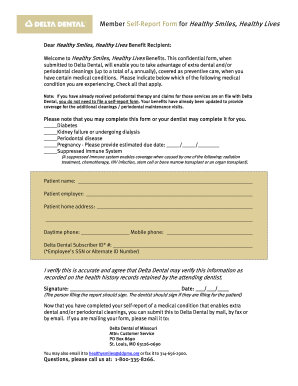
Filling out the Delta Dental Member Self-Report Form online is a straightforward process that enables you to access additional dental cleanings based on certain medical conditions. This guide will walk you through each step of the form to ensure accurate and efficient completion.
Follow the steps to complete your self-report form accurately.
- Click ‘Get Form’ button to obtain the form and open it for editing.
- Begin by selecting the medical conditions that apply to you. You can check all relevant boxes, including diabetes, kidney failure, periodontal disease, pregnancy, or suppressed immune system.
- Fill in your personal information. This includes your name, employer, and home address. Ensure that your details are accurate for verification purposes.
- Provide your contact information by entering your daytime and mobile phone numbers.
- Input your Delta Dental Subscriber ID, which may be your employee’s SSN or an alternate ID number.
- Review your completed form for accuracy. Make sure all sections are filled out correctly.
- Sign the form to verify your information is accurate. If a dentist is filing the report for you, they should sign instead.
- Once completed, save any changes. You can also download, print, or share the form as needed for submission.
Complete your Delta Dental Member Self-Report Form online today to ensure you receive your dental benefits.
Dentists are increasingly dropping Delta Dental due to frustrations with payment delays and low reimbursement rates. Many practices aim to provide the best possible service without the strain of navigating complex insurance hurdles. If you have found yourself needing assistance related to this, the Delta Dental Member Self-Report Form can serve as a helpful tool for addressing your concerns.