We use cookies to improve security, personalize the user experience, enhance our marketing activities (including cooperating with our marketing partners) and for other business use.
Click "here" to read our Cookie Policy. By clicking "Accept" you agree to the use of cookies. Read less
Read more
Accept
Loading
Form preview
  • US Legal Forms
  • Form Library
  • More Forms
  • More Multi-State Forms
  • Download - Rutgers School Of Business Camden

Get Download - Rutgers School Of Business Camden

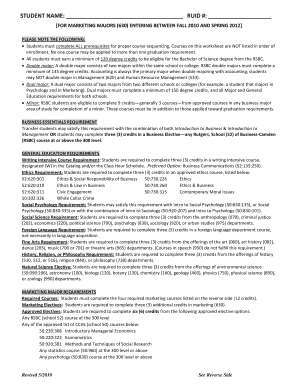
Plete ALL prerequisites for proper course sequencing. Courses on this worksheet are NOT listed in order of enrollment. No one course may be applied to more than one graduation requirement. All students must earn a minimum of 120 degree credits to be eligible for the Bachelor of Science degree from the RSBC. Double major: A double major consists of two majors within the same school or college; RSBC double majors must complete a minimum of 135 degree credits. Accounting is always the primary major.

How it works

  1. Open form

    Open form follow the instructions

  2. Easily sign form

    Easily sign the form with your finger

  3. Share form

    Send filled & signed form or save

How to fill out the Download - Rutgers School Of Business Camden online

Completing the Download - Rutgers School Of Business Camden form is an essential step for students pursuing their degree in marketing. This guide will provide you with clear instructions on how to effectively fill out the form, ensuring you meet all necessary requirements.

Follow the steps to complete the form accurately.

  1. Use the 'Get Form' button to access the document and open it for editing.
  2. Begin filling out the fields at the top of the form. Start with 'Student Name' and enter your full name, followed by your 'RUID #' which is your Rutgers University ID number.
  3. Carefully review the instructions regarding course prerequisites, credit requirements, and major specifics outlined at the beginning of the document. Make sure to understand these as they are critical for your academic planning.
  4. Fill in the 'Major Prerequisite Requirements' section. Enter the course numbers and grades for each listed course you have completed. Ensure you maintain the required grades as indicated.
  5. Continue to the 'General Education Requirements' and systematically fill in the course numbers and grades for each required course. Be mindful of the credits needed in each category.
  6. Move on to the 'Business Core Requirements' section and complete this by entering your respective course grades and credits.
  7. Next, fill out the 'Major Requirements' section, documenting the required courses and any electives you have taken, including their respective credits.
  8. Lastly, in the 'Capstone Course Requirement' section, enter the grade for 'Business Policy & Business Strategy'. Also, fill in your 'Senior Review Date' and 'Expected Graduation Date'.
  9. Once you have filled out all relevant information, review your entries for accuracy. Save your changes, and then you can choose to download, print, or share the completed form as needed.

Complete your documents online to streamline your academic progress today.

Get form

Experience a faster way to fill out and sign forms on the web. Access the most extensive library of templates available.
Get form

Related content

nullDFR 2017 Report - Rutgers University-Camden
As suggested by the IPEDS Technical Review Panel, the figures in this report provide...
Learn more
Current Undergraduate Students / Academic Services
Academic ADvising Syllabus. Download PDF ... Quick Links. Quick Links. Quick Links. Quick...
Learn more
Experiences and Reflections of a Computer and...
Our Automatic Programming Department at Univac in Philadelphia as well as a corresponding...
Learn more

Related links form

MA Acorn Animal Hospital Boarding Agreemant - Franklin 2018 MA Institute Of Technology Subrecipient Profile Questionnaire 2017 MD EACC Local Board Of Education Candidate Questionnaire - Charles County 2018 MD EACC Local Board Of Education Candidate Questionnaire - Charles County 2022

Questions & Answers

Get answers to your most pressing questions about US Legal Forms API.

Contact support

College students typically receive Form 1098-T as their primary tax document. It reports tuition payments and eligible charges that can lead to potential tax credits. Students should keep track of their 1098-T for accurate tax filing. For more comprehensive details, downloading resources from the Rutgers School of Business Camden can be beneficial.

The tax ID for Rutgers University is also known as the Employer Identification Number (EIN), which is 22-6002036. This number is crucial for tax reporting purposes. If you're filing taxes or need this for other reasons, you can usually find it on relevant tax documents. For further assistance, consider downloading guides from the Rutgers School of Business Camden.

Your 1098 form is usually accessible through your Rutgers student account. You can log in to your account to view and download your tax documents. If you face challenges, don't hesitate to contact the financial aid office for support. For further clarification, resources are available for download at the Rutgers School of Business Camden.

You can typically find your W-2 form from Rutgers through the University’s payroll department. To access your W-2, log into your Rutgers account and navigate to the appropriate section for tax documents. If you need immediate assistance, reaching out to the payroll office can provide you with guidance. For any related queries, you might want to download resources from Rutgers School of Business Camden.

Rutgers utilizes Form 1098-T as the primary tax document for reporting eligible tuition and fees. This form is essential for students who wish to claim education-related tax benefits. Keep an eye out for your 1098-T form around January each year. You can also download other helpful documents through the Rutgers School of Business Camden.

Admission to Rutgers School of Business is competitive, reflecting the school's commitment to high academic standards. Candidates should possess a mix of solid academic records and practical experiences to align with the school's expectations. A strategic approach to your application can help, as admissions teams look for candidates who showcase initiative and leadership qualities. For comprehensive guidance, downloading resources on Rutgers School of Business Camden may be helpful.

Getting into Rutgers Business School can be competitive, but it is achievable with a strong application. The school reviews multiple factors such as academic performance, extracurricular activities, and personal statements. Developing a comprehensive application that showcases your strengths will enhance your chances significantly. For assistance with your application process, you can download guides related to Rutgers School of Business Camden.

To increase your chances of acceptance into Rutgers Business School, aim for a GPA of at least 3.0. However, a higher GPA will significantly enhance your application, reflecting your dedication to academic excellence. Keep in mind that the school considers various factors, including your coursework and personal statement. For further details on admission requirements, consider downloading information about Rutgers School of Business Camden.

Rutgers Camden is regarded as a solid choice for business education, offering a blend of academic rigor and practical experience. Its location and strong faculty connections provide students with valuable networking opportunities. Graduates often find rewarding careers post-graduation due to the skills learned during their studies. To learn more about the opportunities available, download insights about Rutgers School of Business Camden.

Getting into Rutgers Camden can present challenges, especially for highly competitive programs. It’s important to focus on your GPA, recommendation letters, and personal statements to stand out. Building a well-rounded profile can greatly benefit your application. For guidance on preparing your application, download relevant resources about Rutgers School of Business Camden.

Get This Form Now!

Use professional pre-built templates to fill in and sign documents online faster. Get access to thousands of forms.
Get form
If you believe that this page should be taken down, please follow our DMCA take down processhere.

Industry-leading security and compliance

US Legal Forms protects your data by complying with industry-specific security standards.
  • In businnes since 1997
    25+ years providing professional legal documents.
  • Accredited business
    Guarantees that a business meets BBB accreditation standards in the US and Canada.
  • Secured by Braintree
    Validated Level 1 PCI DSS compliant payment gateway that accepts most major credit and debit card brands from across the globe.
Get Download - Rutgers School Of Business Camden
Get form
Form Packages
Adoption
Bankruptcy
Contractors
Divorce
Home Sales
Employment
Identity Theft
Incorporation
Landlord Tenant
Living Trust
Name Change
Personal Planning
Small Business
Wills & Estates
Packages A-Z
Form Categories
Affidavits
Bankruptcy
Bill of Sale
Corporate - LLC
Divorce
Employment
Identity Theft
Internet Technology
Landlord Tenant
Living Wills
Name Change
Power of Attorney
Real Estate
Small Estates
Wills
All Forms
Forms A-Z
Form Library
Customer Service
Terms of Service
Privacy Notice
Legal Hub
Content Takedown Policy
Bug Bounty Program
About Us
Help Portal
Legal Resources
Blog
Affiliates
Contact Us
Delete My Account
Site Map
Industries
Forms in Spanish
Localized Forms
State-specific Forms
Forms Kit
Legal Guides
Real Estate Handbook
All Guides
Prepared for You
Notarize
Incorporation services
Our Customers
For Consumers
For Small Business
For Attorneys
Our Sites
US Legal Forms
USLegal
FormsPass
pdfFiller
signNow
airSlate WorkFlow
DocHub
Instapage
Social Media
Call us now toll free:
+1 833 426 79 33
As seen in:
  • USA Today logo picture
  • CBC News logo picture
  • LA Times logo picture
  • The Washington Post logo picture
  • AP logo picture
  • Forbes logo picture
© Copyright 1997-2025
airSlate Legal Forms, Inc.
3720 Flowood Dr, Flowood, Mississippi 39232
Form Packages
Adoption
Bankruptcy
Contractors
Divorce
Home Sales
Employment
Identity Theft
Incorporation
Landlord Tenant
Living Trust
Name Change
Personal Planning
Small Business
Wills & Estates
Packages A-Z
Form Categories
Affidavits
Bankruptcy
Bill of Sale
Corporate - LLC
Divorce
Employment
Identity Theft
Internet Technology
Landlord Tenant
Living Wills
Name Change
Power of Attorney
Real Estate
Small Estates
Wills
All Forms
Forms A-Z
Form Library
Customer Service
Terms of Service
Privacy Notice
Legal Hub
Content Takedown Policy
Bug Bounty Program
About Us
Help Portal
Legal Resources
Blog
Affiliates
Contact Us
Delete My Account
Site Map
Industries
Forms in Spanish
Localized Forms
State-specific Forms
Forms Kit
Legal Guides
Real Estate Handbook
All Guides
Prepared for You
Notarize
Incorporation services
Our Customers
For Consumers
For Small Business
For Attorneys
Our Sites
US Legal Forms
USLegal
FormsPass
pdfFiller
signNow
airSlate WorkFlow
DocHub
Instapage
Social Media
Call us now toll free:
+1 833 426 79 33
As seen in:
  • USA Today logo picture
  • CBC News logo picture
  • LA Times logo picture
  • The Washington Post logo picture
  • AP logo picture
  • Forbes logo picture
© Copyright 1997-2025
airSlate Legal Forms, Inc.
3720 Flowood Dr, Flowood, Mississippi 39232