Get Cigna Lms-613500 2006-2026
How it works
-

Open form follow the instructions
-

Easily sign the form with your finger
-

Send filled & signed form or save
How to fill out the CIGNA LMS-613500 online
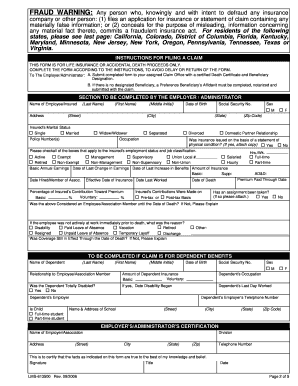
Completing the CIGNA LMS-613500 form online is a straightforward process that ensures timely handling of life insurance or accidental death claims. This guide offers step-by-step instructions to assist you in accurately filling out the necessary fields, thereby expediting your claim.
Follow the steps to successfully complete the form.
- Press the ‘Get Form’ button to access the CIGNA LMS-613500 document. This will open the form in your preferred online editor.
- Fill in the 'Name of Employee/Insured' section by entering the last name, first name, and middle initial of the insured individual.
- Indicate the date of birth, social security number, and sex of the insured. Provide the residential address including the street, city, state, and zip code.
- Select the marital status of the insured from the options provided: single, married, widow/widower, separated, divorced, or domestic partner.
- Enter the policy number(s) related to the insurance and the insured's occupation. If the insurance was based on a physical condition statement, check 'Yes' and attach the necessary documentation.
- Complete the employment status by checking the applicable boxes regarding the insured's job classification and work hours.
- Provide details regarding the insured’s earnings and coverage dates, including the amount of insurance and the percentage of their contribution towards the premium.
- If claiming for dependent benefits, complete the dependent's information including their name, date of birth, social security number, and relationship to the employee.
- In the certification section, the employer or administrator must sign and input their title and contact number to verify the accuracy of the information provided.
- Once all sections are completed, save your changes. You can choose to download, print, or share the form as needed.
Start filling out your CIGNA LMS-613500 form online today to ensure a prompt claim process.
To claim life insurance when someone dies, you first need to gather the necessary documents, including the death certificate and the policy details. With CIGNA LMS-613500, start by contacting their claims department to initiate the process. Ensure you provide accurate information to help expedite your claim. For assistance in navigating this process, consider utilizing the US Legal Forms platform which offers templates to simplify documentation.