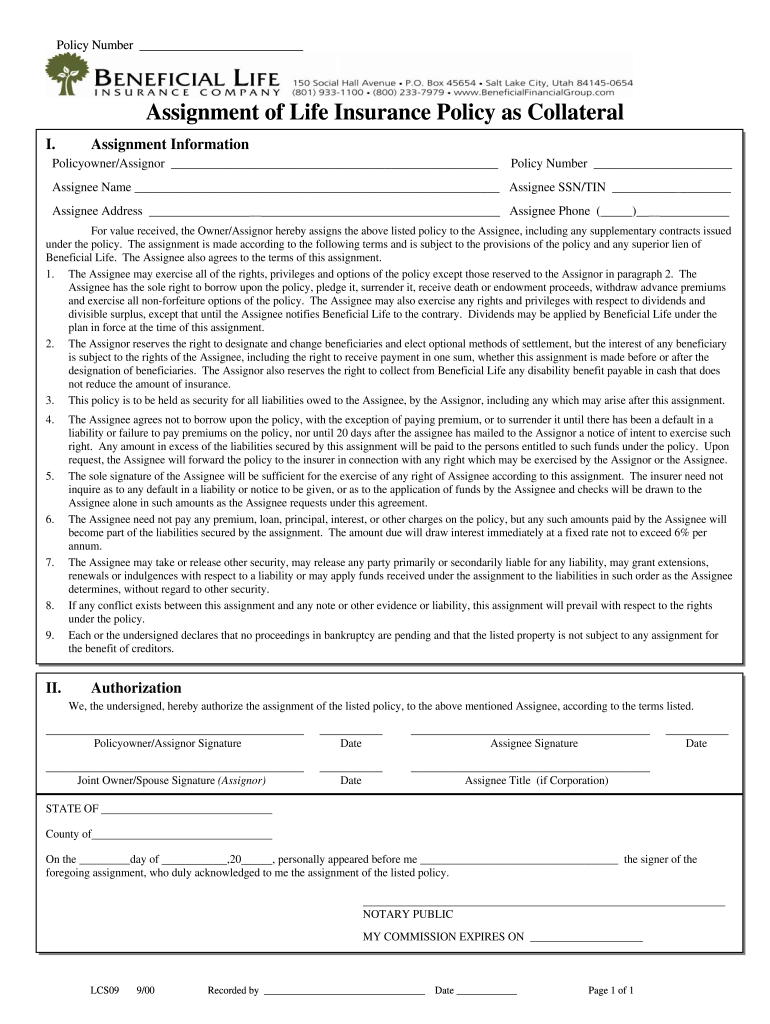
Olicy Number ______________________ Assignee Name __________________________________________________________ Assignee SSN/TIN ___________________ Assignee Address ________________________________________________________ Assignee Phone (_____)_______________ For value received, the Owner/Assignor hereby assigns the above listed policy to the Assignee, including any supplementary contracts issued under the policy. The assignment is made according to the following terms and is subject to the provis.
Loading

Open form follow the instructions

Easily sign the form with your finger

Send filled & signed form or save
How to fill out the Beneficial Life LCS09 online
The Beneficial Life LCS09 form is crucial for the assignment of a life insurance policy as collateral. This guide provides step-by-step instructions to help users fill out this form online with clarity and precision.
Follow the steps to fill out the Beneficial Life LCS09 form effectively.
- Click ‘Get Form’ button to access the Beneficial Life LCS09 form and open it on your device.
- Begin by filling in the section for Assignment Information. Enter the policyowner or assignor's name and policy number accurately.
- In the provided area, confirm that the assignor reserves the right to designate and change beneficiaries, and ensure this aligns with your intent.
- Ensure all required signatures are included: policyowner/assignor, assignee, and if applicable, joint owner or spouse.
- Double-check all entries for accuracy, and once satisfied, save the changes made to the form. You may then download, print, or share the completed form as needed.
Complete your Beneficial Life LCS09 form online to ensure a smooth assignment process.
Experience a faster way to fill out and sign forms on the web. Access the most extensive library of templates available.
Related content
May 15, 2024 — In accordance with 10 CFR 50.36a(a)(2), this letter transmits the...
May 11, 2012 — This self-instructional course is designed to improve students' ability...
Flush the system adequately to remove as much air as possible; then pressurize the loop to...
Get answers to your most pressing questions about US Legal Forms API.
How to fill out a beneficiary for life insurance?
To designate a beneficiary for your life insurance policy, locate the beneficiary section of your policy document. Clearly write the names and information of your chosen beneficiaries, and ensure you follow any specific guidelines provided by your insurer. For extra assistance, check the Beneficial Life LCS09 resources to verify you have filled out everything correctly.
How to fill out Sun Life claim form?
When filling out the Sun Life claim form, start by carefully reading the instructions provided. Include accurate information about your policy and the specific details of the claim. If you find yourself needing assistance, the Beneficial Life LCS09 platform offers valuable insights that can simplify this process.
How to file a claim on Sun Life?
To file a claim with Sun Life, you need to visit their official website or contact their customer service for assistance. Prepare relevant documentation, including your policy details and any necessary medical records. Additionally, consider using the Beneficial Life LCS09 services for streamlined guidance throughout the claims process.
How do I fill out a health insurance claim form?
Filling out a health insurance claim form requires you to understand the specific details of your policy. Begin by detailing your personal information and the nature of the medical services received. The Beneficial Life LCS09 resources can help clarify any confusing terms, making the submission process easier for you.
Who owns the beneficial life insurance company Inc.?
Beneficial Life Insurance Company Inc. operates under strong ownership, which is key to its stability. The organization is backed by a reputable financial group committed to providing quality life insurance products, including the Beneficial Life LCS09. Knowing the ownership structure can provide reassurance about the company's longevity and commitment to its policyholders. Consider this when choosing your life insurance options.
Which life insurance has best claim?
When searching for life insurance with the best claim process, the Beneficial Life LCS09 deserves your attention. This policy is designed to streamline claims, making it easier for beneficiaries to receive payments promptly. A smooth claims experience often reflects the financial strength and reliability of the insurer, and Beneficial Life has consistently focused on improving this aspect. Review the Beneficial Life LCS09 for its reputation in claims efficiency.
What happened to beneficial life insurance company?
The Beneficial Life Insurance Company has gone through significant changes over the years. Recently, it transitioned to focus on the Beneficial Life LCS09, which continues to offer exceptional coverage options to clients. This shift illustrates their commitment to providing high-quality life insurance solutions. Stay updated on their offerings to better understand how they can serve your needs.
Which life insurance is most beneficial?
When considering which life insurance is most beneficial, look at the Beneficial Life LCS09. This policy offers a balance of coverage and affordability, helping you secure your financial future. With its flexible options, it allows you to customize your policy based on your specific needs. Evaluate your circumstances, and the Beneficial Life LCS09 may be the right choice for you.
What happened to Home Beneficial Life Insurance Company?
Home Beneficial Life Insurance Company underwent significant changes in recent years, with a focus on improving service delivery within their policies. They transitioned many of their services under Beneficial Life LCS09, which offers updated benefits and features for clients. It's advisable to check with their official channels for the latest information regarding your policies and any impact on your coverage.
What happened to the beneficial life insurance company?
Beneficial Life Insurance Company restructured over recent years, focusing on delivering better products and service under the Beneficial Life LCS09 plan. Changes in leadership and strategy aimed to enhance customer experience and ensure financial stability. Rest assured, current policyholders continue to receive their benefits without disruption.
Use professional pre-built templates to fill in and sign documents online faster. Get access to thousands of forms.
If you believe that this page should be taken down, please follow our DMCA take down process here.