Loading
Get Baptist Health System Bhs-mr 90446318 2014-2026
How it works
-

Open form follow the instructions
-

Easily sign the form with your finger
-

Send filled & signed form or save
How to fill out the Baptist Health System BHS-MR 90446318 online
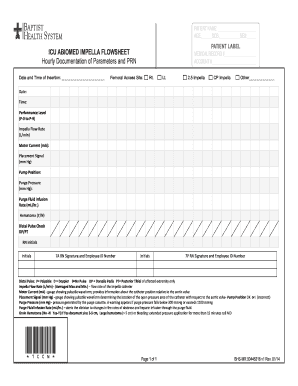
Completing the Baptist Health System BHS-MR 90446318 is essential for accurate documentation of patient care involving the Impella device. This guide provides clear, step-by-step instructions to help users fill out the form online efficiently.
Follow the steps to complete the BHS-MR 90446318 correctly.
- Press the ‘Get Form’ button to access and open the Baptist Health System BHS-MR 90446318 form in your browser.
- Begin by entering the patient's name in the designated field. Make sure the spelling is accurate to maintain proper records.
- Input the patient's age, date of birth, and sex in the respective fields. This information is critical for patient identification and care.
- Document the date and time of insertion of the Impella device in the specified area at the top of the form.
- Indicate the femoral access site by selecting 'Rt.' for right or 'Lt.' for left, providing necessary details about the access point.
- Fill in the medical record number and account number where indicated to ensure the document is linked to the correct patient.
- Select the type of Impella used by marking '2.5 Impella', 'CP Impella', or 'Other' if applicable, and specify the type if you've selected 'Other.'
- For each hour of documentation, enter the performance level, impella flow rate, motor current, placement signal, pump position, purge pressure, and purge fluid infusion rate in the provided fields.
- Check for the presence of a hematoma and mark 'Y' for Yes or 'N' for No in the designated area. If Yes, note the size of the hematoma.
- Perform a distal pulse check and document the findings using the provided codes (P, D, 0, DP, PT) for further assessment.
- Initial the appropriate sections with the RN's initials and provide the RN signature along with their employee ID number.
- Once all required fields are completed, review the form for accuracy and completeness before saving your changes, downloading, printing, or sharing the document as needed.
Complete your documentation online now for accurate and efficient patient care.
Baptist Healthcare believes in delivering compassionate, high-quality care that aligns with Christian values. The organization emphasizes the importance of treating every individual with dignity and respect, reflecting the core principles of the Baptist Health System BHS-MR 90446318. This commitment drives their approach to patient care and overall healthcare delivery.