Loading
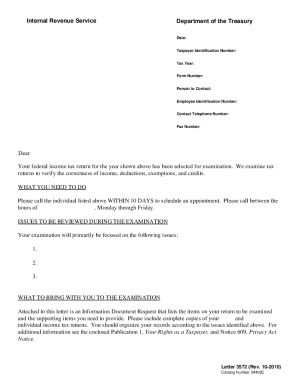
Get Irs Letter 3572 2010-2026
How it works
-

Open form follow the instructions
-

Easily sign the form with your finger
-

Send filled & signed form or save
How to fill out the IRS Letter 3572 online
Filling out the IRS Letter 3572 is an important step for individuals selected for a tax examination. This guide will provide clear, step-by-step instructions on how to complete the form efficiently online, ensuring that you have all the necessary information at hand.
Follow the steps to fill out the IRS Letter 3572 online
- Click the ‘Get Form’ button to obtain the form and open it in the editor.
- Review the header section of the form where you will find details such as the date, taxpayer identification number, tax year, and form number. Ensure that all information is accurate and current.
- In the 'person to contact' section, fill in the name of the designated IRS examiner who will be reviewing your case.
- Enter the employee identification number of the IRS representative that corresponds with the individual named in the previous step.
- Provide the contact telephone number and fax number of the IRS examiner for any necessary communications.
- In the body of the letter, carefully read through each section to understand what is required for your examination. Take note of the issues that will be reviewed during the examination.
- After completing the relevant sections, ensure you have reviewed your entries for accuracy and completeness.
- Save your changes to the form. You can also download, print, or share the form as needed.
Take the necessary steps to complete and submit your documents online today.
Related links form
Yes, you can request an IRS non-filing letter online through the IRS services. This letter can help confirm that you did not file a tax return for a given year. For help with retrieving IRS letters, including the IRS Letter 3572 and non-filing letters, US Legal Forms offers resources that can guide you effectively.