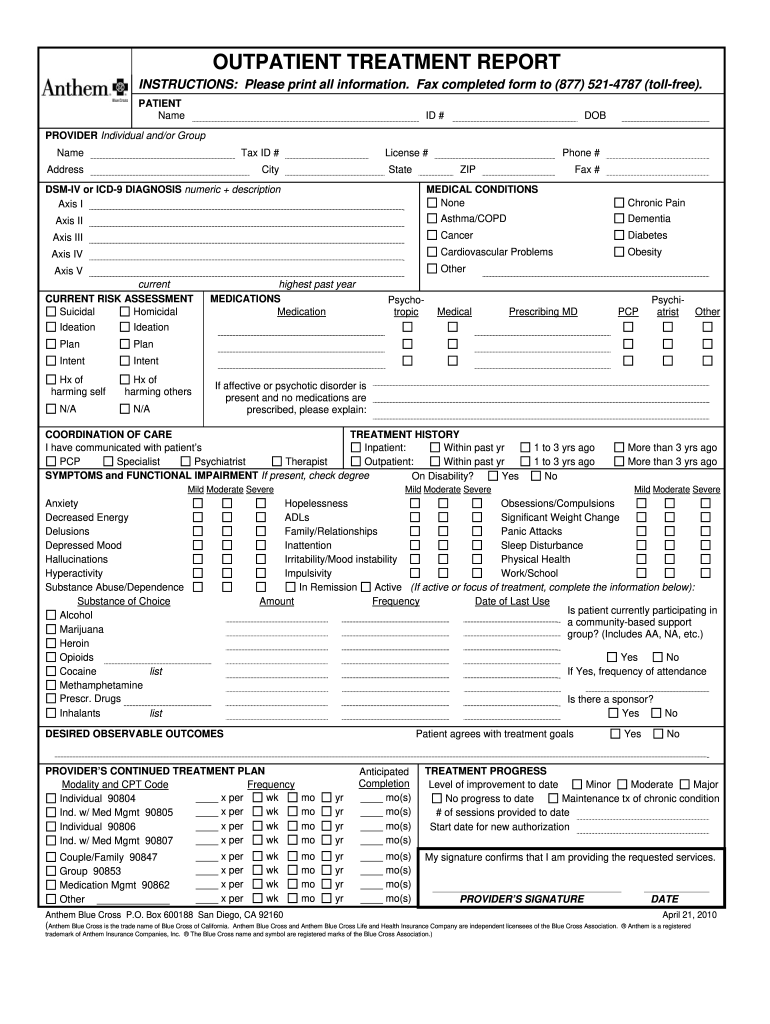
Dress City License # State Phone # ZIP DSM-IV or ICD-9 DIAGNOSIS numeric + description Axis I Fax # MEDICAL CONDITIONS None Chronic Pain Axis II Asthma/COPD Dementia Axis III Cancer Diabetes Axis IV Cardiovascular Problems Obesity Axis V Other current CURRENT RISK ASSESSMENT Suicidal Homicidal Ideation Ideation Plan Plan Intent Intent Hx of harming self N/A Hx of harming others N/A highest past year MEDICATIONS Medication Psychotropic Medical Prescribing MD Psychiatr.
Loading

Open form follow the instructions

Easily sign the form with your finger

Send filled & signed form or save
How to fill out the Anthem Outpatient Treatment Report online
Completing the Anthem Outpatient Treatment Report online can be straightforward with the right guidance. This comprehensive guide will walk you through each component of the report to ensure you provide all necessary information accurately.
Follow the steps to complete the report seamlessly.
- Click the ‘Get Form’ button to access the report and open it in your preferred editor.
- Begin by filling out the 'Patient' section. Provide the patient's full name, identification number (ID #), and date of birth (DOB). Ensure accuracy for proper identification.
- Next, proceed to the 'Provider' section. Enter the provider's name, tax ID number, and complete address including city, state, zip code, and phone number.
- In the 'DSM-IV or ICD-9 Diagnosis' field, input the numeric diagnosis codes along with their descriptions. Ensure to fill out Axis I and Axis II as applicable.
- Move to 'Current Risk Assessment'. Indicate any suicidal or homicidal thoughts, plans, or intents. Complete the history of harm section accurately.
- Fill the 'Medications' section with all relevant information regarding prescribed medications. If no medications are prescribed for affective or psychotic disorders, provide an explanation.
- Complete the 'Coordination of Care' and 'Treatment History' sections by specifying if you've communicated with the patient’s primary care provider or specialists and the treatments they have received.
- In the 'Symptoms and Functional Impairment' section, check the relevant symptoms and indicate the degree of impairment experienced by the patient.
- Detail the desired observable outcomes by confirming alignment with the treatment goals.
- Outline the provider’s continued treatment plan detailing the modality, CPT codes, frequency, and anticipated completion date.
- Review the 'Treatment Progress' section and indicate the level of improvement observed. Enter the number of sessions provided to date and provide your signature to confirm service provision.
- After completing the form, ensure all information is correct. Save your changes, and when ready, download, print, or share the completed report as needed.
Now that you have this guide, begin completing the Anthem Outpatient Treatment Report online today!
Experience a faster way to fill out and sign forms on the web. Access the most extensive library of templates available.
Related content
Plan-specific evaluation reports include findings for each plan regarding its...
Use this document to understand about: • Your cost sharing;. • Your medical and...
Sep 24, 2015 — In addition, summary tables can specify care setting, such as inpatient...
Get answers to your most pressing questions about US Legal Forms API.
What is the Owens and Minor lawsuit about Anthem?
The Owens and Minor lawsuit against Anthem pertains to allegations surrounding improper billing and potential impact on patient care services. This case raises critical questions about transparency and fairness in the healthcare system. Review your Anthem Outpatient Treatment Report for insights that could apply to your situation if you have concerns related to this lawsuit.
Is Anthem the same as Anthem Blue Cross?
Yes, Anthem is often referred to as Anthem Blue Cross, particularly in California. Both names represent the same health insurance provider offering a range of plans and services. If you are navigating your healthcare options, having the Anthem Outpatient Treatment Report can provide clarity and support your healthcare decisions.
What is the Anthem lawsuit about?
The Anthem lawsuit primarily revolves around allegations of unfair practices in relation to healthcare coverage and reimbursement. These claims reflect consumer frustrations with access to necessary treatments and care. Keeping your Anthem Outpatient Treatment Report updated could be beneficial if you plan to engage in discussions related to this lawsuit.
How much is the payout per person for the Blue Cross Blue Shield lawsuit?
The payout per person in the Blue Cross Blue Shield lawsuit can vary, but it is expected to be in the range of a few hundred to several thousand dollars based on the actions taken. This lawsuit centers on claims of anti-competitive practices affecting consumers. Understanding the details in your Anthem Outpatient Treatment Report may assist you in claiming any compensation you might be eligible for.
What is the class action lawsuit against Anthem?
The class-action lawsuit against Anthem addresses allegations of improper billing practices and discrimination against certain patient groups. Class actions like this seek to hold Anthem accountable for ensuring fair treatment for their members. Having an Anthem Outpatient Treatment Report can provide vital documentation if you are affected by these practices.
What is the cha lawsuit against Anthem?
The CHA lawsuit against Anthem involves claims related to provider access and reimbursement issues for mental health services. It highlights concerns raised by consumers and advocates regarding patient care quality. As part of navigating these complexities, an Anthem Outpatient Treatment Report may serve as a useful resource to understand your options.
How do I contact Anthem provider?
You can contact your Anthem provider by visiting their official website and navigating to the 'Contact Us' section. There, you can find various means such as phone numbers, email addresses, and live chat options. Additionally, having your Anthem Outpatient Treatment Report on hand can help streamline the process by providing all necessary information when reaching out.
Why is Anthem denying my claims?
Anthem may deny your claims for several reasons, including lack of prior authorization or services deemed not medically necessary. Understanding the specific reasons for denial can be challenging, but the Anthem Outpatient Treatment Report can offer valuable insights. It serves as a resource to help you identify areas for improvement in your submissions. If you encounter repeated denials, consider consulting uslegalforms as a platform to navigate your claims more effectively.
What is Anthem's timely filing limit?
Anthem typically has a strict timely filing limit, often set at 60 days from the date of service. Submitting claims after this window can lead to automatic denials. To avoid complications, referring to the Anthem Outpatient Treatment Report can provide clarity on submission timelines. This proactive approach helps ensure that you submit your claims within the required period.
Why are most insurance claims denied?
Most insurance claims, including those to Anthem, are denied due to missing documentation, incorrect billing codes, or treatments considered non-essential. Policyholders often struggle to pinpoint the exact cause of denial. Understanding the Anthem Outpatient Treatment Report can help you identify potential pitfalls in your claims. By knowing these common reasons, you can enhance your submission process significantly.
Use professional pre-built templates to fill in and sign documents online faster. Get access to thousands of forms.
If you believe that this page should be taken down, please follow our DMCA take down process here.
This form is available in several versions. Select the version you need from the drop-down list below.