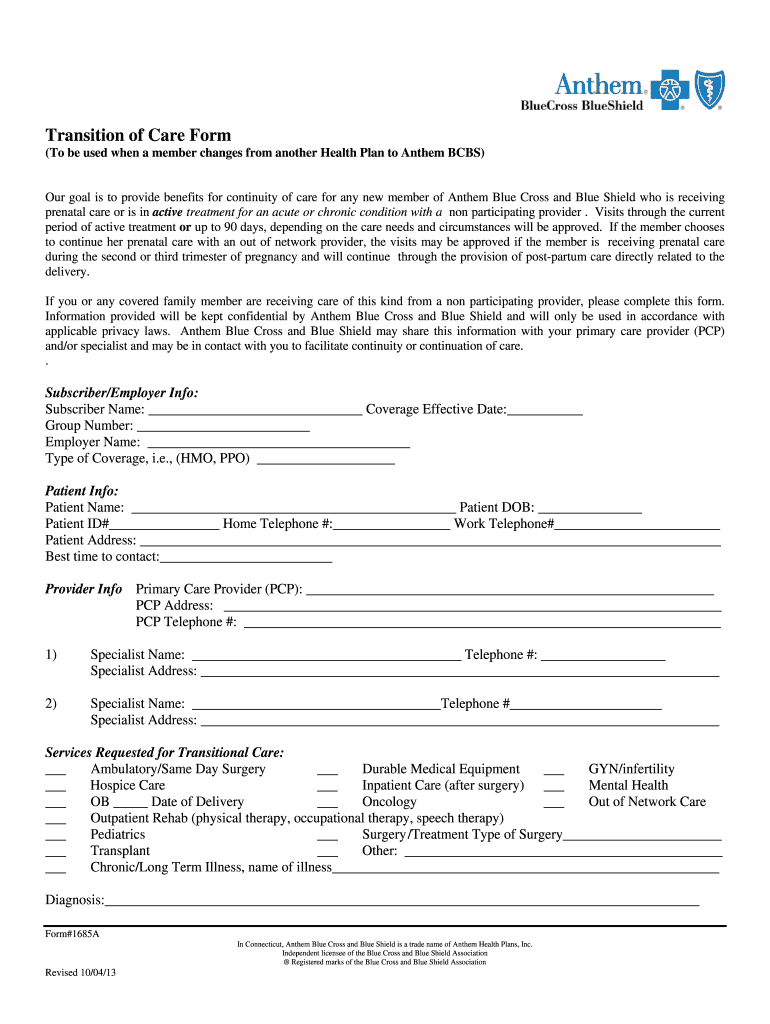
D Blue Shield who is receiving prenatal care or is in active treatment for an acute or chronic condition with a non participating provider . Visits through the current period of active treatment or up to 90 days, depending on the care needs and circumstances will be approved. If the member chooses to continue her prenatal care with an out of network provider, the visits may be approved if the member is receiving prenatal care during the second or third trimester of pregnancy and will continue th.

Open form follow the instructions

Easily sign the form with your finger

Send filled & signed form or save
How to fill out the Anthem 1685A online
This guide aims to provide clear and comprehensive instructions on completing the Anthem 1685A form online. Designed for individuals transitioning to Anthem Blue Cross and Blue Shield, this guide will help ensure that your continuity of care is effectively documented.
Follow the steps to successfully complete your Anthem 1685A form online.
- Click the ‘Get Form’ button to access the Anthem 1685A form in your preferred online environment.
- Begin by filling out the Subscriber/Employer Info section. Enter the subscriber's name, effective coverage date, group number, employer name, and type of coverage, such as HMO or PPO.
- Next, proceed to the Patient Info section. Fill in the patient’s name, date of birth, patient ID number, home telephone number, work telephone number, and address. Also, indicate the best time to contact the patient.
- Move on to the Provider Info section. Input the primary care provider's name, address, and telephone number.
- If applicable, list any specialist information. Fill out the name, telephone number, and address of the first and second specialists.
- In the Services Requested for Transitional Care section, check all relevant care types that the patient is receiving or will require. Be thorough in this section to ensure all necessary services are documented.
- Provide a brief description of the active treatment being received in the space provided. This is critical for understanding the context of care.
- Answer the questions regarding case management. Indicate whether you are working with a nurse case manager and if you would like to be contacted by the Case Management Department at Anthem.
- Finally, ensure that the subscriber, guardian, or parent's signature is obtained where indicated, along with the date of signing.
- Once all fields are filled out, save the completed form as a digital file. You may print it out or share it as required. Make sure to submit it according to the instructions given, either by mailing it or faxing it to the specified numbers.
Complete your Anthem 1685A form online today to ensure seamless continuity of care.
Experience a faster way to fill out and sign forms on the web. Access the most extensive library of templates available.
Related content
Anthem Whole Health Connection is included when Anthem health benefits are combined with...
Handel, George Frideric, 1685-1759 ($t: Empfindungen am Grabe Jesu); Handel, George...
Si la marca de su dispositivo no aparece en la lista de códigos, o si has tratado todos...
Get answers to your most pressing questions about US Legal Forms API.
How to find EOB Blue Cross?
To find your Explanation of Benefits from Blue Cross, first log into your online account. Search for EOB documents under your claims history for easy access. If you cannot find the EOB, contact customer support for assistance. Using platforms like US Legal Forms can also provide you with useful tips on navigating your insurance documentation.
How do I get Explanation of Benefits from Anthem?
To obtain your Explanation of Benefits from Anthem 1685A, visit your online account where EOBs are stored. Alternatively, you can request a paper copy if you prefer physical documentation. Familiarizing yourself with your EOB helps you manage your healthcare expenses better. If you need assistance with the process, consider using US Legal Forms for more support.
Does Anthem have a grace period?
Yes, Anthem 1685A does provide a grace period for premium payments. This period typically lasts 30 days, allowing you to maintain your coverage while addressing any missed payments. Be proactive and stay informed about your payment schedule to avoid coverage interruptions. If you have questions, consult the US Legal Forms platform for additional guidance.
Why is Anthem denying my claims?
Anthem 1685A might deny your claims for various reasons, including incorrect coding, lack of necessary documentation, or policy exclusions. It's essential to review the denial notice to understand the specific cause. If you believe the denial is an error, you can appeal the decision. Resources on US Legal Forms can assist you in structuring your appeal effectively.
How do I get an explanation of benefits from Anthem?
To get an explanation of benefits from Anthem 1685A, log into your online account and access the EOB section. You can also find your EOB in your email if you opted for electronic communication. If you prefer paper copies, they are typically mailed to you after the processing of your claims. Ensure to review them carefully for a clear understanding of your benefits.
How do I find my Explanation of Benefits?
You can find your Explanation of Benefits (EOB) from Anthem 1685A in several ways. Check your online account for digital copies, or you may receive them via mail after your claims are processed. If you encounter any difficulties, US Legal Forms offers resources to help you navigate EOB retrieval effectively. Understanding your EOB is crucial for managing your health expenses.
How to access Anthem HSA?
To access your Health Savings Account (HSA) with Anthem 1685A, you can log into your Anthem online account. Once logged in, look for the HSA section, which provides details about your balance and transactions. If you need assistance, the user-friendly US Legal Forms platform can guide you through the access process. Ensure you keep track of your contributions and withdrawals.
How long do you have to submit a medical insurance claim?
You usually have 90 days to submit a medical insurance claim to Anthem 1685A. This timeframe allows you to gather all relevant information regarding your medical services. Submitting your claim on time ensures you receive the benefits you deserve. Be diligent and check your policy details for any specific timelines.
How long do you have to file a claim with Anthem?
To file a claim with Anthem 1685A, you typically have 90 days from the service date to submit your claim. It's important to ensure that all necessary documents and information accompany your claim. If you miss this window, your claim may be denied. Keep track of deadlines to avoid any complications.
Is Anthem PPO good insurance?
Anthem PPO insurance offers flexibility in choosing healthcare providers without requiring referrals. Many users appreciate its broad network of doctors and specialists, making it a solid choice for those seeking both quality and convenience. For more insights on plan comparisons, resources from US Legal Forms can assist you in making informed decisions about your insurance.
Use professional pre-built templates to fill in and sign documents online faster. Get access to thousands of forms.
If you believe that this page should be taken down, please follow our DMCA take down process here.
This form is available in several versions. Select the version you need from the drop-down list below.