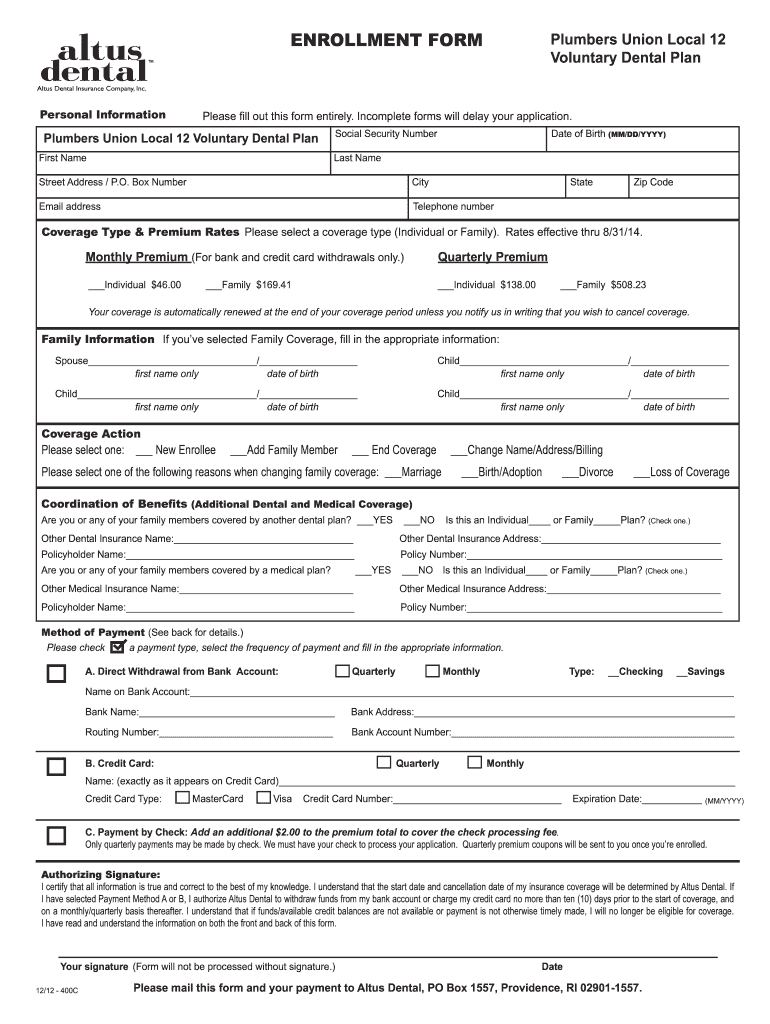
ENROLLMENT FORM Personal Information Plumbers Union Local 12 Retiree Dental Plan Please fill out this form entirely. Incomplete forms will delay your application. Social Security Number Date of Birth.
Loading

Open form follow the instructions

Easily sign the form with your finger

Send filled & signed form or save
How to fill out the Altus Dental Enrollment Form online
This guide provides a step-by-step approach to completing the Altus Dental Enrollment Form online. Whether you are enrolling for yourself or adding family members, this comprehensive outline will assist you in providing the necessary information accurately.
Follow the steps to complete the enrollment form effortlessly.
- Press the ‘Get Form’ button to retrieve the Altus Dental Enrollment Form and open it in your preferred editor.
- Begin by filling out your personal information in the designated fields. Ensure you provide your date of birth in the MM/DD/YYYY format, full name, and contact details, including your street address, city, state, zip code, email address, and telephone number.
- Choose the coverage type by indicating either ‘Individual’ or ‘Family’. Review the corresponding premium rates that are applicable for your selection.
- If you selected Family Coverage, complete the Family Information section by filling in the first names and dates of birth for each family member you wish to enroll.
- In the Coverage Action section, select your desired option: ‘New Enrollee’, ‘Add Family Member’, or ‘End Coverage’. Specify the reason for any changes in coverage if applicable.
- Proceed to the Coordination of Benefits section. Indicate whether you or any family members have additional dental or medical coverage. Fill in the details for any other dental or medical plans, including the policyholder's name and address.
- Select your preferred method of payment by checking one of the available options. Fill in the required bank or credit card information, ensuring that all details are accurate, including the frequency of payment.
- Review the authorizing statement and provide your signature along with the date. Remember, the form will not be processed without authorization.
- Once completed, you can save your changes, download a copy for your records, print the form, or share it as needed. Ensure you mail the form and payment to Altus Dental as instructed.
Get started with your Altus Dental Enrollment Form today and ensure you have the coverage you need.
Experience a faster way to fill out and sign forms on the web. Access the most extensive library of templates available.
Related content
To be completed by Human Resources or Benefit Administrator. Group No. Dental Division No...
Please mail this form to Delta Dental of Rhode Island, P.O. Box 1517, Providence, RI...
Get answers to your most pressing questions about US Legal Forms API.
What is the difference between PPO and EPO dental plans?
The main difference between PPO and EPO dental plans revolves around network restrictions. PPOs offer more flexibility with providers but may have higher costs, while EPOs usually have lower fees but require you to see in-network dentists. When deciding which plan to enroll in, use the Altus Dental Enrollment Form to explore your options.
What is a health & dental Enrollment Form?
A health & dental Enrollment Form is a necessary document that enables you to sign up for dental and health insurance. This form collects important information to ensure you receive the appropriate coverage. When you're ready to enroll, the Altus Dental Enrollment Form will guide you through the process.
Is dental select a PPO or HMO?
Dental Select primarily operates as a PPO. This plan allows you to visit any dentist, but you will save more by seeing in-network providers. For those interested in signing up, the Altus Dental Enrollment Form can facilitate your enrollment seamlessly.
What is a dental expense claim form?
A dental expense claim form is a document used to request reimbursement for dental services. Patients complete this form and submit it to their insurance provider after receiving treatment. Make sure to have the Altus Dental Enrollment Form handy for easy access to your insurance details.
Is a dental PPO or DMO better?
Choosing between a dental PPO and a DMO depends on your needs. A dental PPO offers more flexibility in choosing your dentist, while a DMO typically has lower premiums but limits your choices. By using the Altus Dental Enrollment Form, you can compare plans and select the one that best fits your lifestyle.
Is Altus Dental a PPO?
Yes, Altus Dental offers a PPO option that allows you to choose from a wide network of dentists. With this plan, you can receive care from in-network providers at reduced costs. Using the Altus Dental Enrollment Form can help you easily enroll and start enjoying these benefits.
Can I add dental insurance after open enrollment?
You may find it challenging to add dental insurance after the open enrollment period. Typically, you must wait until the next enrollment period unless you experience a qualifying life event. If you need immediate access to dental coverage, consider using the Altus Dental Enrollment Form during the next enrollment phase.
What is the purpose of the enrollment form?
The enrollment form serves to collect essential information from individuals who wish to enroll in health and dental insurance plans. This form ensures that the insurance provider has accurate details needed to process your application. Using the Altus Dental Enrollment Form effectively can streamline your enrollment process and help you gain access to necessary healthcare services.
What is the meaning of enrollment in health insurance?
Enrollment in health insurance refers to the process of signing up for coverage, allowing individuals to access medical and dental services as needed. This process usually involves submitting an enrollment form, such as the Altus Dental Enrollment Form, to ensure that you have the benefits you require. It is important to complete this process during the designated enrollment period.
How do I find out my dental insurance provider?
To find out your dental insurance provider, check any insurance cards you may have received or the documentation related to your health benefits. Alternatively, you can contact your employer’s HR department or the insurance company directly. If you need to enroll, completing the Altus Dental Enrollment Form on the US Legal Forms platform can also help guide you.
Use professional pre-built templates to fill in and sign documents online faster. Get access to thousands of forms.
If you believe that this page should be taken down, please follow our DMCA take down process here.