Loading
Form preview
  • US Legal Forms
  • Form Library
  • More Forms
  • More Multi-State Forms
  • E Trade Usspaa-b68948 2005

Get E Trade Usspaa-b68948 2005-2026

How it works

  1. Open form

    Open form follow the instructions

  2. Easily sign form

    Easily sign the form with your finger

  3. Share form

    Send filled & signed form or save

How to fill out the E TRADE USSPAA-B68948 online

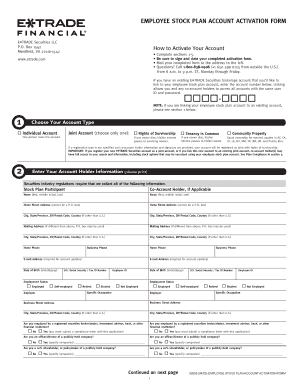
Filling out the E TRADE USSPAA-B68948 Employee Stock Plan Account Activation Form is a crucial step for users looking to activate their accounts efficiently. This guide provides clear, step-by-step instructions to help you complete the form accurately and navigate the online process with ease.

Follow the steps to fill out the form correctly.

  1. Click the ‘Get Form’ button to download the E TRADE USSPAA-B68948 form and access it in your online editor.
  2. In section 1, choose your account type. Indicate whether you are setting up a joint account with rights of survivorship, an individual account, tenancy in common, or community property. Ensure you understand the implications of each type.
  3. Proceed to section 2 to enter your account holder information. This includes printing your name, address, contact information, and social security or tax ID number. If applicable, provide similar information for any co-account holder.
  4. In section 3, create your investment profile. Clearly state your investment objective, level of investment experience, annual income, approximate net worth, and liquid net worth. Ensure this reflects your financial situation accurately.
  5. Select your preferred account features in section 4. This includes choices regarding income on cash balances and how you wish to receive account documents. Carefully review each option and tick your preferences.
  6. Finally, review section 5 and sign and date the application. Ensure you understand the terms outlined regarding the exercise of stock options and account management prior to signing.
  7. Once the form is complete, save any changes made. You can then download the completed form, print it, or share it appropriately via the platform.

Act now to complete your E TRADE USSPAA-B68948 form online and start managing your employee stock plan account.

Get form

Experience a faster way to fill out and sign forms on the web. Access the most extensive library of templates available.
Get form

Related links form

Monash Peninsula Map DSM V Checklist For Autism Spectrum Disorder HEALTH FORM GARDA TRENTINO HALF MARATHON - Trentinoeventi Rpw Mvm Method

Questions & Answers

Get answers to your most pressing questions about US Legal Forms API.

Contact support

To send documents to E-Trade, you can upload them through the secured messaging feature in your account. Alternatively, you can send documents via fax or traditional mail, depending on what works best for you. Make sure you follow E-Trade's guidelines for submitting necessary documents accurately.

To find your bank's SWIFT code, you can usually check your bank’s website or contact their support team. Many banks also provide this information on your bank statements. Remember, using the correct code is crucial for transactions like those involving E-Trade's USSPAA-B68948.

You can find your tax forms on the E-Trade platform by logging into your account and navigating to the tax center. E-Trade provides access to various tax documents, including 1099s, which are essential for preparing your taxes. Having these forms readily available means you can stay organized during tax season.

To locate your equity bank SWIFT code, you can typically visit your bank's official website or contact their customer service. If you have an E-Trade account, it’s helpful to have the SWIFT code USSPAA-B68948 handy for international transactions. Ensure you have verified this information to facilitate easy banking.

The SWIFT code for E-Trade is USSPAA-B68948. This code is utilized for processing international payments to and from your E-Trade accounts. Always double-check that this code is entered correctly to ensure smooth transactions.

To locate your E-Trade account, visit the E-Trade website or use the mobile app. Log in with your credentials, and you will see your account information on your dashboard. If you encounter difficulties, consider referencing guides that can help you navigate to your specific E TRADE USSPAA-B68948 account.

The routing number for E-Trade, now under Morgan Stanley, typically depends on the type of account you hold. To find your specific routing number, you can check your account details online or contact customer service. Having the correct routing number streamlines transactions related to E TRADE USSPAA-B68948.

Trade is not owned by JP Morgan. Instead, it is part of Morgan Stanley since the acquisition in 2020. This integration has allowed Trade to strengthen its offerings, including investment options and customer support. Understanding this relationship helps you grasp how TRAD USSPAAB68948 aligns with larger financial services.

To find your E TRADE account number, simply log into your E TRADE account online. You can view this critical information in the account details section, usually found on the home page or under account settings. If you need further assistance, don't hesitate to reach out to E TRADE’s customer support, who will provide you with guidance. Utilizing the US Legal Forms platform may also help you manage your related legal needs effectively.

E TRADE collaborates with multiple banks to provide seamless financial services to its customers. The primary bank associated with E TRADE is E TRADE Bank, which offers a range of banking options linked with your trading and brokerage services. This integration ensures that you have easy access to both banking and trading under one platform, enhancing your experience. For more specific information, you can check E TRADE's official website.

Get This Form Now!

Use professional pre-built templates to fill in and sign documents online faster. Get access to thousands of forms.
Get form
If you believe that this page should be taken down, please follow our DMCA take down processhere.

Industry-leading security and compliance

US Legal Forms protects your data by complying with industry-specific security standards.
  • In businnes since 1997
    25+ years providing professional legal documents.
  • Accredited business
    Guarantees that a business meets BBB accreditation standards in the US and Canada.
  • Secured by Braintree
    Validated Level 1 PCI DSS compliant payment gateway that accepts most major credit and debit card brands from across the globe.
Get E TRADE USSPAA-B68948
Get form
  • Adoption
  • Bankruptcy
  • Contractors
  • Divorce
  • Home Sales
  • Employment
  • Identity Theft
  • Incorporation
  • Landlord Tenant
  • Living Trust
  • Name Change
  • Personal Planning
  • Small Business
  • Wills & Estates
  • Packages A-Z
  • Affidavits
  • Bankruptcy
  • Bill of Sale
  • Corporate - LLC
  • Divorce
  • Employment
  • Identity Theft
  • Internet Technology
  • Landlord Tenant
  • Living Wills
  • Name Change
  • Power of Attorney
  • Real Estate
  • Small Estates
  • Wills
  • All Forms
  • Forms A-Z
  • Form Library
  • Legal Hub
  • About Us
  • Help Portal
  • Legal Resources
  • Blog
  • Affiliates
  • Contact Us
  • Delete My Account
  • Site Map
  • Industries
  • Forms in Spanish
  • Localized Forms
  • State-specific Forms
  • Forms Kit
  • Real Estate Handbook
  • All Guides
  • Notarize
  • Incorporation services
  • For Consumers
  • For Small Business
  • For Attorneys
  • USLegal
  • FormsPass
  • pdfFiller
  • signNow
  • altaFlow
  • DocHub
  • Instapage
Form Packages
  • Adoption
  • Bankruptcy
  • Contractors
  • Divorce
  • Home Sales
  • Employment
  • Identity Theft
  • Incorporation
  • Landlord Tenant
  • Living Trust
  • Name Change
  • Personal Planning
  • Small Business
  • Wills & Estates
  • Packages A-Z
Form Categories
  • Affidavits
  • Bankruptcy
  • Bill of Sale
  • Corporate - LLC
  • Divorce
  • Employment
  • Identity Theft
  • Internet Technology
  • Landlord Tenant
  • Living Wills
  • Name Change
  • Power of Attorney
  • Real Estate
  • Small Estates
  • Wills
  • All Forms
  • Forms A-Z
  • Form Library
Customer Service
  • Legal Hub
  • About Us
  • Help Portal
  • Legal Resources
  • Blog
  • Affiliates
  • Contact Us
  • Delete My Account
  • Site Map
  • Industries
  • Forms in Spanish
  • Localized Forms
  • State-specific Forms
  • Forms Kit
Legal Guides
  • Real Estate Handbook
  • All Guides
Prepared for you
  • Notarize
  • Incorporation services
Our Customers
  • For Consumers
  • For Small Business
  • For Attorneys
Our Sites
  • USLegal
  • FormsPass
  • pdfFiller
  • signNow
  • altaFlow
  • DocHub
  • Instapage
Social Media
Call us now toll free:
+1 833 426 79 33
As seen in:
© Copyright 1999-2026 airSlate Legal Forms, Inc. 3720 Flowood Dr, Flowood, Mississippi 39232
  • Your Privacy Choices
  • Terms of Service
  • Privacy Notice
  • Content Takedown Policy
  • Bug Bounty Program