Loading
Get Agla5051 2014-2026
How it works
-

Open form follow the instructions
-

Easily sign the form with your finger
-

Send filled & signed form or save
How to fill out the AGLA5051 online
This guide provides a step-by-step explanation of how to complete the AGLA5051 form online. Whether you are familiar with legal documents or are a first-time user, this guide aims to simplify the process, ensuring that you fill out the form accurately and efficiently.
Follow the steps to complete the AGLA5051 form online.
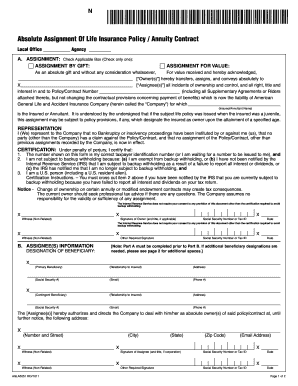
- Click ‘Get Form’ button to obtain the form and open it in the editor.
- Indicate the type of assignment by checking the appropriate box, either 'Assignment by gift' or 'Assignment for value'. Be sure to select only one option.
- Complete the section labeled 'Owner(s)' by entering the name(s) of the individual(s) transferring rights.
- In the 'Assignee(s)' field, enter the name of the individual or entity receiving the assignment.
- Provide the policy or contract number relevant to this assignment and input the name of the insured or annuitant.
- Review the representation section and ensure that you confirm no bankruptcy or insolvency proceedings are affecting the owner.
- Complete the certification statement, confirming the accuracy of the taxpayer identification number and backup withholding status. Follow the instructions provided if you need to cross out any item.
- Sign and date the form in the designated areas for both the owner and a non-related witness.
- Fill out the 'Assignee(s) Information' section, including beneficiary designations and their corresponding details.
- Ensure all fields are accurately filled out, then save your changes. You may download, print, or share the completed form as necessary.
Complete your documents online to ensure efficient processing.
When filling out your tax withholding form, collect all pertinent information, including your income and any applicable deductions. Follow the prompts carefully, using the AGLA5051 as a guide to make sure you understand what information to provide. Taking your time will help you avoid mistakes and ensure correct withholding.