We use cookies to improve security, personalize the user experience, enhance our marketing activities (including cooperating with our marketing partners) and for other business use.
Click "here" to read our Cookie Policy. By clicking "Accept" you agree to the use of cookies. Read less
Read more
Accept
Loading
Form preview
  • US Legal Forms
  • Form Library
  • More Forms
  • More Multi-State Forms
  • Kohler K-325 2014

Get Kohler K-325 2014-2025

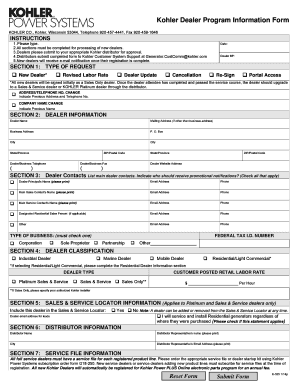
Ing of new dealers. 3.Dealers please submit to your appropriate Kohler distributor for approval. 4.Distributors submit completed form to Kohler Customer System Support at Generator.CustComm kohler.com 5.New dealers will receive e-mail notification once their registration is complete. Date: Dealer BP: SECTION 1: TYPE OF REQUEST New Dealer* Revised Labor Rate Dealer Update Cancellation Re-Sign Portal Access *All new dealers will be signed initially as a Sales Only.

How it works

  1. Open form

    Open form follow the instructions

  2. Easily sign form

    Easily sign the form with your finger

  3. Share form

    Send filled & signed form or save

How to fill out the Kohler K-325 online

Filling out the Kohler K-325 online is a straightforward process that requires careful attention to detail. This guide will provide you with step-by-step instructions to ensure you complete the form correctly.

Follow the steps to properly complete the Kohler K-325 online form.

  1. Click ‘Get Form’ button to access the form and open it in your preferred online editor.
  2. Begin by entering the date and dealer business partner (BP) information at the top of the form.
  3. In Section 1, select the type of request by checking one of the following options: New Dealer, Revised Labor Rate, Dealer Update, Cancellation, Re-Sign, or Portal Access. If applicable, indicate any address or company name changes.
  4. Proceed to Section 2 and fill in your dealer information, including dealer name, mailing address (if different from business address), business address, city, state or province, ZIP or postal code, dealer/business telephone, dealer/business fax, and dealer website address.
  5. In Section 3, list the main dealer contacts. Indicate promotional notification preferences by checking the appropriate boxes. Provide names, email addresses, and phone numbers for each contact.
  6. For Section 4, select your dealer classification by checking the applicable boxes (Industrial Dealer, Marine Dealer, Mobile Dealer, Residential/Light Commercial) and enter your federal tax ID number if applicable.
  7. In Section 5, indicate whether to include the dealer in the Sales & Service Locator and provide the dealer email address for leads if applicable.
  8. Fill in Section 6 with the distributor's name, representative’s name, city, and email address.
  9. Complete Section 7 by ordering the appropriate service file or dealer startup kit using the Kohler Power Systems subscription order form if you are a full-service dealer.
  10. In Section 8, provide user information for portal access by entering the first and last names, as well as email addresses for all necessary users.
  11. Section 9 requires answering multiple questions regarding years in business, number of technicians, primary focus of your business, advertising strategies, and other relevant information. Ensure to check all applicable boxes.
  12. Once you have filled in all the required fields, review your entries for completeness and accuracy before submitting the form.
  13. To submit the completed form, you may choose to print it, sign it, and fax it to Kohler Co. or follow electronic submission instructions if applicable.
  14. Finally, save any changes, and you may choose to download, print, or share the completed form as needed.

Complete your Kohler K-325 form online today for a seamless submission experience.

Get form

Experience a faster way to fill out and sign forms on the web. Access the most extensive library of templates available.
Get form

Related content

OFCI Engine Families
CATERPILLAR, INC. ECPXL09.3HTF, 130≤kW≤560, 325, 325, 9.3, I6, DEDICATED FUEL, DIRECT...
Learn more
division k electrical standards index k.1
Jun 24, 2019 — It shall be FM Approved and UL Classified,. Envirotemp FR3 or...
Learn more
Workman® MD & MDX
B. 2014. Updated Drive Train chapter. C. 02/2018. Updated engine RPM. Updated Electrical...
Learn more

Related links form

WRITTEN PESTICIDE SAFETY TRAINING PROGRAM - Co Sutter Ca Shape Or Concrete Poems - BTeach-nologycomb Warranty Registration Form 1-31-11 WRF-0001qxp - OPW Sehr Geehrte Damen Und Herren Von Der Agentur Fr Arbeit - Elo-forum

Questions & Answers

Get answers to your most pressing questions about US Legal Forms API.

Contact support

To adjust the water temperature on the Kohler K-325 kitchen faucet, use the handle located on the side. Turn it towards the hot or cold water side to achieve your desired temperature. This simple adjustment allows for personalized comfort during everyday tasks. For guidance and tips, refer to resources available on the US Legal Forms platform.

The Kohler K-325 touch faucet uses a state-of-the-art sensor to detect motion. When you touch the faucet or bring your hand close, it activates, providing instant water flow. This technology enhances efficiency in your kitchen and allows for easy use. Make sure the sensor area remains clean to ensure optimal performance.

Yes, you can manually operate the Kohler K-325 touchless faucet. Simply use the handle to adjust the water flow when needed. This feature provides flexibility, allowing you to switch between touchless operation and manual control. This adaptability can help simplify various kitchen tasks.

No, the Kohler K-325 touch faucet requires batteries to function properly. Without batteries, the touch sensor will not activate the water flow. If you experience issues, check the battery compartment for proper installation and replacement. For further assistance, US Legal Forms offers helpful documentation and resources.

To remove the bonnet from your Kohler K-325 faucet, start by ensuring the water supply is turned off. Use an appropriately sized wrench to loosen the bonnet nut, turning it counterclockwise. Once loosened, carefully lift off the bonnet. If you encounter difficulties, resources on US Legal Forms can guide you through the repair process.

Touch faucets, like the Kohler K-325, may stop working due to several reasons. Common issues include dead batteries, clogs in the sensor area, or faulty wiring. Regular maintenance and timely battery replacement can help prevent these interruptions. If problems persist, consider checking resources available on US Legal Forms for professional assistance.

Taking apart a Kohler single handle kitchen faucet like the K-325 involves a few straightforward steps. First, remember to turn off the water supply for safety. Use a screwdriver to remove the handle and access the inner components. Follow the manufacturer’s guidelines, which you can find on their website, to ensure that you disassemble it correctly without damaging any parts.

Cleaning the spray head of your Kohler K-325 kitchen faucet is essential for maintaining optimal performance. Start by soaking the spray head in a mixture of vinegar and water to dissolve mineral deposits. After soaking, use a soft cloth or brush to wipe away any remaining debris. Rinse it thoroughly before reattaching it to ensure water flows freely.

Removing a faucet handle without visible screws can be tricky, but it's possible with a Kohler K-325. Look for a small cap on the handle, which might cover the screw. If there’s no cap, try gently twisting or pulling the handle upwards; it's often held in place by friction. If you encounter resistance, use a flat-head screwdriver to pry it loose carefully.

Disassembling a single handle faucet like the Kohler K-325 requires a few simple steps. First, turn off the water supply and cover the drain to prevent losing small parts. Next, gently pry off the decorative cap and remove the screw beneath it. Once you loosen the handle, you can carefully lift it off, allowing you to access the internal parts for cleaning or replacement.

Get This Form Now!

Use professional pre-built templates to fill in and sign documents online faster. Get access to thousands of forms.
Get form
If you believe that this page should be taken down, please follow our DMCA take down processhere.

Industry-leading security and compliance

US Legal Forms protects your data by complying with industry-specific security standards.
  • In businnes since 1997
    25+ years providing professional legal documents.
  • Accredited business
    Guarantees that a business meets BBB accreditation standards in the US and Canada.
  • Secured by Braintree
    Validated Level 1 PCI DSS compliant payment gateway that accepts most major credit and debit card brands from across the globe.
Get Kohler K-325
Get form
Form Packages
Adoption
Bankruptcy
Contractors
Divorce
Home Sales
Employment
Identity Theft
Incorporation
Landlord Tenant
Living Trust
Name Change
Personal Planning
Small Business
Wills & Estates
Packages A-Z
Form Categories
Affidavits
Bankruptcy
Bill of Sale
Corporate - LLC
Divorce
Employment
Identity Theft
Internet Technology
Landlord Tenant
Living Wills
Name Change
Power of Attorney
Real Estate
Small Estates
Wills
All Forms
Forms A-Z
Form Library
Customer Service
Terms of Service
Privacy Notice
Legal Hub
Content Takedown Policy
Bug Bounty Program
About Us
Blog
Affiliates
Contact Us
Delete My Account
Site Map
Industries
Forms in Spanish
Localized Forms
State-specific Forms
Forms Kit
Legal Guides
Real Estate Handbook
All Guides
Prepared for You
Notarize
Incorporation services
Our Customers
For Consumers
For Small Business
For Attorneys
Our Sites
US Legal Forms
USLegal
FormsPass
pdfFiller
signNow
airSlate WorkFlow
DocHub
Instapage
Social Media
Call us now toll free:
+1 833 426 79 33
As seen in:
  • USA Today logo picture
  • CBC News logo picture
  • LA Times logo picture
  • The Washington Post logo picture
  • AP logo picture
  • Forbes logo picture
© Copyright 1997-2025
airSlate Legal Forms, Inc.
3720 Flowood Dr, Flowood, Mississippi 39232
Form Packages
Adoption
Bankruptcy
Contractors
Divorce
Home Sales
Employment
Identity Theft
Incorporation
Landlord Tenant
Living Trust
Name Change
Personal Planning
Small Business
Wills & Estates
Packages A-Z
Form Categories
Affidavits
Bankruptcy
Bill of Sale
Corporate - LLC
Divorce
Employment
Identity Theft
Internet Technology
Landlord Tenant
Living Wills
Name Change
Power of Attorney
Real Estate
Small Estates
Wills
All Forms
Forms A-Z
Form Library
Customer Service
Terms of Service
Privacy Notice
Legal Hub
Content Takedown Policy
Bug Bounty Program
About Us
Blog
Affiliates
Contact Us
Delete My Account
Site Map
Industries
Forms in Spanish
Localized Forms
State-specific Forms
Forms Kit
Legal Guides
Real Estate Handbook
All Guides
Prepared for You
Notarize
Incorporation services
Our Customers
For Consumers
For Small Business
For Attorneys
Our Sites
US Legal Forms
USLegal
FormsPass
pdfFiller
signNow
airSlate WorkFlow
DocHub
Instapage
Social Media
Call us now toll free:
+1 833 426 79 33
As seen in:
  • USA Today logo picture
  • CBC News logo picture
  • LA Times logo picture
  • The Washington Post logo picture
  • AP logo picture
  • Forbes logo picture
© Copyright 1997-2025
airSlate Legal Forms, Inc.
3720 Flowood Dr, Flowood, Mississippi 39232