Loading
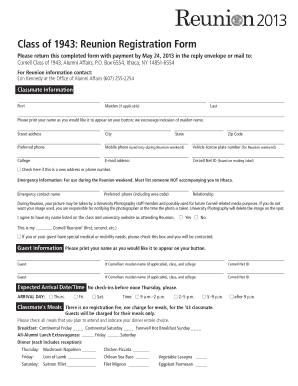
Get 2013 Class Of 1943: Reunion Registration Form Please Return This Completed Form With Payment By May
How it works
-

Open form follow the instructions
-

Easily sign the form with your finger
-

Send filled & signed form or save
How to fill out the 2013 Class Of 1943: Reunion Registration Form online
Filling out the 2013 Class Of 1943: Reunion Registration Form is a straightforward process. This guide provides clear, step-by-step instructions to ensure you complete your registration smoothly and correctly.
Follow the steps to successfully complete your registration form.
- Click ‘Get Form’ button to access the registration form and open it in your preferred editor.
- Begin with the Classmate Information section. Enter your first name, maiden name (if applicable), and last name. Ensure that you print your name as you wish it to appear on your button.
- Fill out your street address, city, state, and zip code. Provide a preferred phone number and your mobile phone number for use during the Reunion weekend.
- Provide your e-mail address and Cornell Net ID, which can be found on your mailing label. If your address or phone number has changed, check the box indicating this.
- In the Emergency Information section, list a contact who is not accompanying you to Ithaca. Include their name, relationship, and preferred phone number.
- Read the photography consent information regarding the use of your image during the Reunion. Indicate your preference about being listed on the class website.
- Indicate how many Reunions you have attended by filling in the appropriate number.
- In the Guest Information section, provide guest names as you would like them to appear on buttons. Include their Cornellian status (if applicable).
- Indicate your expected arrival date and time using the provided options.
- Select your meal preferences for yourself and your guests, ensuring to note any dietary requirements.
- Calculate the total amount due for your guests’ meals based on the selections made and fill it in the designated space.
- In the Payment section, indicate your payment method by filling in the necessary details such as credit card information or check number.
- Complete the Housing section by selecting your accommodation and ensuring to communicate any special requirements.
- Review your completed form for accuracy, then save the changes. You may choose to download, print, or share the form as necessary.
Complete your registration online today!
Entering Tufts dental school requires dedication and preparation against high standards. The admissions process is competitive, with numerous qualified candidates vying for a few spots. It is essential to highlight your strengths and experiences in your application. Ensure that you stay connected with your vintage classmates by submitting the 2013 Class Of 1943: Reunion Registration Form Please Return This Completed Form With Payment By May.
Industry-leading security and compliance
US Legal Forms protects your data by complying with industry-specific security standards.
-
In businnes since 199725+ years providing professional legal documents.
-
Accredited businessGuarantees that a business meets BBB accreditation standards in the US and Canada.
-
Secured by BraintreeValidated Level 1 PCI DSS compliant payment gateway that accepts most major credit and debit card brands from across the globe.