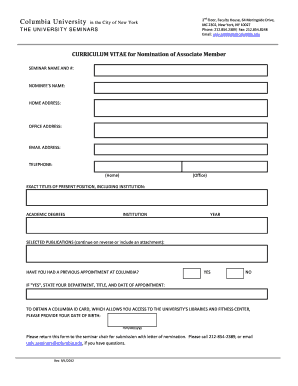
Get Curriculum Vitae Form For Associate Members Nominations
How it works
-

Open form follow the instructions
-

Easily sign the form with your finger
-

Send filled & signed form or save
How to fill out the Curriculum Vitae Form For Associate Members Nominations online
The Curriculum Vitae Form for Associate Members Nominations is a crucial document for those looking to engage with seminar activities at Columbia University. This guide will provide you with a structured approach to completing the form online, ensuring that all required information is accurately submitted.
Follow the steps to complete the nomination form efficiently.
- Click ‘Get Form’ button to access the Curriculum Vitae Form for Associate Members Nominations and open it.
- Begin by entering the seminar name and number in the designated field. This identifies the seminar for which the nomination is being made.
- Fill in the nominee’s name accurately, ensuring it matches the official documents.
- Provide the home address of the nominee in the specified section.
- Input the office address to ensure the nominee can be contacted appropriately via their professional affiliation.
- Enter a valid email address for the nominee for all communications related to the nomination.
- Include the telephone numbers for both home and office as requested. Ensure these are current and reachable.
- Detail the exact titles of the nominee's present position, including the name of their institution to verify their current role.
- List the academic degrees the nominee holds along with the institution and the year they were awarded. This information showcases their qualifications.
- Enumerate selected publications relevant to the nominee's field of expertise. You may continue on the reverse side of the form or attach additional documentation if necessary.
- Indicate whether the nominee has held a previous appointment at Columbia University. If yes, provide details about the department, title, and appointment dates.
- To acquire a Columbia ID card, which provides access to university facilities, include the nominee's date of birth in the format mm/dd/yyyy.
- Once all sections are completed, review the form for accuracy. Save the changes, and choose to download, print, or share the completed form as needed.
Complete and submit your documents online for smooth processing.
Filling a Curriculum Vitae Form For Associate Members Nominations starts with gathering all relevant information about your education, work experience, skills, and achievements. Organize this information clearly and logically, using headings and bullet points where applicable. Make sure to tailor your CV to highlight qualifications that align with the opportunity you are pursuing.
Industry-leading security and compliance
-
In businnes since 199725+ years providing professional legal documents.
-
Accredited businessGuarantees that a business meets BBB accreditation standards in the US and Canada.
-
Secured by BraintreeValidated Level 1 PCI DSS compliant payment gateway that accepts most major credit and debit card brands from across the globe.