Loading
Form preview
  • US Legal Forms
  • Other Templates
  • More Forms
  • More Multi-State Forms
  • Akusa 00294 2014

Get Akusa 00294 2014-2026

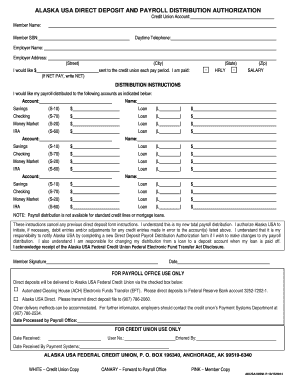
F NET PAY, write NET) (City) sent to the credit union each pay period. I am paid: (State) HRLY (Zip) SALARY DISTRIBUTION INSTRUCTIONS I would like my payroll distributed to the following accounts as indicated below: Account: Name: Savings (S-10) $ Loan (L ) $ Checking (S-70) $ Loan (L ) $ Money Market (S-20) $ Loan (L ) $ IRA (S-60) $ Loan (L ) $ Savings (S-10) $ Loan (L ) $ Checking (S-70) $ Loan (L ) $ Money Market (S-20) $ Loan (L ) $ IRA.

How it works

  1. Open form

    Open form follow the instructions

  2. Easily sign form

    Easily sign the form with your finger

  3. Share form

    Send filled & signed form or save

How to fill out the AKUSA 00294 online

Filling out the AKUSA 00294, also known as the Alaska USA direct deposit and payroll distribution authorization form, can streamline your payroll distribution process. This guide provides a clear and concise overview of each section of the form to help you complete it efficiently.

Follow the steps to accurately complete your AKUSA 00294 form.

  1. Click the ‘Get Form’ button to obtain the form and open it in your preferred online editor.
  2. Enter your credit union account information by providing your member name and member social security number (SSN). It is essential to ensure the accuracy of these details for proper processing.
  3. Fill in your daytime telephone number for the credit union to contact you if needed.
  4. Provide your employer's name and complete address, including street, city, state, and zip code.
  5. Indicate the amount you would like to be deposited into your credit union account each pay period. Specify whether this amount is net pay by writing 'NET' if applicable.
  6. In the distribution instructions section, specify how you wish your payroll distributed. For each account type (savings, checking, loan, etc.), fill in the corresponding dollar amounts you would like allocated.
  7. Be mindful that payroll distribution is not available for standard credit lines or mortgage loans. Confirm your understanding that these instructions will cancel any previous direct deposit arrangement.
  8. Authorize Alaska USA to initiate necessary debit entries or adjustments for any errors in credit entries made to your listed accounts. Acknowledge your responsibility to notify Alaska USA of any changes by completing a new form.
  9. Finally, add your signature and date to the form to confirm your authorization and completion of the document.
  10. Once finished, ensure to save your changes, download, print, or share the completed form as required.

Complete your AKUSA 00294 form online today to manage your payroll distribution effectively.

Get form

Experience a faster way to fill out and sign forms on the web. Access the most extensive library of templates available.
Get form

Related content

The Ubiquitin Ligase RNF34 Participates in the...
by S Taniguchi · 2022 · Cited by 12 — An in vitro study reveals that RNF34 directly...
Learn more
Annual Variability in Seed Production by Woody...
Annual Variability in Seed Production by Woody Plants and the Masting Concept:...
Learn more
2020-11 FOIA Log
... 2014 through October 2020 (or date of search, if later) containing various ... Any...
Learn more

Related links form

Student Handbook - Mountain Home Public Schools - Bombers K12 Ar Edpm Syllabus Local Tax Form CYSTIC FIBROSIS FORM - NorthShore - Northshore

Questions & Answers

Get answers to your most pressing questions about US Legal Forms API.

Contact support

Setting up a Direct Debit with Global Credit Union is a simple process. You usually need to fill out a Direct Debit authorization form, providing details of your account and the payments you wish to automate. Be sure to include the reference of AKUSA 00294 to ensure accurate processing of your Direct Debit transactions.

Setting up a direct deposit account is an efficient way to receive your funds. First, go to your employer and request a direct deposit form. Complete it with your Global Credit Union account information, and ensure you refer to AKUSA 00294 for clarity on your account specifications. Submit this to your employer to start receiving your funds directly.

You can easily find your Global Credit Union routing number by logging into your online account. Alternatively, check your account statement or the bottom of your checks. If you are still having trouble, consult the AKUSA 00294 documentation, which provides detailed information on where to locate your routing number.

The mobile deposit limit at Global Credit Union typically varies based on your account type and history. Generally, you can deposit a maximum of $5,000 per day. If you have questions about specific limits, refer to your account details or the AKUSA 00294 guidelines for further assistance.

Filling out the EFT authorization form is quite straightforward. First, include your personal details such as name, address, and account information. You also need to specify the type of transactions you authorize. Remember to mention AKUSA 00294 to ensure that the form is processed correctly by Global Credit Union.

To set up direct deposit with Global Credit Union, start by logging into your online banking account. Navigate to the direct deposit section and download the necessary forms. Provide your account information, including your routing number and account number, and submit the form to your employer, making sure to reference AKUSA 00294 for seamless processing.

Unlocking costumes in Tekken 8 involves completing challenges, leveling up your characters, and participating in seasonal events. Players earn currency that can be spent on unlocking new outfits through in-game shops as they progress. Exploit opportunities available in online tournaments as they sometimes offer exclusive costume rewards. For clear instructions and tips on unlocking costumes, consider utilizing resources like US Legal forms.

Asuka Kazama is 20 years old in Tekken 8. This character builds on her lore from previous games, offering a fresh perspective while retaining her original charm. Asuka remains a fan-favorite due to her distinct fighting style and engaging personality. Keeping track of character developments like those of Asuka can deepen your connection to the game.

Unlocking TK8 style alternate B in Tekken 8 involves meeting certain in-game conditions, such as progressing through the farthest stages of the arcade mode. This mode may require you to defeat a series of challenging opponents without losing. Engaging with online forums helps players share new or hidden methods for achieving this unlock. Don’t forget to consult guidance from platforms like US Legal forms to stay informed and maximize your efforts.

To obtain the Asuka costume for Lili in Tekken 8, you generally need to complete specific challenges or events that grant access to exclusive roster options. Participating in seasonal events often opens paths to receive special costumes. Keep an eye on DLC announcements, as popular costumes may reappear through downloadable content. Leveraging comprehensive guides available through resources like US Legal forms may also be helpful in your quest.

Get This Form Now!

Use professional pre-built templates to fill in and sign documents online faster. Get access to thousands of forms.
Get form
If you believe that this page should be taken down, please follow our DMCA take down processhere.
Get AKUSA 00294
Get form
  • Adoption
  • Bankruptcy
  • Contractors
  • Divorce
  • Home Sales
  • Employment
  • Identity Theft
  • Incorporation
  • Landlord Tenant
  • Living Trust
  • Name Change
  • Personal Planning
  • Small Business
  • Wills & Estates
  • Packages A-Z
  • Affidavits
  • Bankruptcy
  • Bill of Sale
  • Corporate - LLC
  • Divorce
  • Employment
  • Identity Theft
  • Internet Technology
  • Landlord Tenant
  • Living Wills
  • Name Change
  • Power of Attorney
  • Real Estate
  • Small Estates
  • Wills
  • All Forms
  • Forms A-Z
  • Other Templates
  • Legal Hub
  • About Us
  • Help Portal
  • Legal Resources
  • Blog
  • Affiliates
  • Contact Us
  • Delete My Account
  • Site Map
  • Industries
  • Forms in Spanish
  • Localized Forms
  • State-specific Forms
  • Forms Kit
  • Real Estate Handbook
  • All Guides
  • Notarize
  • Incorporation services
  • For Consumers
  • For Small Business
  • For Attorneys
  • USLegal
  • FormsPass
  • pdfFiller
  • signNow
  • altaFlow
  • DocHub
  • Instapage
Form Packages
  • Adoption
  • Bankruptcy
  • Contractors
  • Divorce
  • Home Sales
  • Employment
  • Identity Theft
  • Incorporation
  • Landlord Tenant
  • Living Trust
  • Name Change
  • Personal Planning
  • Small Business
  • Wills & Estates
  • Packages A-Z
Form Categories
  • Affidavits
  • Bankruptcy
  • Bill of Sale
  • Corporate - LLC
  • Divorce
  • Employment
  • Identity Theft
  • Internet Technology
  • Landlord Tenant
  • Living Wills
  • Name Change
  • Power of Attorney
  • Real Estate
  • Small Estates
  • Wills
  • All Forms
  • Forms A-Z
  • Other Templates
Customer Service
  • Legal Hub
  • About Us
  • Help Portal
  • Legal Resources
  • Blog
  • Affiliates
  • Contact Us
  • Delete My Account
  • Site Map
  • Industries
  • Forms in Spanish
  • Localized Forms
  • State-specific Forms
  • Forms Kit
Legal Guides
  • Real Estate Handbook
  • All Guides
Prepared for you
  • Notarize
  • Incorporation services
Our Customers
  • For Consumers
  • For Small Business
  • For Attorneys
Our Sites
  • USLegal
  • FormsPass
  • pdfFiller
  • signNow
  • altaFlow
  • DocHub
  • Instapage
Social Media
Call us now toll free:
+1 833 426 79 33
As seen in:
© Copyright 1999-2026 airSlate Legal Forms, Inc. 17 Station Street, Suite 303, Brookline, MA 02445
  • Your Privacy Choices
  • Terms of Service
  • Privacy Notice
  • Content Takedown Policy
  • Bug Bounty Program