Loading
Get Ga Kelley & Johnson Worksheet Limited Liability Company 2006-2026
How it works
-

Open form follow the instructions
-

Easily sign the form with your finger
-

Send filled & signed form or save
How to fill out the GA Kelley & Johnson Worksheet Limited Liability Company online
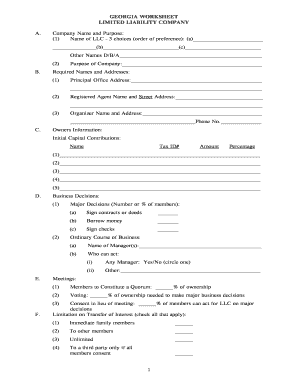
Filling out the GA Kelley & Johnson Worksheet Limited Liability Company is an essential step in establishing a limited liability company. This guide will assist you in completing the worksheet accurately and efficiently, ensuring you meet all the necessary requirements.
Follow the steps to complete the worksheet accurately.
- Click the ‘Get Form’ button to access the worksheet and open it in your preferred editor.
- Begin with the company name and purpose section. Enter your top three choices for the name of the LLC, prioritizing them in order of preference. Additionally, provide any other names under which the company will operate.
- In the required names and addresses section, provide the principal office address where the business will be located, as well as the registered agent's name and street address.
- For the owners' information, list each owner's name, tax identification number, initial capital contribution amount, and the percentage of ownership.
- In the major decisions section, indicate the number or percentage of members required to sign contracts, borrow money, or sign checks.
- For meetings, specify the percentage of ownership needed to constitute a quorum and to make major business decisions.
- In the limitation on transfer of interest section, indicate the applicable options by checking all that apply to your LLC.
- Provide the name and address of an accountant or bookkeeper to manage the company’s financial records.
- Finally, review all the information you have entered for accuracy, then save changes, and download or print the completed form as needed.
Ensure your LLC is set up correctly by completing the GA Kelley & Johnson Worksheet Limited Liability Company online today.