Loading
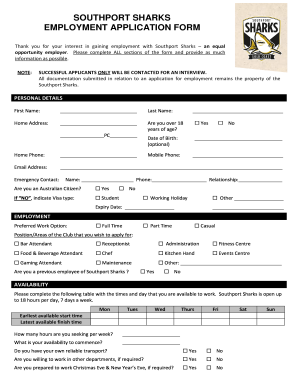
Get Southport Sharks Employment Application
How it works
-

Open form follow the instructions
-

Easily sign the form with your finger
-

Send filled & signed form or save
How to fill out the Southport Sharks Employment Application online
Completing the Southport Sharks Employment Application online is a straightforward process designed to gather essential information about your qualifications and availability. This guide will help you through each section of the application, ensuring that you provide all the necessary details.
Follow the steps to successfully complete your application.
- Click ‘Get Form’ button to access the Southport Sharks Employment Application and open it in your preferred document editor.
- In the 'Personal Details' section, enter your first name, last name, home address, and contact information accurately. Indicate whether you are over 18 years of age and provide your date of birth if comfortable. Fill in your mobile and home phone numbers, along with your email address. Additionally, include the name, phone, and relationship of an emergency contact.
- Under 'Employment,' select your preferred work option (full time, part time, or casual) and specify the position or area of the club for which you are applying. Indicate if you have previously worked for Southport Sharks.
- Complete the 'Availability' table indicating the days and times you are available to work. Include your earliest start time, latest finish time, desired hours per week, and when you can commence work. Also, note if you have reliable transportation and are willing to work in other departments or on special occasions.
- In the 'Employment History' section, if not attaching a current resume, list your most recent jobs, including the period of employment, position held, employer's name, and reasons for leaving.
- Provide references by listing three contacts who can speak to your past employment experiences. Include their names, companies, positions, and telephone numbers. This section also can be skipped if a current resume is attached.
- In the 'Education History' section, if not attaching a current resume, list your most recent educational courses and the institutions attended.
- Indicate whether you have the required certificates or licenses related to the position, and provide their expiry dates. You may also declare your previous work experience in areas like Keno or TAB.
- Complete the 'Capacity to Work Declaration' by answering questions related to your eligibility to work in Australia, any health conditions that may affect your job, and whether you consent to a police check.
- Read and acknowledge the 'Conditions of Employment,' which cover proof of identity, employment period, grooming standards, and ongoing availability.
- Finish with the 'Applicant Declaration' where you certify that the provided information is accurate. Provide your name, signature, and date to complete the application.
- Once all sections are filled out, save your changes, and opt to download, print, or share the completed application as required.
Complete your Southport Sharks Employment Application online to take the next step in your career!
Download the 2023 Membership Form here. Bring a printed version of your completed application form and present to reception on your next visit. Please ensure you bring photo ID and $5 or $12 (depending on the membership type you are after) to receive your Southport Sharks Membership Card.