Get Oarweed Employment History
How it works
-

Open form follow the instructions
-

Easily sign the form with your finger
-

Send filled & signed form or save
How to use or fill out the Oarweed Employment History online
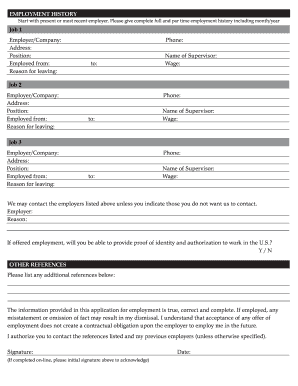
Filling out the Oarweed Employment History form is a crucial step in the job application process. This guide will provide you with clear and concise instructions on how to accurately complete the form, ensuring you provide all necessary information for potential employers.
Follow the steps to successfully fill out your employment history.
- Click ‘Get Form’ button to obtain the document and open it in the editor.
- Begin with your most recent or current employer. For each job entry, fill in the required fields, starting with the 'Employer/Company' name. Make sure to provide the complete name of the organization where you worked.
- Next, enter the 'Address' of the employer. Include the full address to ensure accuracy.
- Fill in your 'Position' at the company. This should reflect your job title during your employment.
- Indicate your 'Employed from' and 'to' dates, formatted as month/year. This will provide a clear timeline of your employment.
- Provide a brief explanation for your 'Reason for leaving' the job. Be honest and concise.
- Include a 'Phone' number where the employer can be reached for reference checks.
- Identify the 'Name of Supervisor' during your employment. This person may be contacted for a reference.
- Enter your 'Wage' if applicable. This can further assist employers in understanding your previous compensation.
- Repeat steps 2 to 9 for additional job entries (Job 2 and Job 3) as needed.
- If there are employers you do not want to be contacted, list them under the designated section and provide your reasons.
- Indicate whether you can provide proof of identity and authorization to work in the U.S. by answering 'Yes' or 'No'.
- List any additional references in the specified section. This can include other individuals who can vouch for your work experience.
- Review the statement regarding the truthfulness of the information provided, and ensure you understand the acknowledgment of the signature.
- If you are filling out the form online, please initial the 'Signature' field to acknowledge your understanding.
- Finally, enter the 'Date' to complete the form. After filling out all necessary fields, you can save your changes, download, print, or share the completed form as needed.
Take the next step in your job application by completing your Oarweed Employment History online today.
You can obtain your entire work history from Social Security by visiting their official website and creating an account. However, for a more user-friendly experience, consider using the Oarweed Employment History service. This tool can help you compile and review your Social Security records alongside other employment data, providing a complete look at your professional background.