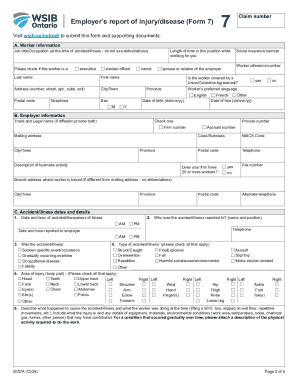
Get Canada Wsib 7 2024-2026
How it works
-

Open form follow the instructions
-

Easily sign the form with your finger
-

Send filled & signed form or save
How to fill out the Canada WSIB 7 online
This guide provides step-by-step instructions to help you fill out the Canada Workplace Safety and Insurance Board (WSIB) Form 7 online. Whether you are new to this process or require a refresher, following these detailed steps will ensure a smooth submission.
Follow the steps to successfully complete the Canada WSIB 7 online.
- Click ‘Get Form’ button to obtain the form and open it in the editor.
- Begin by entering the worker's information in Section A, including their job title, name, address, date of birth, social insurance number, and any relevant details regarding their union membership.
- Proceed to Section B, where you will input your employer information. This includes both your trade and legal name, firm number, mailing address, account number, and a brief description of your business activity.
- In Section C, provide the accident or illness details. Record the date and time of the incident, the type of event (e.g., sudden event or occupational disease), type of accident, and the area of injury. Be detailed in describing what led to the accident.
- Continue filling out Section D regarding health care. Indicate whether the worker received health care for their injury, including details of the treatment facility if applicable.
- If applicable, complete Section E about lost time. Select the appropriate option regarding the worker's return to work status and provide dates accordingly.
- In Section F, discuss and document any modified work that has been offered, including details about the worker's return to work and any limitations.
- Enter wage and employment information in Section G, detailing the worker's rate of pay, type of employment, and any additional earnings information in Section H.
- Complete Section I to outline the worker’s regular work schedule, indicating normal work days and hours.
- Finally, in Section J, declare the truthfulness of the information provided by signing your name, official title, and the date. Submit the form electronically or make sure to attach any necessary documentation.
- Once you have completed the form, save your changes, and choose to download, print, or share the form as needed.
Get started on filing your WSIB Form 7 online today!
Related links form
In Canada, various benefits are not taxable, including workers' compensation benefits and many employer-sponsored health benefits. Also, certain social assistance payments and disability benefits may fall into this category. To ensure you maximize non-taxable benefits, it's essential to familiarize yourself with the laws and consult with a tax advisor. Navigating through Canada WSIB 7 will provide you with insights into what benefits you can leverage without tax implications.